























How to Choose a Desk Lamp for a Home Office Without Creating Screen Glare

A desk lamp can make a home office feel focused, finished, and easier to use, but only when the light lands in the right place. A lamp that looks perfect on a desk can still cause screen glare if the bulb reflects on the monitor, shines into the eyes, or creates a sharp contrast between a bright desktop and a dark room.
Choosing a desk lamp for a home office is not simply a question of brightness. The better question is how the lamp interacts with the screen, the wall behind it, the desk surface, the user’s posture, and the type of work being done. A well-placed lamp should help illuminate notebooks, keyboards, documents, and desk accessories while keeping the monitor visually calm.
The strongest home office lighting setups treat the desk lamp as part of the entire workspace. The desk surface, storage, power access, screen height, and surrounding furniture all affect how light behaves. That is why lighting works best when it is planned alongside workspace pieces that support daily office use, rather than chosen as an isolated decorative detail.
Screen Glare Begins With Light Direction, Not Lamp Brightness
Glare usually starts when light travels in the wrong direction. A lamp can have a moderate bulb and still feel harsh if it points at the screen or sits at eye level. Another lamp may be brighter but more comfortable because the shade, height, and angle keep the light focused on the desk surface.
Direct Glare Comes From Visible Bulbs and Exposed Light Sources
Direct glare happens when the light source is visible from a normal seated position. This may be an exposed bulb, a bright LED strip, a reflective metal shade, or a lamp head positioned too close to eye level.
In a home office, direct glare often feels like eye strain before it looks like a screen problem. The user may squint, lean back, dim the monitor, or avoid using the lamp altogether. This defeats the purpose of having a desk lamp, especially during evening work or detailed tasks like reading printed notes.
A good desk lamp hides or softens the light source. Opaque shades, frosted bulbs, diffusers, and adjustable lamp heads help prevent the bulb from becoming the brightest object in the room.
Reflected Glare Appears When Light Bounces Off the Screen
Reflected glare happens when the lamp appears as a bright spot, streak, or shape on the monitor. It is most noticeable on glossy or semi-glossy screens, but matte screens can still show washed-out patches if the lamp is pointed poorly.
The reflection may come directly from the bulb, from a shiny shade, or from light bouncing off a pale wall, framed print, window, glass tabletop, or glossy desk accessory. This is why moving the lamp only a few inches can sometimes improve the screen dramatically.
A useful test is to sit in the normal working position and look at the screen while the lamp is on. If the lamp, shade, or a bright patch appears on the display, the lamp is in the reflection path.
Contrast Glare Makes the Monitor Feel Harsh
Not all glare looks like a visible reflection. Contrast glare happens when the monitor is much brighter than the room or when the desk surface is strongly lit while the surrounding area stays dark.
This is common in home offices used at night. A single bright lamp shines on the keyboard while the rest of the room stays dim. The screen then feels unusually intense, and the eyes constantly adjust between bright and dark areas.
Balanced lighting is more comfortable. The lamp should support the work surface, while the surrounding room has enough soft light to prevent the monitor from feeling like a floating rectangle in darkness.
The Best Desk Lamp for Computer Work Offers Control Before Style
Style matters in a home office, but control matters more when a lamp sits near a screen. A lamp that cannot be angled, dimmed, shielded, or moved may look attractive while creating daily discomfort.
The best desk lamp for screen-heavy work gives the user control over three things: where the light lands, how intense it feels, and whether the bulb is visible from the seated position.
Adjustable Lamp Arms Help Aim Light Around the Monitor
Adjustable arms are especially useful for people who type, write, read, and shift tasks throughout the day. A lamp with a movable arm or pivoting head can be placed beside the monitor and aimed down toward the desktop instead of toward the display.
A fixed lamp may still work, but the placement has to be more precise. With an adjustable lamp, the user can change the angle for paperwork, move it away during video calls, or lower the brightness when ambient light changes.
Look for practical movement rather than unnecessary complexity. The lamp should feel stable, easy to reposition, and capable of keeping the light source outside the direct line of sight.
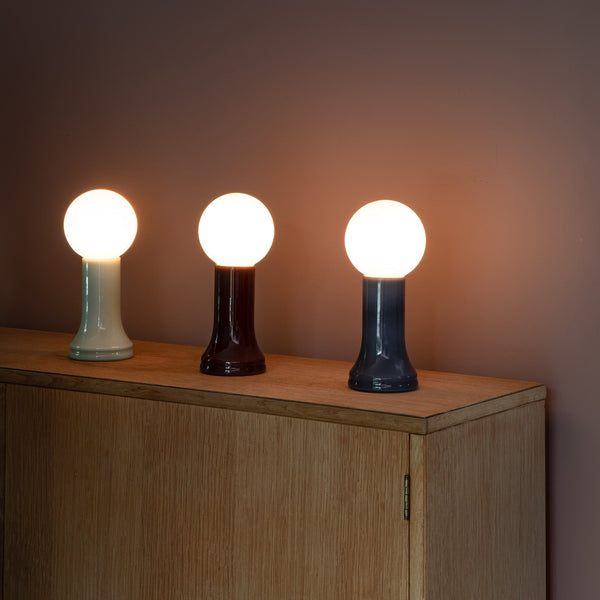
Diffused Table Lamps Can Soften the Room Around the Screen
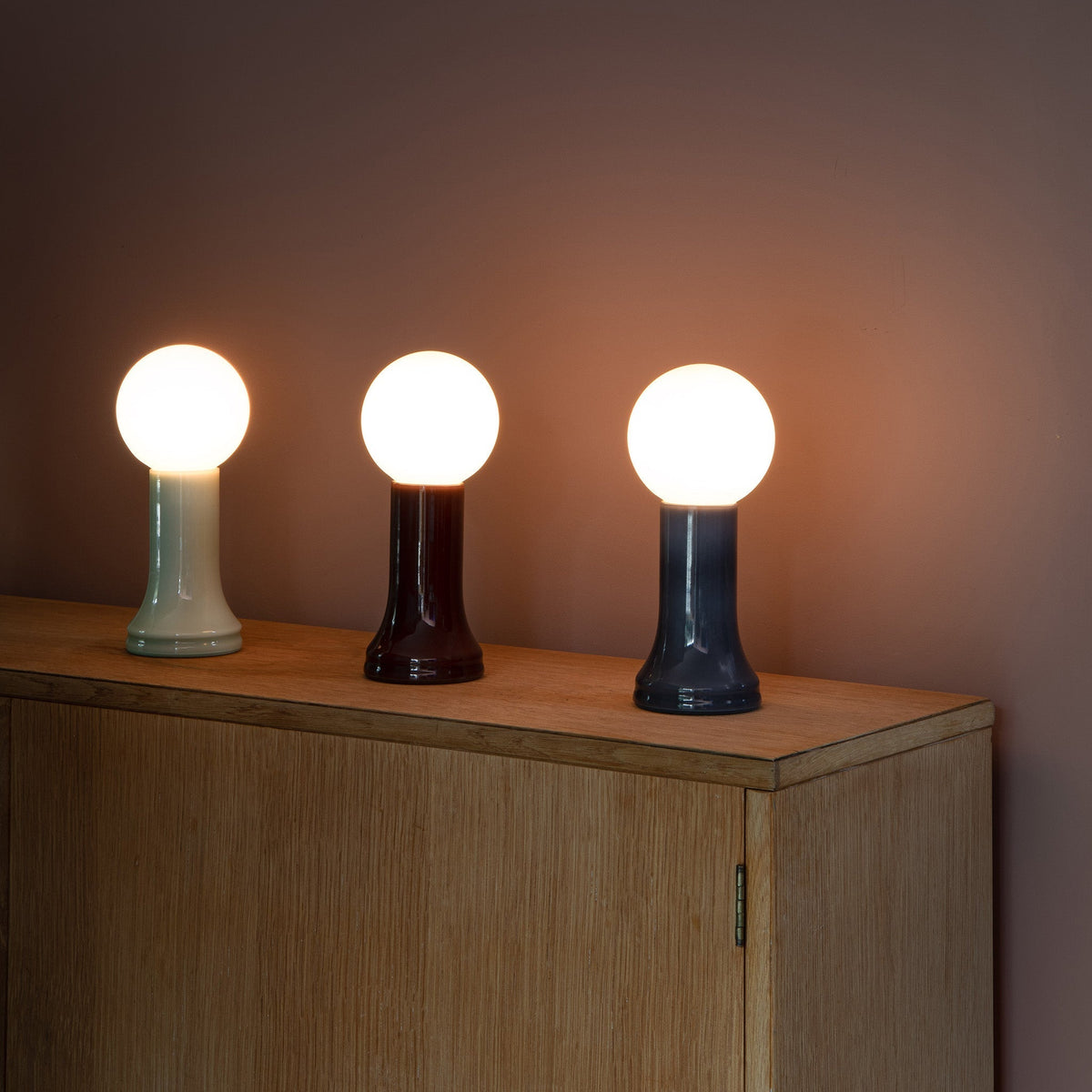
Not every home office lamp needs to act as a task lamp. A diffused table lamp can help soften the surrounding room, especially when the screen feels too bright against a dim background. This kind of lamp is best placed outside the screen reflection zone, such as on a side cabinet, credenza, shelf, or secondary surface.
A lamp like the Shore recycled glass table lamp fits naturally into this supporting role because it is positioned as a table lamp rather than a narrow, monitor-facing task light. Used thoughtfully, a softer table lamp can help the workspace feel warmer without pointing harsh light at the screen.
The key is placement. A table lamp should not sit directly behind the monitor with the bulb visible. It should add surrounding light while staying out of the screen’s reflective angle.
Compact LED Lamps Suit Smaller Home Office Desks
Small desks need careful lighting because there is less room to separate the lamp from the screen. A compact lamp can be useful, but only if it allows the light to be aimed away from the display and toward the active work area.
The Alumina Lamp is best discussed in this context as a lighting option for a tighter or more flexible workspace. On a compact desk, the goal is to reduce visual bulk while still keeping the beam controlled.
Compact lighting should never mean uncontrolled lighting. If the lamp sits too close to the laptop or monitor, even a smaller light source can create glare. The lamp should be placed slightly to the side, angled downward, and tested from the user’s actual seated position.
Desk Lamp Placement Rules That Prevent Screen Reflection
Placement often matters more than the lamp model. A well-designed lamp can still create glare if placed in front of the monitor, too close to the user’s eyes, or directly in the screen’s reflection path.
Place the Lamp to the Side Rather Than in Front of the Screen
A lamp placed directly in front of the monitor is likely to cause problems. It may shine toward the eyes, reflect on the screen, or create a bright foreground that makes the display harder to read.
Side placement is usually better. The lamp can sit on the left or right side of the desk, slightly behind the front edge of the screen, with the shade angled down toward the keyboard, notebook, or document area.
This setup allows the lamp to illuminate the work without becoming part of the screen view.
Position the Lamp Opposite the Writing Hand
For people who take notes, sketch, or review printed documents, hand shadows matter. A right-handed person often benefits from placing the lamp on the left side of the desk. A left-handed person often benefits from placing it on the right.
This keeps the hand from blocking the light while writing. It also prevents the user from increasing lamp brightness to compensate for shadows that could have been solved with better placement.
Screen glare and handwriting comfort can be handled together. The lamp should sit opposite the writing hand, then be adjusted so the bulb does not reflect on the monitor.
Keep the Bulb Outside the Monitor’s Reflection Zone
The reflection zone is the area where the screen can catch and mirror the lamp. It changes depending on the screen angle, lamp height, desk depth, and where the user sits.
To test it, turn on the lamp, sit normally, and look at the screen. Open a dark window, blank document, or any screen with darker areas. If the bulb, shade edge, or a bright glow appears on the display, shift the lamp farther to the side, farther back, lower, higher, or more downward until the reflection disappears.
This test is more reliable than guessing because every home office has different surfaces, windows, and monitor finishes.
Lamp Height, Shade Shape, and Beam Spread Determine Visual Comfort
A desk lamp’s shape affects how the light behaves. Height, shade design, and beam width determine whether the lamp creates a calm pool of light or an irritating hotspot.
The Lamp Head Should Clear the Work Area Without Exposing the Bulb
If the lamp head is too low, the beam may cover only a small area and create strong shadows. If it is too high, the bulb may become visible or spread light into the monitor’s reflection path.
The best position usually places the light above the active work surface but outside direct eye view. The shade should block the brightest part of the bulb while allowing light to fall cleanly onto the desk.
This balance is especially important for people who alternate between paper and screen. The lamp should make the desk readable without competing with the monitor.
Opaque and Semi-Opaque Shades Reduce Sideways Glare
Shade shape controls spill. A cone or dome shade can direct light downward, while a translucent shade may spread light more broadly. An exposed bulb can work as decorative lighting in some areas, but it is risky near monitors because the bright point is more likely to reflect.
Opaque and semi-opaque shades are often easier to manage in a home office. They limit sideways glare, reduce direct visibility of the bulb, and keep the beam focused.
The shade material also matters. Highly reflective metal interiors can intensify the beam, while softer diffusing materials can reduce hotspots. Neither is automatically better. The right choice depends on whether the lamp is being used for precise task work or softer room support.
Narrow Beams Help Detail Work While Wider Diffusion Supports Longer Sessions
A narrow beam is useful for focused tasks like reading a document, writing notes, or reviewing printed material. A wider diffused light can make longer computer sessions feel more comfortable by reducing contrast around the screen.
For many home offices, the best setup is layered. A task lamp handles the immediate work surface, while softer ambient light keeps the surrounding room from feeling too dark.
This prevents the user from relying on one overly bright lamp to solve every lighting problem.
Brightness and Color Temperature Should Match the Screen Environment
Brightness should support the task, not overpower the monitor. Color temperature should feel clear without making the room look harsh or sterile. The ideal balance depends on the time of day, screen brightness, wall color, and type of work.
| Lighting Choice | Best Use in a Home Office | Glare Risk | Practical Recommendation |
|---|---|---|---|
| Bright direct task light | Detailed paperwork or close visual work | Higher near screens | Angle it away from the monitor |
| Moderate dimmable task light | Daily computer work | Lower when placed well | Use as the main desk lighting option |
| Warm ambient lamp | Evening comfort and background softness | Low if positioned carefully | Keep it outside the reflection path |
| Cool white lamp | Detail visibility and alertness | Moderate if too intense | Use with diffusion or dimming |
| Exposed bulb lamp | Decorative accent | Higher near monitors | Avoid eye-level and screen-facing placement |
Dimmable Output Gives Better Control Than One Fixed Brightness
A lamp that feels comfortable at noon may feel too bright after sunset. A lamp that works in a darker room may feel unnecessary when daylight is strong. Dimming helps the light adapt instead of forcing the user to accept one intensity all day.
Dimmable lamps are especially useful for shared rooms, small apartments, and workspaces near windows. They allow the user to reduce brightness when the screen is already clear and increase it only when paperwork or detailed tasks need more visibility.
Warm-Neutral Light Often Feels More Balanced Than Extreme Cool Light
Very warm light can feel cozy, but it may make detailed work feel less crisp. Very cool light can look sharp, but it may also feel stark when paired with a bright monitor. A warm-neutral to neutral tone often feels more balanced for home office work.
The goal is not to chase a perfect number. The goal is visual comfort. The lamp should make documents, keyboard letters, and desk surfaces easy to see without making the monitor feel cold, washed out, or overly bright.
Frosted Bulbs and Diffusers Reduce Sharp Reflection Points
A small exposed bulb can create a sharp reflection on the screen. A frosted bulb or diffuser spreads the light over a larger surface, which usually softens the reflection and makes the lamp easier to place.
Diffusion is particularly helpful in rooms with glossy surfaces, framed art, glass accessories, or reflective monitor finishes. It does not replace good placement, but it makes glare easier to manage.
Laptop Height and Monitor Angle Can Make a Lamp More Glare-Free
The lamp is only one part of the glare equation. A screen that sits too low or tilts at an awkward angle may catch reflections from more directions. Adjusting the display can make the same lamp feel much better.
A Low Laptop Screen Catches Reflections From More Angles
When a laptop sits flat on the desk, the screen often tilts upward toward nearby lamps, windows, or ceiling lights. This can pull reflected light directly into the user’s view.
A low screen can also encourage poor posture, which changes the user’s eye position and makes reflections harder to control. The lamp may seem like the problem when the screen angle is also contributing.
Raising the Screen Improves Both Viewing Angle and Light Control
A raised laptop screen gives the user more flexibility. It can be angled with more precision, positioned closer to eye level, and separated from the brightest part of the desk lamp’s beam.
The Slim Laptop Stand fits this part of the setup because laptop height directly affects screen reflections. Once the laptop is raised, the lamp should be tested again, since even a small height change can alter the reflection path.
Monitor Tilt Should Remove Reflections Without Creating Neck Strain
Tilting the monitor can reduce glare, but it should not create a new ergonomic problem. The screen should be adjusted just enough to remove reflections while keeping text comfortable to read.
A good approach is to set the screen height and viewing distance first, then adjust the lamp. After that, fine-tune the monitor tilt. This prevents the user from twisting posture around the lamp instead of building a comfortable workspace.
Power Access Affects Where the Lamp Can Sit on the Desk
Many glare problems come from convenience. The lamp is placed where the outlet is, not where the light works best. Power access can either support good lighting placement or force the lamp into an awkward spot.
Outlet Location Should Not Decide the Lamp Position
If the only accessible outlet is behind the monitor, the lamp may end up directly in the worst possible place. If the cord is too short, the lamp may be pushed to the front corner of the desk, where it shines into the eyes or reflects off the screen.
The best lamp position should be chosen for visibility and comfort first. Power should support that decision, not control it.
Built-In Desk Power Can Keep the Lamp Zone Cleaner
Cable clutter affects lighting more than people realize. Cords running across the desk can cast shadows, crowd the lamp base, and make it harder to shift the light into the right position.
An In-Desk Power Module can help organize power access near the work surface, which may make it easier to keep the lamp where it performs well. This kind of solution is most useful when the desk supports multiple devices and the lamp should not compete with chargers, adapters, or tangled cords.
Clamp-On Power Helps Preserve Flexible Lamp Placement
Some desks need power access without built-in installation. In those cases, Clamp-On Desk Power can support a more flexible setup by bringing power closer to the edge or side of the work surface.
This matters because the best glare-free lamp position is often not the closest point to the wall outlet. When power is easier to reach, the lamp can be placed for light quality rather than cord convenience.
Home Office Layout Mistakes That Make Desk Lamp Glare Worse
Even a good lamp can perform poorly in the wrong layout. Screen glare often comes from small setup choices that seem harmless until the lamp is turned on.
Placing the Lamp Directly Behind the Monitor
Backlighting can be helpful when it is soft, hidden, and indirect. It becomes a problem when a bright bulb or shade is visible behind the monitor. The screen then sits between the user and a light source, increasing contrast and visual discomfort.
A better approach is to keep any background lamp off to the side or diffused enough that it does not compete with the display.
Pointing the Lamp Toward a Glossy Wall, Window, or Framed Print
Light can reflect from surfaces around the monitor before reaching the screen. A glossy whiteboard, glass frame, window, or polished wall finish can redirect light in unexpected ways.
If glare remains even after moving the lamp away from the screen, look at what the lamp is pointing toward. The reflection may be coming from the room, not the desk.
Using One Bright Lamp as the Only Light Source
A single bright desk lamp in a dark room can create hard contrast. The work surface becomes bright, the background stays dark, and the monitor feels more intense.
Layered light is usually more comfortable. A desk lamp can handle the task area, while a softer lamp elsewhere in the room reduces contrast. This allows the desk lamp to run at a moderate level instead of doing all the lighting work alone.
Matching Desk Lamp Choice to the Way Work Actually Happens
The right desk lamp depends on how the desk is used. A person who spends all day on video calls needs different lighting behavior than someone who reviews printed documents, sketches, or works at night.
For Video Calls, Soft Side Lighting Works Better Than Monitor-Facing Light
A lamp aimed directly at the face can improve visibility, but it can also reflect in glasses, shine on the screen, or create harsh shadows. Soft side lighting is usually more flattering and less disruptive.
Place the lamp slightly to one side and above the desk surface, then adjust the brightness so the face is visible without creating bright reflections. If the lamp appears in glasses, move it farther to the side or diffuse it.
For Paperwork, the Document Zone Needs Stronger Task Lighting
Printed pages, notebooks, planners, and contracts need more direct light than a keyboard. The lamp should illuminate the document area without spilling onto the monitor.
This is where angled task lighting is especially helpful. The beam can be pointed toward the paper while the screen remains outside the brightest zone.
For Creative Work, Angle and Color Consistency Matter
Creative tasks such as sketching, material comparison, craft work, and visual planning need consistent light across the work surface. Shadows and color shifts can make details harder to judge.
A lamp used for creative work should be easy to reposition. It should also provide enough diffusion to avoid hotspots on paper, glossy samples, or tools.
For Shared Workspaces, Movable Lighting Is More Practical
Shared home offices need flexibility. One person may be left-handed, another right-handed. One may use a raised monitor, while another uses a laptop. A lamp that moves easily can adapt to different users without forcing everyone into the same layout.
In shared spaces, avoid lamps that are difficult to reposition or rely on a very narrow placement zone.
A Simple Glare Test Before Settling on a Lamp Position
A desk lamp should be tested in the actual work environment before its placement is considered finished. The room, monitor, wall color, and desk surface all affect the outcome.
Use this process:
1. Sit in the normal working posture.
2. Turn on the desk lamp at the brightness used most often.
3. Open a dark window, blank document, or high-contrast screen.
4. Look for reflected bulbs, shade outlines, or bright patches.
5. Move the lamp farther to the side or slightly behind the screen line.
6. Angle the shade downward toward the work surface.
7. Tilt the monitor just enough to remove reflections.
8. Dim the lamp until the desk stays readable without overpowering the screen.
9. Repeat the test after sunset, when glare is often easier to notice.
Dark Screens Reveal Reflections Faster Than Bright Screens
Reflections are easier to see on dark content. A bright webpage may hide glare, while a dark application window may reveal the bulb immediately.
This is why testing only during one task can be misleading. A lamp may seem fine while reading a white document but become distracting during video editing, design work, evening browsing, or any task with a darker screen.
Night Testing Catches Problems Daylight Can Hide
Daylight can mask glare by filling the room with ambient brightness. At night, the same lamp may become the dominant light source, making reflections and contrast more obvious.
A home office lamp should be tested in the conditions where it will actually be used. For many people, that means checking both daytime and evening performance.
A Clear Desk Surface Lets You Use Less Light With Better Results
Clutter changes how light moves across the desk. Papers, cups, chargers, books, and decorative items can block the beam, create shadows, or force the lamp into an awkward position.
Clutter Blocks the Beam and Creates Uneven Shadows
When the desk surface is crowded, the lamp may need to be brighter just to make the active work area visible. That extra brightness can increase glare risk.
A clearer surface allows light to spread more evenly. The lamp can be dimmer, better aimed, and less likely to reflect on the monitor.
Paper Storage Keeps the Active Lighting Zone Open
Documents are one of the most common sources of desk clutter. Stacked papers can block task light, create shadows, and take over the area where the lamp should be aimed.
A Filing Cabinet supports a cleaner work surface by giving papers and office materials a dedicated place away from the active lighting zone. With fewer items crowding the desktop, the lamp can focus on the task instead of fighting visual clutter.
The Brightest Part of the Beam Should Land on the Work
The lamp’s strongest light should land where the work happens: the notebook, document, keyboard, sketchpad, or reading area. It should not land on accessories, unused paper stacks, glossy objects, or the monitor.
A clean desk makes this easier. It gives the lamp a clear target and reduces the need for excessive brightness.
The Right Desk Lamp Creates a Calmer, Clearer Home Office Screen
A glare-free home office does not depend on finding the brightest lamp. It depends on choosing a lamp that can be controlled. Direction, shade shape, bulb diffusion, dimming, height, and placement all matter more than raw intensity.
The right desk lamp lights the work surface without becoming visible in the screen. It supports reading and writing without casting harsh shadows. It adds comfort to the room without making the monitor harder to view. It fits the way the desk is actually used, whether the workday includes video calls, documents, creative tasks, or long stretches of screen time.
A better lighting setup starts with practical decisions. Place the lamp to the side. Keep the bulb out of the reflection path. Aim the shade down and across the desk. Raise and tilt the screen with care. Keep cords and clutter from dictating where the lamp sits. Test the setup during the day and after dark.
When the lamp, screen, desk surface, storage, and power access work together, the home office feels easier to use. The screen stays clearer, the desk stays more functional, and the lighting supports focused work without creating the glare that makes a workspace harder to enjoy.
Related Articles
-
 Shore Table Lamp Ideas That Make Desk Lighting Feel Softer
-
 How to Choose a Table Lamp That Adds Warmth Without Reducing Visibility
-
 Can a Table Lamp Support Evening Work Better Than Overhead Lighting?
-
 How to Use a Table Lamp to Make a Home Office Feel Less Harsh and More Lived In
-
 Best Table Lamp Options for Creating a Relaxed But Productive Workspace
-
 What Size Table Lamp Works Best in Small Offices and Compact Rooms?

