
























Shore Table Lamp Ideas That Make Desk Lighting Feel Softer

A desk can have plenty of illumination and still feel visually harsh. A bright monitor against a dark wall, an exposed bulb near eye level, or a strong ceiling fixture can make the workspace feel more clinical than comfortable. The problem is often not a lack of light. It is an imbalance between the brightest and darkest parts of the room.
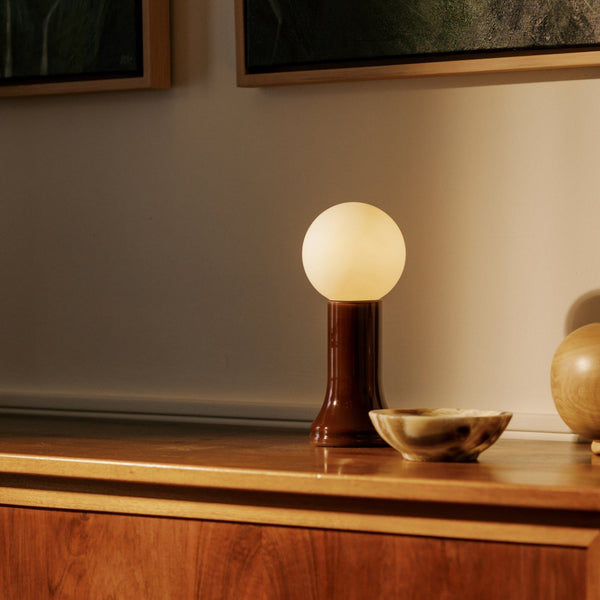
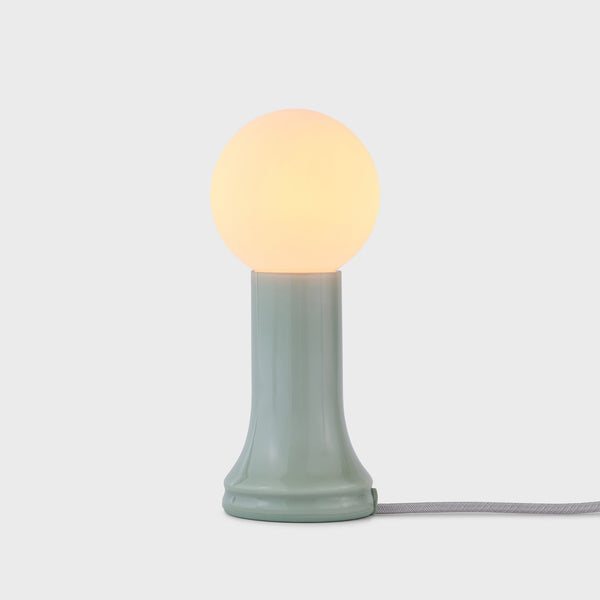
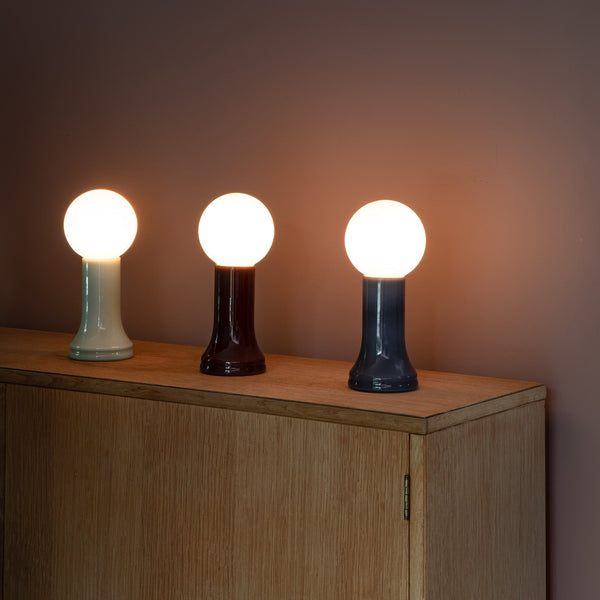
The Shore Table Lamp offers a different approach. Its mouth-blown recycled-glass base brings color, translucency, and a sculptural presence to the work area. Bottle Brown, Sea Green, and Smoke Grey provide distinct ways to coordinate the lamp with surrounding furniture and materials.
Used thoughtfully, the Shore Table Lamp can soften the visual boundary between the desk, screen, and room. It works best as an ambient layer that supports comfortable contrast rather than as the only source for reading, handwriting, or other detailed tasks.
Why Softer Desk Lighting Depends on Balance Instead of Low Brightness
Soft desk lighting is sometimes mistaken for dim lighting. The two are not the same.
A dim room may still feel uncomfortable when a computer screen becomes the dominant source of brightness. By contrast, a well-balanced workspace can remain adequately illuminated while feeling calm, warm, and visually organized.
Ambient Light and Task Light Serve Different Purposes
Ambient lighting shapes the overall atmosphere around the workstation. It fills darker areas, reduces abrupt contrast, and helps the desk feel connected to the rest of the room.
Task lighting has a narrower responsibility. It directs illumination toward paperwork, a keyboard, a sketchbook, or another area where visual precision matters.
The Shore Table Lamp is most effective when assigned the ambient role. Rather than pointing intense light at a specific document, it creates a gentler pool of illumination beside or behind the primary work zone.
That distinction matters because asking one lamp to perform every lighting function can lead to disappointing results. A decorative table lamp may create a warm mood without supplying concentrated light for fine-detail work. A highly directional task lamp may illuminate a page clearly while making the rest of the room feel cold or underlit.
Recycled Glass Softens the Desk’s Visual Character
Most computer workstations contain hard, technical materials: dark screens, metal monitor arms, plastic accessories, cables, and rectangular devices. A rounded glass lamp introduces a different visual language.
The Shore lamp’s recycled-glass base adds depth without requiring several decorative objects. Because the glass itself has color and presence, the lamp can remain visually interesting during daylight hours when it is switched off.
This makes it especially suitable for home offices that share space with a bedroom, living room, or open-plan interior. The workspace can retain its practical purpose without looking disconnected from the furniture and materials around it.
Is the Shore Table Lamp Bright Enough for Desk Work?
The answer depends on the activity.
For computer-based work in a room with adequate daylight or general lighting, the lamp may provide a useful supporting glow. For reading small text, reviewing printed documents, drawing, or detailed handwork, a separate directional source may still be necessary.
Desk size also affects the result. A compact pale surface may reflect more of the surrounding light, while a deeper or darker desktop can create a more concentrated pool of illumination. Reviewing an office and standing desk collection can help clarify how surface dimensions, finishes, and fixed or adjustable formats influence the available lighting area.
Build a Layered Lighting Plan Around the Shore Table Lamp
A comfortable workstation rarely depends on one fixture. It usually combines daylight, general room lighting, ambient light, and focused task light.
The goal is not to switch on every source at once. Each layer should have a clear responsibility.
Give Every Light Source a Specific Job
Daylight can provide broad illumination during the brightest part of the day. A ceiling fixture can keep the surrounding room visible. A directional desk lamp can support detailed work. The Shore Table Lamp can soften the darker areas beside or behind the screen.
| Lighting layer | Primary responsibility | Useful position | Common placement mistake |
|---|---|---|---|
| Daylight | Broad daytime illumination | Beside or in front of the desk | Allowing direct glare to reach the screen |
| Shore ambient light | Reducing harsh room-to-screen contrast | Rear corner, side surface, or nearby shelf | Placing the brightest point beside the monitor |
| Directional task light | Illuminating documents and detailed work | Opposite the dominant writing hand | Aiming the beam toward the display |
| Ceiling light | Maintaining general room visibility | Distributed above the workspace | Using more brightness than the room requires |
| Video light | Illuminating the face during calls | In front of the user | Expecting a background lamp to light the face evenly |
This separation keeps the workstation adaptable. During the morning, daylight may carry most of the load. Later, the Shore lamp can fill a shadowed corner. In the evening, the ceiling light can be reduced while the ambient and task layers remain active.
Reduce the Brightness Gap Around the Monitor
A screen often feels harshest when the wall and desk around it are almost completely dark. The eye repeatedly shifts between the bright display and the darker surrounding field.
Placing the Shore lamp behind or slightly beside the monitor can soften that boundary. The lamp should not compete with the screen or create a bright spot directly next to it. Instead, it should illuminate enough of the surrounding area to make the display feel less isolated.
A pale wall may return more of the lamp’s light into the room. A dark wall may absorb more of it, creating a smaller and more concentrated pool. Neither is automatically better. The placement simply needs to respond to the surface behind the desk.
Prevent Competing Pools of Illumination
Two strong lamps aimed at the same work surface can create overlapping shadows and distracting reflections. A more controlled arrangement lets the task lamp illuminate the page while the Shore lamp supports the broader environment.
This division also creates a cleaner visual composition. The desk does not need multiple prominent fixtures fighting for attention. One can remain functional and directional while the Shore lamp contributes shape, color, and warmth.
Position the Shore Table Lamp to Control Glare and Preserve Desk Space
Lamp placement should begin from the seated working position, not from the doorway. A setup that looks balanced from across the room may place the bulb directly in the user’s sightline.
Start at the Rear Corner of a Standard Desk
For screen-focused work, a rear corner is usually a practical starting point. It leaves the center of the desktop available for the monitor, keyboard, and frequently used tools.
Place the lamp far enough from the screen that its brightest area does not appear as a reflection. Check the display while it is both on and off, since reflections can become easier to notice on a dark screen.
The glass base should also have clear space around it. Avoid surrounding it with loose charging cables, stacked notebooks, or a drink that could be knocked over during routine movement.
Use Screen Height to Separate Light From the Sightline
Raising a laptop can improve the visual relationship between the display and the lamp. When the screen sits higher, the Shore lamp can remain lower and farther to the side rather than occupying the same horizontal sightline.
An adjustable laptop support is relevant for workstations that need variable screen elevation. The linked design offers adjustable height and wood-look surface options, allowing the laptop position to be coordinated with the desk finish.
A Screen-First Placement Check
1. Set the laptop or monitor at the intended working height.
2. Sit at the normal viewing distance.
3. Place the Shore lamp behind or beside the screen.
4. Check for reflections from several viewing angles.
5. Confirm that the bulb is not continuously visible.
6. Route the cord away from the keyboard and main hand-movement zone.
This sequence prevents the lamp from determining the position of every other object. The screen and primary work tools remain the functional center of the desk.
Protect the Lamp Zone on a Narrow Desktop
Compact desks require stricter space planning. A laptop, external keyboard, notebook, and lamp can quickly consume the usable surface.
An anodized laptop stand can raise the computer while reducing the amount of horizontal space occupied by the device. The linked stand is a fixed anodized-aluminum design, so it should not be described or treated as an adjustable model.
Once the laptop footprint is consolidated, reserve one rear corner for the lamp. Keep frequently used objects in front of it rather than beside its base. This creates a clear hierarchy: technology in the center, tools within reach, and ambient lighting at the perimeter.
Recheck Placement on a Sit-Stand Workstation
A lamp that sits comfortably below eye level while seated may become more visible when the desk rises.
Test the Shore lamp at both working heights. Make sure the cord has enough slack to move without pulling the base, but not so much that it hangs into the leg area. Keep the cord away from moving frame components and confirm that the lamp remains stable throughout the desk’s normal range of motion.
Match Shore Table Lamp Colors With Desk Finishes and Room Materials
The lamp’s color affects more than decoration. It determines how the glass relates to the desktop, chair, wall, and visible technology.
The strongest combinations usually repeat one or two materials rather than matching every item exactly.
Bottle Brown Creates a Grounded Workspace With Walnut and Warm Neutrals
Bottle Brown suits workspaces built around walnut, cream, tan, muted textiles, and dark natural accents. The deeper glass color can make an evening desk feel settled without relying on numerous decorative accessories.
To prevent the arrangement from becoming visually heavy, balance darker elements with a lighter wall, a pale notebook, or a restrained desktop surface. Black technology can remain part of the composition, but it should not dominate every layer.
Bottle Brown also works well when the home office shares a room with traditional furniture. Its warm tone helps the workstation feel connected to wood cabinetry, leather accents, or woven materials.
Sea Green Keeps Light Desks Calm but Distinctive
Sea Green introduces color while remaining compatible with light oak, white surfaces, soft gray upholstery, and natural textures.
It can give a small workstation a clear focal point without requiring bright artwork or several desk accessories. The glass color and the light’s color temperature should still be considered separately. Green glass contributes to the lamp’s appearance, but it should not be assumed to change the surrounding light in a precise or uniform way.
This palette is particularly effective in daylight-rich rooms where the desk needs personality without feeling crowded.
Smoke Grey Bridges Pale Surfaces and Dark Technology
Smoke Grey can connect a white or light wood desktop with black monitors, charcoal seating, and brushed-metal accessories.
It is a useful choice for monochrome interiors because it introduces translucency without adding a strong accent color. The result can feel softer than an all-black lighting fixture while preserving a restrained material palette.
For a broader furniture scheme, office furniture and workspace-planning options can help connect desks, chairs, accessories, and coordinated workspace elements without treating the lamp as an isolated styling decision. The destination page covers modern office furniture categories and workspace selection rather than lighting performance specifically.
Adapt Shore Table Lamp Ideas to Hybrid Work Nooks and Shared Spaces
The Shore lamp does not need to remain on a conventional computer desk. Its sculptural glass base can also support flexible spaces that move between work, meetings, and everyday use.
Turn a Bistro Surface Into a Softer Work Nook
A dining corner or casual collaboration area can function as a temporary laptop station without looking permanently converted into an office.
A bistro table with two height options offers both seated and taller configurations, making it relevant to different kinds of compact work zones.
On a circular surface, avoid placing the Shore lamp directly in the center. That position consumes the most flexible part of the table and can interfere with laptop placement, notebooks, or conversation.
A more practical arrangement places the lamp near the back perimeter, with the computer slightly forward and off-center. When the work session ends, the laptop can be removed while the lamp remains as part of the room.
Add Perimeter Light to a Small Meeting Area
Collaborative tables need open sightlines. A decorative lamp placed in the center can block faces, compete with shared screens, or reduce space for documents.
Around a 48-inch round meeting table, the Shore lamp will usually work better on a nearby shelf, cabinet, or side surface. The table can remain visually clear while the surrounding light feels less institutional. The linked meeting table is presented in a 48-inch round configuration with a 30-inch height.
Position the lamp slightly behind the seating area rather than directly across from participants. This creates background depth without introducing a bright source into the main line of sight.
Coordinate Lamp Height With Collaborative Seating
Seated eye level should guide the height of any nearby ambient light. A lamp that appears low and unobtrusive while standing may become distracting during a long meeting.
An ergonomic conference chair provides a useful reference point for planning the seated composition around meeting rooms and collaborative spaces. The linked chair is specifically presented for meetings, discussions, and presentation settings.
Place the Shore lamp so its brightest point remains below or outside the direct sightline of seated users. A lower credenza or side surface often works better than a tall shelf positioned directly behind another participant.
Correct Harsh Shore Lamp Setups Before Adding More Light
When the desk still feels uncomfortable, increasing brightness is rarely the best first response. Diagnose the arrangement in a systematic order.
1. Move the lamp away from the monitor edge. A visible bright source beside the display can make both objects feel more intense.
2. Check the screen for reflections. Change the lamp’s angle or distance before changing the entire lighting plan.
3. Look at the wall behind the screen. A completely dark background may need gentle ambient illumination.
4. Redirect the task lamp. Aim focused light toward paper or the keyboard rather than toward the display.
5. Simplify conflicting light colors. Several visibly different tones can make the room feel fragmented.
6. Add a task source for detailed work. Do not expect the Shore lamp to provide concentrated illumination for every activity.
7. Clear the glass base. Cables, stationery, and stacked objects can make the lamp area feel crowded and harder to maintain.
8. Reduce excessive overhead brightness. A strong ceiling fixture can overpower the warmer pool created near the desk.
9. Review the setup after dark. A placement that feels balanced in daylight may become too prominent when the surrounding room darkens.
Adjust Shore Table Lamp Placement Throughout the Workday
A fixed arrangement does not always produce consistent comfort. Daylight direction, screen brightness, and work type change over the course of the day.
Let Daylight Lead During Morning Work
When the window provides adequate illumination, the Shore lamp can remain off or operate as a subtle supporting layer. Avoid switching on every fixture automatically.
If one side of the desk appears shadowed, use the lamp to balance that area rather than competing with the window. Side lighting is generally easier to manage than positioning the desk directly toward intense sunlight.
Create Background Depth for Video Calls
The Shore lamp can contribute warmth behind or beside the user during video meetings, but it should not be expected to illuminate the face evenly.
Place it outside the camera frame or allow only part of its glow to appear in the background. Avoid positioning the brightest point directly behind the head, where it can create a distracting hotspot.
A separate front-facing light may still be needed when the face appears dark. The background lamp and face light should perform separate roles.
Lower Visual Intensity Gradually in the Evening
As natural light fades, reduce the contrast between the screen and room in stages. Turn on ambient lighting before the workspace becomes completely dark. Lower excessive ceiling light, then adjust the screen to a comfortable level.
The aim is not to create a dim room that makes documents difficult to read. It is to maintain enough general visibility while allowing the Shore lamp to establish a calmer atmosphere around the desk.
Shape a Softer Workspace That Can Change With the Day
The most effective Shore Table Lamp ideas connect light, furniture, technology, and daily behavior.
A rear-corner position may work for focused computer use. A nearby shelf may be better for video calls. A side surface can support evening ambient light after the desk has been cleared. Bottle Brown can deepen a walnut palette, Sea Green can enliven a light workspace, and Smoke Grey can soften a monochrome arrangement.
The lamp should remain part of a flexible lighting system rather than carrying the entire room on its own. Daylight can lead when available. A task light can handle detailed work. General lighting can preserve safe visibility. The Shore lamp can then perform the role it suits best: adding material warmth, reducing abrupt visual contrast, and helping the desk feel less clinical as the workspace shifts from daytime focus to a quieter evening setting.
Related Articles
-
 How to Choose a Table Lamp That Adds Warmth Without Reducing Visibility
-
 Can a Table Lamp Support Evening Work Better Than Overhead Lighting?
-
 How to Use a Table Lamp to Make a Home Office Feel Less Harsh and More Lived In
-
 Best Table Lamp Options for Creating a Relaxed But Productive Workspace
-
 What Size Table Lamp Works Best in Small Offices and Compact Rooms?
-
 Best Table Lamp Placement Ideas for Side Tables, Consoles, and Office Corners


