























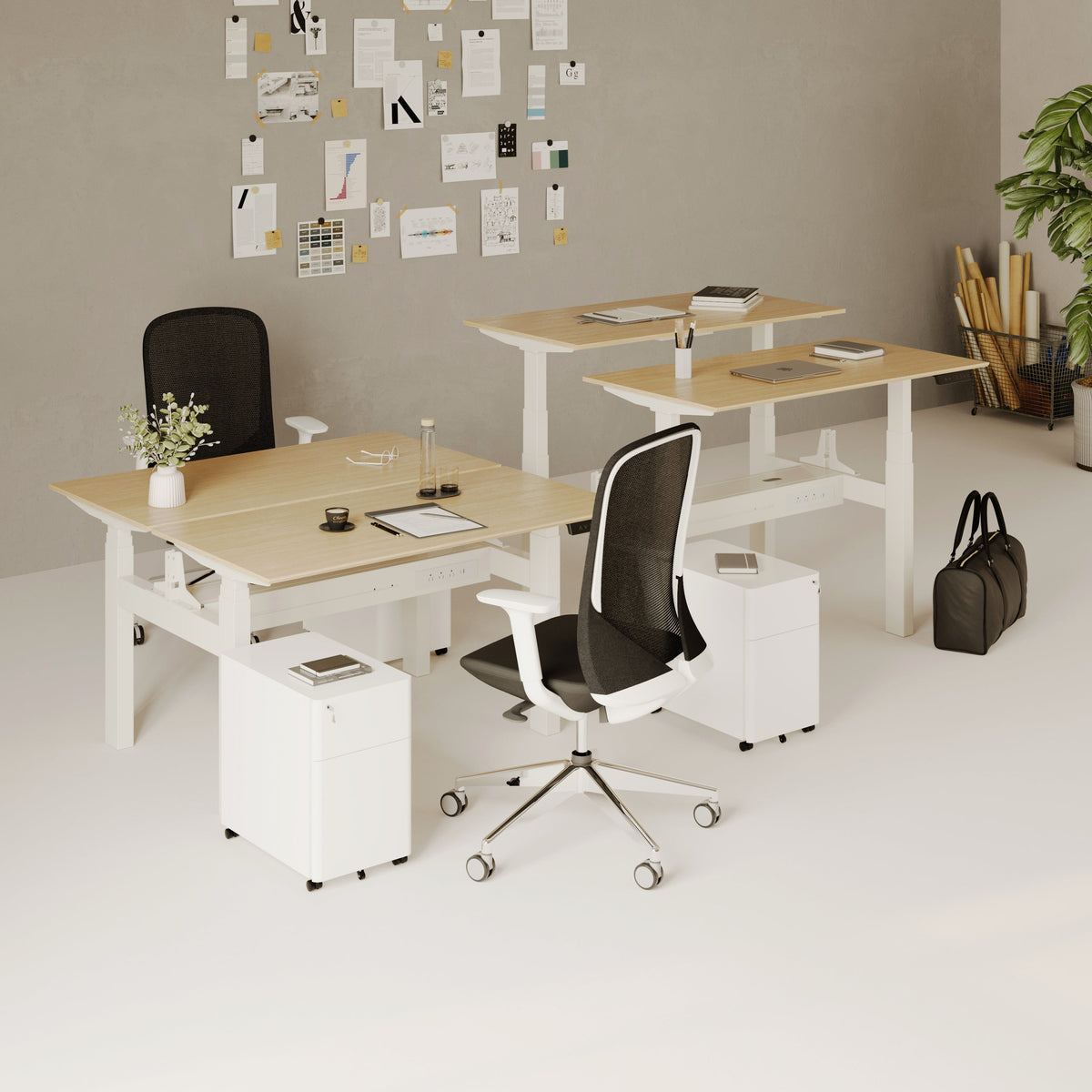
How Filing Cabinet Storage Supports Office Desk Must Haves

A productive office desk is defined as much by what stays off the surface as by what remains within reach. Monitors, keyboards, notebooks, phones, chargers, and current project materials all compete for limited space. Without a dependable storage system, even a carefully selected desk can become crowded with folders, loose papers, office supplies, and documents waiting for attention.
Filing cabinet storage gives those materials a permanent, organized destination. It protects the desktop as an active work zone while keeping important records close enough for practical access. This relationship is central to choosing office desk must haves. The goal is not to fill the desk with accessories. The goal is to create a coordinated workspace where each tool, document, and surface has a clear purpose.
When storage, desk proportions, power access, seating, and collaboration areas are planned together, the entire office becomes easier to navigate. Work can move from focused tasks to document review and team discussion without leaving clutter behind.
Filing Cabinet Storage Creates the Foundation for Office Desk Must Haves
Filing cabinet storage supports office desk must haves by moving paperwork, supplies, and sensitive records away from the primary work surface while keeping them organized nearby. This allows the desk to remain available for the task currently being completed.
Desktop trays and organizers can manage a small number of active items, but their capacity is limited. When incoming mail, client files, receipts, contracts, project notes, and completed records are placed in the same tray, the organizer becomes another pile. A filing cabinet creates clearer boundaries between documents that require immediate action and documents that need to be retained.
A compact lockable filing cabinet is especially relevant when a workstation needs nearby drawer storage without giving up the desktop. The linked cabinet includes sliding drawers, an integrated lock, rolling wheels, and a compact coated-steel form. These are practical characteristics for offices that need accessible storage and controlled document visibility.
Filing storage should not be treated as an unrelated accessory placed wherever room remains. It is part of the workstation itself. Its position affects how quickly files can be retrieved, whether the user has enough legroom, and how easily the desk can be reset after each task.
Why Desktop Organizers Cannot Manage an Entire Paper Workflow
Desktop organizers work best when their purpose is narrow. One tray might hold documents that require review. A small cup might contain the writing tools used every day. A file holder might support the current project.
Problems begin when these containers become permanent storage. Active papers are mixed with completed records, outdated notes remain visible, and sensitive information may stay exposed longer than necessary. The user then has to search through every category to find one relevant document.
A filing cabinet expands the organization system beyond the surface. It gives completed, reference, and confidential materials a defined location, preventing the desktop from carrying every stage of the paper lifecycle.
Why Physical Filing Still Matters in a Digital Office
Digital workflows have reduced the volume of paper in many workplaces, but they have not made every physical document unnecessary. Signed agreements, original certificates, receipts, warranties, personnel forms, client records, and temporary project documents may still need to be handled or retained.
A lower volume of paper can make deliberate filing more important. The documents that remain may contain sensitive information or serve a specific operational purpose. Leaving them on the desk because there are only a few creates avoidable exposure and makes the workspace feel unfinished.
Physical and digital filing systems work best when their categories correspond. A folder labeled “Current Vendors” should relate clearly to the equivalent digital directory. Consistent naming reduces uncertainty and makes information easier to locate regardless of format.
Organizing Desk Essentials by Frequency, Function, and Sensitivity
Not every useful object qualifies as a desk essential. Office desk must haves should be selected according to how often an item is used, what activity it supports, and whether it should remain visible.
An item used continuously deserves immediate access. A tool used a few times each week may belong in a nearby drawer. A sensitive document may need locked storage even when it is referenced regularly. This approach creates a more reliable system than arranging objects according to appearance alone.
Immediate, Near-Desk, and Secure Access Zones
Immediate-Use Work Tools
The primary desktop should hold tools required for the current task. These commonly include a keyboard, mouse, monitor or laptop, phone, active notebook, and a limited set of writing instruments.
Current-task documents can also remain on the surface, provided they are removed or filed when the work session ends. The desktop should show what is happening now, not every project that may require attention later.
Near-Desk Support Materials
Chargers, labels, spare notebooks, frequently consulted folders, and small office supplies should remain easy to reach without occupying the central work area. A desk drawer, mobile pedestal, or nearby cabinet drawer can support this level of access.
The purpose of near-desk storage is convenience without visual competition. Materials are available when required, but they do not interrupt the use of the keyboard, writing area, or monitor.
Secure and Low-Frequency Records
Contracts, personnel documents, completed project files, financial records, and original paperwork generally do not need to remain on the desktop. These materials belong in organized filing storage, particularly when they contain private or confidential information.
Security should match the sensitivity of the document. Locking storage is one useful layer of control, but it should be combined with sensible access policies and thoughtful document handling.
Choosing the Right Storage Location for Each Desk Essential
| Workspace location | Best suited for | Access pattern | Organizational purpose | Common mistake |
|---|---|---|---|---|
| Desktop | Current tools and active work | Continuous | Supports the task in progress | Allowing permanent document piles to form |
| Desktop organizer | A limited group of small essentials | Frequent | Keeps active items visible and grouped | Using it as an archive |
| Desk drawer | Supplies and personal items | Daily | Keeps minor tools nearby but out of sight | Mixing supplies with important files |
| Filing cabinet | Records, folders, and sensitive documents | Daily to occasional | Creates structured storage outside the work surface | Filling unlabeled drawers with unrelated materials |
| Open shelf | Manuals and non-sensitive reference items | Occasional | Makes selected resources visible | Displaying confidential or distracting paperwork |
| Digital storage | Electronic files and scanned copies | Variable | Supports search, sharing, and remote access | Discarding originals without confirming they are no longer needed |
Matching Filing Cabinet Placement to Desk Dimensions and Movement
A cabinet can improve organization while still creating physical problems if it is placed without considering the desk. Drawer extension, chair movement, leg clearance, outlet position, and walking paths all affect whether storage feels supportive or obstructive.
The right arrangement depends partly on the workstation itself. An office desk collection for varied workspaces can include compact desks, standing options, individual surfaces, and multi-person configurations. Each format creates a different relationship with filing storage.
A compact desk may require storage beside the work surface to preserve legroom. A larger fixed desk may accommodate a cabinet below one side. A height-adjustable desk requires clear vertical travel, so nearby storage must not interfere with moving components, cables, or the user’s standing position.
Under-Desk Filing Cabinet Placement
Under-desk placement can conserve floor area, but it should never force the user into an off-center or restricted sitting position. The chair must be able to move naturally, and the user should have room to shift posture during the day.
Measure the cabinet height, width, and depth against the open space beneath the desk. Account for structural supports, crossbars, control boxes, and cable trays. A cabinet that technically fits may still reduce usable knee space.
Under-desk storage is most suitable for compact units and files accessed regularly. Less frequently used archives can be stored farther away, preserving the most valuable area around the user.
Beside-the-Desk Filing Cabinet Placement
A cabinet positioned beside the desk preserves leg clearance and can make drawers easier to reach. It may also provide a small secondary surface for a phone, active folder, or other temporary item.
This arrangement requires enough floor space for drawers to open fully without colliding with walls, chair bases, or nearby furniture. The cabinet should also remain outside the main walking route.
Frequently accessed storage is often most convenient on the user’s dominant side, although outlet placement and room circulation may justify a different position. Comfort and workflow should guide the decision rather than a rigid layout rule.
Filing Storage Around Height-Adjustable Desks
Storage placed near a height-adjustable desk must remain outside the desk’s movement path. Cords should not pass over cabinet edges or become trapped beneath wheels. Items stored on top of a mobile cabinet should also remain stable when the desk changes height.
The best layout supports both seated and standing work. Files should be reachable without excessive bending, while the cabinet should remain clear of legs, feet, and moving desk components.
Building a Paper Workflow That Keeps the Desktop Clear
Furniture creates capacity, but habits determine whether the capacity remains useful. Paper clutter usually forms because a document has no clear next destination. It is reviewed, moved aside, handled again, and eventually buried beneath newer material.
A practical filing workflow gives every document a status:
-
Incoming: Material that has arrived but has not been reviewed.
-
Action required: Documents connected to a signature, payment, response, or decision.
-
Active project: Paper needed for work currently underway.
-
Reference: Information that may be consulted but does not require immediate action.
-
Completed record: Material retained for operational, financial, contractual, or historical reasons.
-
Digitize or discard: Paper that no longer needs to occupy physical storage.
These categories can be adapted to different roles, but they should remain specific enough to guide decisions. A folder called “Miscellaneous” does not tell the user what belongs there. Labels such as “Active Client Approvals” or “Current-Year Receipts” create clearer boundaries.
Separating Active Files from Archived Records
Active files require faster access than completed records. Storing both in one undifferentiated system increases retrieval time and encourages users to keep current folders on the desk.
A useful cabinet may dedicate one drawer or section to active projects and another to completed materials. When a project closes, its folder can move into the appropriate archive category. This keeps the active area limited and easier to scan.
The same principle applies to supplies. Labels and frequently used forms can occupy a separate drawer rather than being mixed with retained documents. Clear separation helps each drawer perform one recognizable function.
Using Consistent Physical and Digital File Names
When physical and digital systems use unrelated labels, users must remember two filing languages. Matching categories reduces that mental load.
A physical folder called “Vendor Agreements” should correspond to a digital folder with the same or a closely related name. Dates, client names, and project identifiers should follow a consistent pattern. The objective is not complexity. It is predictability.
Consistency also supports shared work. A colleague should be able to return a file without relying on the personal memory of the person who created the system.
Coordinating Filing Storage With Power and Cable Access
Technology and document storage often compete for the same area beside and beneath a desk. Chargers, surge protectors, power cords, rolling cabinets, and open drawers can create interference when they are planned separately.
An AC and USB in-desk power module can bring charging and connection access directly to the work surface. The linked module includes four AC outlets as well as USB-B and USB-C ports. Integrated access does not remove the need for cable management, but it can reduce the number of loose chargers crossing the desktop.
Power cords should never run through a drawer-opening path or beneath cabinet wheels. Height-adjustable desks need sufficient cable slack for movement, but excess loops should be controlled so they do not gather around storage.
Creating Separate Technology and Document Zones
A practical workstation can assign one side to technology and the other to paper handling. The technology side may contain device charging, monitor connections, and cable routing. The document side may provide filing access, labels, and space for the current folder.
This arrangement reduces overlap between loose paper and connected devices. It can also make the desk easier to reset because each category has a defined direction.
The zones do not need to be symmetrical. Their position should reflect handedness, nearby outlets, room circulation, and the location of the filing cabinet.
Storing Technology Accessories Without Creating a New Clutter Category
Spare adapters, backup cables, and rarely used connectors should not remain on the desktop simply because they relate to technology. A dedicated drawer can keep these items available without mixing them with paper files.
Frequently used charging equipment should be separated from backup components. Small labels or divided containers can prevent cords from tangling and make the correct accessory easier to identify.
Protecting Sensitive Documents While Preserving Access
A functional office desk must support both convenience and discretion. Documents containing personal, financial, contractual, or proprietary information should not remain visible simply because they may be needed again.
Sensitive materials can include employee forms, client contact details, banking records, signed agreements, tax documents, password recovery information, medical forms, and internal plans. The exact level of protection depends on the workplace and the information involved, but visibility should always be considered deliberately.
A private room does not automatically create complete document security. Visitors, shared users, cleaning staff, and maintenance personnel may enter the space. Locked storage adds another layer of control, although it does not replace responsible access policies or digital security practices.
Organizing Locked Files for Practical Retrieval
Protected documents still need clear categories. A locked drawer filled without labels may secure the paper while making it difficult to use.
Daily-access confidential records should be separated from long-term archives. Folders should remain upright and easy to remove. Overfilled drawers can damage documents, hide labels, and make users reluctant to return materials after use.
Security works best when the filing process is simple enough to follow during a busy day. When protected storage is inconvenient, papers are more likely to remain on the desk.
Extending Desk Organization Into Meeting Areas
Clutter rarely stays contained at one workstation. When a desk lacks storage, folders migrate to meeting tables, empty chairs, windowsills, and other temporary surfaces. This reduces the readiness of shared spaces and makes documents harder to track.
Meeting areas work best when they support discussion rather than overflow storage. A conference chair for collaborative rooms belongs in a setting where seating is kept available for participants, not covered with bags or project files. The linked chair is designed for meeting rooms and collaborative spaces, with support intended for discussions and presentations.
Filing cabinet storage helps protect that purpose. Project materials can remain organized until needed, then return to their assigned location after the meeting.
Moving Active Files From Storage to a Meeting Surface
Consider a team reviewing a client project. Instead of carrying the entire project archive into the room, the team retrieves only the active folder and relevant reference documents. Notes and decisions are recorded during the discussion. Retained materials then return to the assigned cabinet section.
This small workflow keeps documents traceable and prevents meeting surfaces from becoming temporary archives. It also reduces the risk of unrelated information being left behind after participants leave.
A round meeting table with optional power can provide a dedicated surface for small-group discussions, document reviews, and device-based work. Its purpose remains collaboration, so only the materials needed for the current meeting should occupy it.
Protecting Shared Surfaces From Permanent Storage
Every shared surface should have a clear role. Meeting tables support discussion. Chairs support seating. Cabinets support retained materials. When one category lacks capacity, another piece of furniture is often forced to compensate.
A brief end-of-meeting reset can prevent this drift. Papers return to their folders, devices are disconnected, and the table is cleared for the next group. The process becomes easier when the filing destination is nearby and clearly labeled.
Scaling Filing Storage for Small Offices and Hybrid Teams
Small offices require careful storage decisions because every cabinet affects movement. The goal is not to add the largest possible filing unit. It is to provide enough organized capacity for real document needs while preserving usable floor area.
Before selecting storage, consider current paper volume, expected retention, the number of users, access frequency, security requirements, and opportunities for appropriate digitization. Oversized storage can encourage unnecessary accumulation, while insufficient storage pushes documents back onto the desk.
Drawer extension must be included in floor planning. A cabinet may have a compact footprint when closed but still block a walkway when opened. Chair bases, doors, desk legs, and adjacent furniture should all be considered.
Using Secondary Tables Without Creating Overflow Desks
A compact bistro table for shared work areas can support short conversations, temporary laptop work, or informal collaboration. The linked table is offered in seated and counter-height configurations, with optional in-desk power available.
A secondary table should not become a substitute filing surface. Its usefulness depends on remaining open for the activity it was selected to support. When papers begin to live there permanently, the office has created another clutter zone rather than another functional workspace.
Filing storage protects flexible furniture by giving retained materials a more appropriate home.
Establishing Shared Filing Rules
Hybrid teams need systems that remain understandable even when different people use the office on different days. Drawer ownership, project categories, and file return locations should be visible and consistent.
Useful shared practices include:
-
Assigning drawers by role, department, or project
-
Using labels that everyone understands
-
Recording when a sensitive or important file is removed
-
Returning materials after meetings or remote work sessions
-
Avoiding personal abbreviations that other users cannot interpret
-
Reviewing inactive files so current storage remains manageable
These practices make the cabinet part of the team’s workflow rather than one person’s private system.
Choosing Filing Cabinet Features According to Work Patterns
The most useful filing cabinet is not necessarily the one with the greatest capacity. It is the cabinet that fits the desk, supports the document workflow, and remains convenient enough to use consistently.
A compact footprint matters when floor area is limited. Mobility can help when layouts change or files need to move between nearby work zones. Locking access may be appropriate for sensitive records. Stable construction supports repeated drawer use, while clear drawer separation keeps supplies, active files, and archives from becoming mixed.
Finish and proportion also influence whether storage feels integrated. A cabinet that relates visually to the desk is less likely to look like an afterthought, especially in client-facing offices or home workspaces where several activities share one room.
Filing Storage for Different Types of Office Work
Administrative and Financial Work
Administrative roles often require regular access to forms, vendor records, invoices, and retained documents. Clear categories and controlled access are more useful than a broad catchall drawer.
Creative and Project-Based Work
Creative teams may need to store approvals, printed concepts, samples, notes, and client-specific materials. Organizing folders by project stage helps distinguish active work from completed references.
Remote and Home-Based Work
A home office benefits from separating business records from household paperwork. Dedicated filing categories prevent personal documents from mixing with client, tax, or operational materials.
Shared Departmental Work
Shared storage requires common naming, visible ownership, and predictable return locations. A system that only one employee understands is not truly organized.
Building Adaptable Workspaces Around Storage-Led Planning
Modern offices often support several activities within one area. A room may function as a focused workstation, a video-call setting, a document review area, and an informal meeting space. Storage-led planning helps those activities coexist without requiring every surface to hold permanent materials.
The workplace furniture featured within modern office furniture for adaptable workspaces reflects the needs of design studios, remote work settings, coworking environments, and other flexible offices. The linked page brings together desks, chairs, and accessories within a broader workplace context rather than presenting filing storage as an isolated choice.
Adaptability begins with open movement paths and clear furniture roles. A desk supports focused work. Filing storage controls documents. Power access supports devices. Meeting furniture supports collaboration. When each component performs its intended function, the room can transition between activities with less disruption.
A Five-Zone Model for Office Desk Must Haves
-
Primary work zone: The desktop area reserved for the current task
-
Technology zone: Monitors, connected devices, power access, and managed cables
-
Active-document zone: A limited location for papers currently being used
-
Secure-storage zone: Filing drawers for retained or sensitive records
-
Collaboration zone: A meeting or touchdown surface protected from permanent clutter
These zones can fit within a small home office or extend across a larger team environment. Their scale changes, but their purposes remain distinct.
The One-Touch Principle for Controlling Paper
Every time a document is handled without a decision, it creates additional work. It is moved, reviewed again, and placed in a new temporary location.
A one-touch principle encourages the user to assign a destination when the paper is handled. It may move to an action folder, an active project file, protected storage, digitization, or disposal. Not every decision can be completed immediately, but the document should still receive a clear status.
This habit connects the filing cabinet directly to everyday desk performance. Storage succeeds when returning a file feels easier than leaving it on the surface.
A Future-Ready Office Desk Keeps Current Work Visible
Filing cabinet storage protects the most valuable feature of a desk: usable space for focused work. It keeps reference materials accessible, gives sensitive records a more appropriate location, and prevents completed paperwork from competing with current priorities.
The strongest office desk must haves work as a connected system. The desk supports active tasks. Power access supports devices. Filing storage supports document control. Meeting furniture supports collaboration. Clear circulation allows people to move between each activity without carrying clutter from one area to another.
A well-planned workstation does not need to look empty or overly controlled. It needs to make the next action clear. Current work remains visible, retained information stays organized, and every surface is ready to serve the purpose for which it was chosen.
Related Articles
-
 Filing Cabinet Ideas for Better Office Furniture Accessories
-
 Best File Cabinet for Home Office Storage That Feels Easy
-
 Better Multiple Monitor Desk Setup Starts With One Stand
-
 Make Laptop and 2 Monitor Setup Work With Better Stands
-
 Why Dual Monitor Comfort Needs a Monitor and Laptop Stand
-
 How a Monitor and Laptop Stand Fixes Screen Height Issues


