























Laptop Stand vs Flat Desk Setup: Which Is Better for Posture and Comfort?

Choosing between a laptop stand and a flat desk setup seems simple until long work hours start to affect how the body feels. A laptop placed directly on the desk is easy, familiar, and convenient. A raised laptop can create a more refined workstation, but only if the setup supports the way people actually work. The better option for posture and comfort depends on how screen height, typing position, desk layout, and visual strain interact over the course of a normal day.
A useful comparison starts with one basic truth. Laptops combine the screen and keyboard into one unit. That is efficient for portability, but it creates a compromise for ergonomics. When the keyboard is at a comfortable typing level, the screen usually sits too low. When the screen is lifted to a better viewing height, the built-in keyboard can become less comfortable for sustained typing. That tension sits at the center of the posture debate.
For many people, the answer is not about which setup looks better or feels better for five minutes. It is about which one helps maintain a more neutral working position over repeated daily use. That is where the differences become clearer.
Why laptop position shapes posture more than most people realize
Laptop posture problems rarely come from one dramatic mistake. They usually come from small, repeated adjustments the body makes to keep up with a low screen, limited arm space, or poor visual conditions. Over time, those adjustments can lead to neck tension, rounded shoulders, wrist discomfort, and a general sense of fatigue.
The attached screen-and-keyboard problem
A desktop monitor and external keyboard can be positioned separately. A laptop cannot. This is why the device itself often pushes users into compromise. On a flat desk, the built-in keyboard may feel accessible, but the screen tends to pull the head downward. On a stand, the screen often moves into a better visual zone, but typing directly on the raised keyboard can become awkward for long sessions.
This is why posture and comfort should be evaluated as a system. A screen may be visible, but that does not make it supportive. A desk may be clean and attractive, but that does not mean it encourages sustainable body mechanics.
What good posture looks like in a laptop workspace
Good posture in this context does not mean sitting rigidly. It means creating conditions that make it easier to work with less strain. In most laptop setups, that involves:
-
A screen that does not require constant downward bending of the neck
-
Shoulders that can stay relaxed instead of pulled forward
-
Forearms that are not cramped against the edge of the desk
-
Wrists that are not sharply bent for long periods
-
A viewing distance that does not encourage leaning toward the screen
When these elements are out of balance, the body compensates. That compensation is what often turns a workable setup into an exhausting one.
Where a flat desk setup works well and where it starts to fall short
A flat desk setup remains common for good reason. It is quick to use, requires no extra equipment, and keeps the laptop exactly as it was designed to be used. For short tasks, that simplicity can be a real advantage.
Why direct desk placement feels natural at first
Setting a laptop flat on a desk allows immediate access to the keyboard and trackpad. For quick bursts of work, that can feel straightforward and intuitive. Students, hybrid workers, and people moving between spaces often prefer this arrangement because it is easy to reset and does not add visual clutter.
For short sessions such as checking messages, responding to emails, reviewing a document, or joining a brief call, a flat desk setup may be perfectly reasonable. It keeps the workstation simple and avoids turning every work surface into a fully built-out station.
Why screen height becomes the weak point
The main problem appears when short sessions turn into longer ones. The lower the screen sits, the more likely users are to angle the head downward. That downward gaze can seem minor at first, but it often triggers a chain reaction. The chin drops, the upper back rounds, the shoulders roll forward, and the torso gradually follows.
Many people do not notice this change while it is happening. They simply feel more tired later. That is why flat desk laptop use often seems comfortable in the moment but less supportive across an entire day.
How fatigue builds gradually in a flat setup
Flat desk work rarely causes discomfort all at once. It tends to create slow-loading strain patterns:
1. The eyes focus on a lower screen.
2. The head leans slightly forward.
3. The shoulders move inward.
4. The back loses some of its natural support.
5. The user shifts, slumps, or braces without realizing it.
This does not mean a flat desk setup is inherently bad. It means its limits become more noticeable when the laptop is used as a primary work tool rather than a temporary one.
The desk can improve or worsen the experience
A better work surface does not solve every ergonomic issue, but it can improve how a flat laptop setup performs. Desk depth matters because it determines how close the screen sits to the face. Elbow room matters because limited space encourages awkward arm positioning. Surface organization matters because clutter often forces uneven reach patterns.
A workstation with enough room for proper spacing, writing, and accessory placement is easier to adapt than one that feels compressed from the start. That is one reason why many people begin with the laptop but end up realizing the desk itself deserves more attention, especially when considering an ergonomic desk collection that supports a more functional daily layout.
Why a laptop stand usually offers the stronger posture advantage
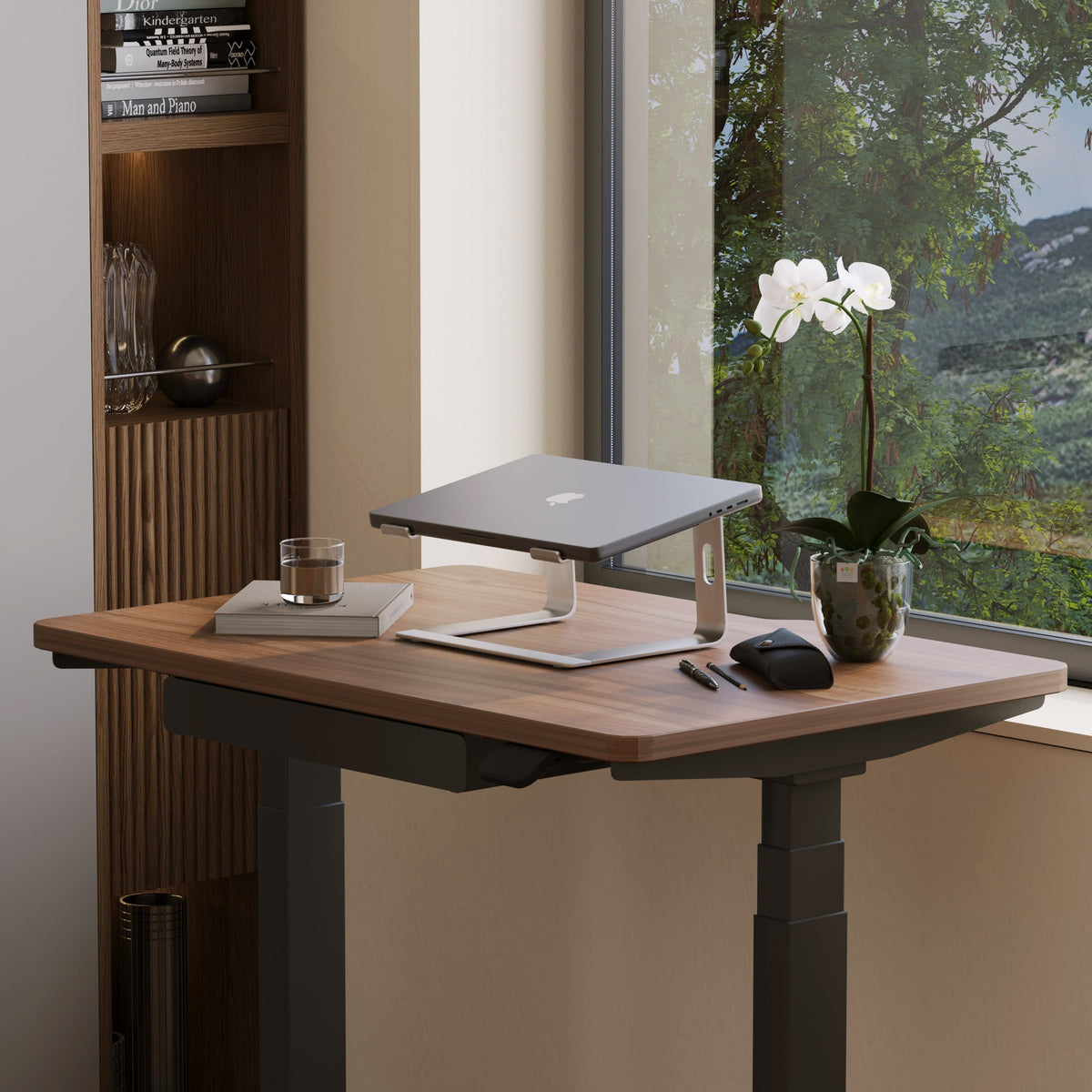
For sustained laptop use, a stand generally provides the clearer ergonomic benefit. The reason is straightforward. It improves the position of the screen, and screen position affects the head, neck, shoulders, and upper back more than many users expect.
Better viewing height changes upper-body behavior
When the laptop is elevated, the screen can sit closer to eye level. That often makes it easier to keep the head more upright and the chest more open. Instead of collapsing downward toward the display, the user can look more forward. This one change often improves the entire posture pattern.
That does not mean every stand guarantees comfort. It means the stand addresses one of the biggest built-in flaws of laptop use, which is the low screen position.
The strongest benefit is visual alignment
The biggest value of a stand is not that it transforms the whole workstation by itself. It is that it puts the visual target in a better place. When the eyes can meet the screen more naturally, the body is less likely to chase it downward.
For users who work on a laptop for extended periods, a height-adjustable laptop riser can make it easier to adapt screen placement to different desk setups and working styles. That kind of flexibility is especially useful in shared or evolving workspaces where a fixed angle does not always suit the person using it.
Why typing posture still matters
A stand improves the screen position, but long typing sessions on an elevated built-in keyboard can shift strain into the wrists, forearms, and shoulders. That is why the best stand-based setup usually treats screen height and hand position as separate issues.
This distinction matters because people often assume a laptop stand is a complete ergonomic solution. It is more accurate to say that it creates a better foundation for posture, especially for the neck and upper back. The rest of the setup still needs to support how the hands and arms work.
Slim formats can suit smaller spaces
Not every workstation needs a large or highly visible accessory. In tighter desk areas, a lightweight laptop stand can support screen elevation while keeping the visual footprint cleaner and the surface less crowded. This can be especially useful in home offices where the desk needs to function as both a work zone and part of the room’s overall design.
A body-zone comparison reveals the real difference
Posture is easiest to understand when broken down by body area. The setup that feels acceptable overall may still place one area under more strain than another.
Neck, shoulders, wrists, and lower back compared
| Body Area | Flat Desk Setup | Laptop Stand Setup | General Outcome |
|---|---|---|---|
| Neck | Often angled downward for long periods | More likely to support a forward gaze | Stand usually performs better |
| Shoulders | Commonly roll forward as the user leans in | Often relax more when the screen is higher | Stand often has the advantage |
| Wrists | Easy to access at first, but posture may compress over time | Can improve or worsen depending on typing method | Depends on full setup |
| Upper Back | More likely to round during long sessions | Better positioned for upright sitting | Stand usually performs better |
| Lower Back | Often affected indirectly by upper-body collapse | Can improve when the torso stays taller | Stand often supports better comfort |
Why neck relief often becomes the deciding factor
Neck strain is one of the earliest signs that a flat desk setup is not working well over time. A low screen pulls the head into repeated downward flexion, and that posture can influence the entire upper body. When a stand reduces the need for that constant downward angle, the rest of the body often follows in a more supportive direction.
Why wrist comfort is more conditional
Wrists are different. A flat desk setup may feel more natural for direct typing because the keyboard is lower and immediately accessible. A stand can improve the viewing angle while making built-in typing less ideal for long sessions. This is why wrist comfort should not be judged separately from the rest of the posture picture. The best setup is the one that balances visual comfort with hand positioning rather than improving one while neglecting the other.
Desk layout and accessories play a major role in comfort
A laptop stand can help, but it cannot fully compensate for a poorly arranged desk. Comfort is strongly influenced by what surrounds the laptop, not just by where the laptop sits.
Surface layout affects reach and tension
If the desk is shallow, crowded, or visually busy, the user has fewer ways to position the laptop at a comfortable distance. If the lamp, notebook, charger, and daily tools are all competing for limited surface space, the workstation becomes harder to use without awkward reaching or twisting.
This is where supporting pieces matter. A thoughtful mix of office workspace accessories can help organize the working area so the laptop setup functions more cleanly instead of creating friction throughout the day.
Lighting influences posture more than most users expect
Poor lighting often leads people to blame the chair, desk, or laptop position for discomfort when the real issue is visual strain. If the screen feels hard to read because the room is too dim, too harsh, or unevenly lit, the body tends to respond by moving closer. Once that happens, posture breaks down quickly.
A focused multi-use LED task light can support clearer reading and more stable visual conditions around the desk. That kind of support is not just about ambiance. It can reduce the tendency to lean toward the screen, which directly affects neck and shoulder comfort.
Ambient comfort supports longer work sessions
Visual comfort is not only about brightness. It is also about balance. A workspace that feels too stark or too dark can make the screen feel harsher than it needs to. Softer surrounding light can help create a more comfortable visual environment, particularly during early morning or evening work.
A recycled glass table lamp can contribute to that broader comfort layer by softening the contrast in the room and helping the desk feel more settled for focused work.
The better setup depends on how the laptop is actually used
There is no universal answer that fits every person equally well. The right choice depends on whether the laptop is a primary workstation, a secondary tool, or something used occasionally in short bursts.
For full-day laptop users
When a laptop is used for several hours at a time, a stand-based arrangement is usually the better option for posture and comfort. The reason is not trend or appearance. It is repeated exposure. Over longer sessions, the effects of low screen height become harder to ignore. A setup that supports a better gaze angle is often the more responsible choice.
For occasional or flexible use
If the laptop is used briefly, moved often, or opened mainly for temporary tasks, a flat desk setup can still make sense. Simplicity matters. A quick setup that suits the rhythm of the day can be more practical than a workstation that requires more pieces than the user actually needs.
For compact home offices
In smaller spaces, the decision often comes down to how much function can be achieved without overwhelming the room. This is where low-profile solutions and careful surface planning make a meaningful difference. The best small workspace setups protect comfort while still allowing the desk to feel open and intentional.
For people redesigning the workspace as a whole
Sometimes the real question is bigger than the laptop itself. When posture issues keep appearing, it may be worth looking at the entire room, including the desk, lighting, and accessory layout. People exploring modern ergonomic workspace options often find that comfort improves most when the environment is treated as a connected system rather than a collection of isolated fixes.
Which is better for posture and comfort?
For most people who work on a laptop regularly, a laptop stand is the better choice for posture and comfort. It usually provides the stronger foundation because it addresses the screen-height problem that drives so much neck and upper-body strain. That advantage becomes more meaningful as usage time increases.
A flat desk setup still has a place. It works well for short, occasional tasks and for users who value simplicity above all else. But when the laptop becomes a daily work tool rather than a temporary device, the limitations of direct desk placement tend to show up more clearly.
The most reliable answer is not based on one accessory alone. It comes from building a workstation that respects how the body sees, reaches, types, and focuses. When the screen is easier to view, the desk has room to function properly, and the surrounding environment supports comfort instead of fighting it, posture improves in a way that feels practical and believable. That is usually where a stand-based setup earns its advantage.
Related Articles
-
 Best Setup for Laptop and 2 Monitors With Less Neck Strain
-
 Monitor Stand vs No Stand: What Changes for Posture, Screen Height, and Focus
-
 When Office Chair Headrests Help or Hurt for Neck Alignment
-
 Office chair headrest pros and cons and when it helps or hurts
-
 Dual monitor desk setup rules that keep your posture aligned all day
-
 When Office Chair Headrests Help or Hurt

