

























Workstation Panels That Make Open Plan Office Furniture Work
Workstation panels can turn exposed open-plan desks into clearer, more functional work zones. Discover how panel height, placement, desk compatibil...
Learn more
Visit quiz page to see how we makes it easy to create an inspiring workplace


A desk lamp used to have one simple job: light the surface where reading, writing, or focused work happened. Modern work has changed that. The same lamp now influences how clearly someone appears on video calls, how comfortable their eyes feel during screen-heavy work, how organized the desk looks, and how naturally the workspace supports a full day of tasks.
The best desk lamp for video calls and everyday work is not always the brightest lamp or the most decorative one. It is usually the lamp that balances soft facial lighting, adjustable task light, low glare, comfortable color temperature, and a practical footprint. A lamp that looks beautiful but shines directly into the eyes can become distracting. A task lamp that is excellent for paperwork may cast harsh shadows across the face during meetings. A light that feels cozy in the evening may look too yellow on camera.
A strong desk lighting setup begins with one clear goal: make the face, work surface, screen, and surrounding workspace feel balanced. When lighting supports the way the desk is actually used, calls look clearer, reading feels easier, and the room feels more intentional without needing a complicated studio setup.
Video calls are less forgiving than real-life conversations. A room can feel bright in person while still looking dim or uneven through a webcam. Cameras respond strongly to contrast, so a bright window behind the desk, a ceiling light above the head, or a lamp placed too low can create shadows that feel more dramatic on screen than they do in the room.
The right desk lamp helps the camera read the face clearly. It should soften shadows, reduce harsh contrast, and keep skin tones looking natural without shining directly into the eyes.
For video calls, the strongest light source should usually come from in front of the user or slightly to one side of the camera. This does not mean the lamp needs to sit directly behind the laptop or monitor. In fact, pointing a lamp straight into the face can cause squinting, shiny highlights, and discomfort.
A better position is slightly above eye level and 30 to 45 degrees off to one side. This allows the lamp to brighten the face without making the lighting look flat. It also helps reduce the deep shadows that overhead lights often create under the eyes, nose, and chin.
If the laptop sits too low, even good lighting can struggle. A low camera angle changes the way light falls across the face and can make the user look downward throughout the call. Raising the screen with a laptop stand for better screen height can make the lighting setup easier to control because the camera, face, and lamp can work together at a more natural angle.
A bare bulb or exposed LED can create bright spots on the forehead, cheeks, glasses, or wall behind the desk. Diffused light spreads brightness more evenly, which is why lamps with frosted shades, fabric shades, translucent glass, or indirect bounce lighting tend to look more flattering on camera.
Softness matters because video calls are not only about visibility. They are also about visual comfort. A lamp that creates sharp shadows may make the room feel tense or unfinished, while a softer source helps the person and background look more balanced.
Before joining a call, the webcam preview can reveal what the eye misses. Turn on the lamp, open the camera preview, and look for four things: shadows under the eyes, glare on glasses, bright patches on skin, and distracting reflections behind the desk. If any of these appear, adjust the lamp angle before changing anything else.
Small movements often matter more than dramatic changes. Moving the lamp a few inches higher, dimming it slightly, or turning the shade away from the monitor can make the call look more natural without adding extra equipment.
A desk lamp for everyday work must support more than camera appearance. It also needs to help with reading, typing, reviewing documents, taking notes, sketching, planning, and switching between screen and paper tasks. These activities do not all need the same amount of light.
A lamp that is too dim forces the eyes to work harder. A lamp that is too bright creates contrast and fatigue. The best everyday work lamp gives the user control over both intensity and direction.
Dimming is one of the most useful features in a work desk lamp. During a video call, the lamp may need to be soft and moderate. During paperwork, it may need to be brighter and more focused. During evening work, it may need to be gentle enough to avoid making the room feel harsh.
A non-dimmable lamp can still be useful, but it offers less flexibility. If it is too bright, the user has to move it away, angle it awkwardly, or turn it off. If it is too dim, it may look pleasant but fail at task lighting. Adjustable brightness makes one lamp useful across more parts of the day.
For computer-based work, the lamp should not point directly at the monitor. A bright reflection on the screen can make text harder to read and increase eye strain. Glossy screens, glass desktops, white surfaces, and even framed artwork can bounce light back toward the user or camera.
A good test is to sit in the normal working position and move the lamp until the desk surface is visible without a bright reflection on the screen. The lamp should illuminate the workspace, not compete with the screen. Side placement usually works better than placing the lamp directly behind the monitor or directly beside the keyboard.
Writing notes, reviewing printed documents, drawing, assembling small items, and reading fine print all benefit from a lamp with a movable head or adjustable arm. Directional control lets the user aim brightness exactly where it is needed.
For right-handed writing, placing the lamp on the left side can reduce hand shadows. For left-handed writing, the opposite often works better. For mixed tasks, a pivoting head allows the lamp to shift between a document, keyboard, notebook, or desktop object without moving the entire base.
Color temperature affects how a room feels and how people appear on camera. A lamp can be bright enough but still feel wrong if the color is too yellow, too blue, or mismatched with the rest of the room.
For most video calls and everyday office work, neutral white light is the safest starting point. It tends to keep faces, papers, and desk surfaces looking natural while still feeling clean and focused.
Warm white lighting can make a workspace feel calm, especially in the evening or in rooms with wood tones, soft upholstery, or residential décor. It is often comfortable for relaxed reading or low-pressure work.
The risk is that warm light can look overly yellow or orange on video calls, especially if it is the only light source in the room. It may also make white paper look duller and reduce contrast for detail-heavy tasks. Warm lighting is often best as a secondary or background source rather than the only desk light for calls.
Neutral white light usually works well for hybrid work because it supports both visibility and comfort. It can make skin tones look more balanced on camera, keep documents readable, and reduce the overly cozy or overly clinical feel that comes from lighting at the extremes.
A neutral lamp is especially helpful in rooms where daylight changes throughout the day. It can support morning meetings, afternoon screen work, and evening planning without making the workspace feel dramatically different each time.
Cool white light can make details appear crisp, which may help with technical, creative, or inspection-based tasks. However, when used as a direct facial light, it can make a video call look stark. In darker rooms, cool light can also feel more intense than expected.
If cool light is preferred, dimming and diffusion become especially important. A cool lamp with a harsh beam may feel efficient for a short task but uncomfortable over a full work session.
| Color Style | Strongest Use | Video Call Effect | Everyday Work Effect |
|---|---|---|---|
| Warm white | Evening work, relaxed rooms, background lighting | Soft but sometimes yellow | Comfortable but less crisp for detail |
| Neutral white | Video calls, screen work, reading, daily office tasks | Balanced and natural | Strong all-around visibility |
| Cool white | Detail-heavy tasks, bright rooms, precision work | Can look stark if too direct | Crisp but potentially tiring over time |
The same lamp can perform well or poorly depending on where it sits. Placement affects shadows, reflections, screen visibility, and comfort. A desk lamp should be treated as part of the full workstation rather than an isolated accessory.
Laptop-first workspaces often have two challenges: the screen sits low, and the keyboard takes up the same surface where a lamp, notebook, charger, and other tools need to fit. When the laptop is flat on the desk, the webcam usually points upward or from below, which makes lighting harder to balance.
Raising the laptop improves the relationship between camera and light. Once the screen is closer to eye level, the lamp can be placed just outside the camera line and angled toward the face or work surface. This creates a cleaner call setup and a more comfortable daily posture.
With an external monitor, the lamp should usually sit beside the screen rather than behind the user. A lamp behind the face can create a silhouette, especially if the room is otherwise dim. A lamp behind the monitor can also create uneven contrast on the wall and distract the camera.
Side lighting offers more control. Place the lamp near one edge of the monitor and angle it across the desk or toward the face. If the background looks too dark, a separate ambient lamp can add depth behind the user without overpowering the main light.
Glasses can catch lamp reflections when the light source, lenses, and camera line up. Turning the lamp off solves the reflection but usually makes the face too dark. A better approach is to move the lamp higher, farther to the side, or slightly farther away.
The goal is to keep the light reaching the face while preventing the lamp itself from appearing in the lenses. A softer shade, lower brightness, and off-center placement can make a major difference.
Not every lamp style is meant to solve the same problem. A focused task lamp, sculptural table lamp, flexible LED lamp, and compact lighting setup can each support work in different ways. The best choice depends on how the desk is used most often.
An adjustable LED task lamp is often the most practical choice for people who write, read, type, and review documents at the same desk. It offers directional control and usually fits well near a monitor or laptop.
The most useful versions allow the head or arm to move easily, stay stable once positioned, and provide a comfortable level of brightness. The main limitation is visual softness. Some task lamps look sharp or technical, so diffusion and careful placement matter if the lamp will also be used for video calls.
A table lamp can make a workspace feel more finished and less purely functional. It may not be the best primary task light for small print or detail-heavy work, but it can add warmth, depth, and visual softness to the room.
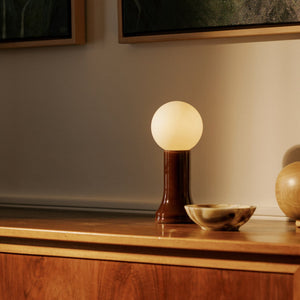
Placed to the side or slightly behind the main work area, a table lamp can keep the background from looking flat or dark on camera. A material with natural diffusion can also help soften the room’s appearance. For a work area that needs a more composed visual presence, a recycled glass table lamp can support that softer layer of lighting without pretending to replace a precision task lamp.
Some workspaces are not dedicated offices. A desk may share space with a living area, bedroom, studio, or multipurpose room. In those settings, lighting needs to shift between work mode, call mode, reading mode, and room ambiance.
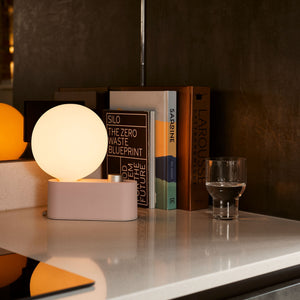
A lamp that can serve more than one role can be useful when the desk setup changes often. An LED lamp for desk or wall use fits this kind of flexible lighting conversation because it is presented as a lamp that can work in more than one placement style. That kind of adaptability can be especially helpful when the room needs to look polished but still function as a practical workspace.
A small desk can become crowded quickly. A lamp base, laptop charger, phone cable, notebook, keyboard, and monitor accessories can compete for the same limited surface. In that situation, the lamp choice should account for cable management and power access, not only brightness.
Keeping charging access near the work area can prevent cords from stretching across the desktop. A clamp-on power access for desks can support a cleaner setup by keeping outlets and USB access closer to where devices are used. That leaves more room for the lamp to sit where it actually performs best.
The lamp is only one part of how a desk looks and functions. Power access, cable control, storage, background organization, and furniture layout all affect how well the lighting works.
A beautiful lamp cannot fully compensate for tangled cables, cluttered surfaces, or a desk pushed into a poorly lit corner. A practical workspace lets the lamp do its job without fighting the rest of the setup.
A lamp should be placed where the light works best, not only where the nearest outlet happens to be. When the outlet is too far away, users often compromise by putting the lamp in an awkward position or running cords across the desk.
A more intentional setup gives power access to the items that need it most: lamp, laptop, monitor, phone, webcam, speaker, or task device. An in-desk charging and power module fits naturally into this planning because it keeps power integrated into the desk surface instead of forcing every device to compete for a distant wall outlet.
Loose papers, stacked folders, glossy packaging, tangled cords, and scattered desk items can all catch light in distracting ways. On camera, clutter can make the background look busier and the lighting appear less controlled.
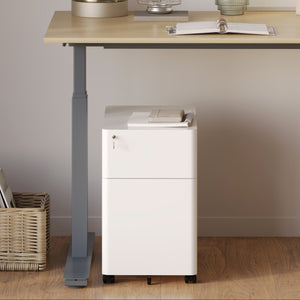
A cleaner workspace makes the light feel more deliberate. It gives the camera fewer reflective objects to process and keeps attention on the person speaking. For documents, notebooks, and smaller office items that should stay nearby but out of view, a compact lockable filing cabinet can help reduce visual noise around the desk while keeping practical storage within reach.
Desk lighting works best when the furniture layout gives it room to function. Desk depth affects where a lamp can sit. Monitor placement affects glare. Chair position affects camera angle. Wall color affects how light bounces around the room.
A workspace built around flexible workdays gives lighting more opportunity to feel natural. Desks, chairs, storage, and accessories should support the same goal: a desk that looks composed during calls and feels comfortable during daily work. Thoughtful workspace furniture built for flexible workdays helps connect lighting with the broader environment rather than treating the lamp as a final decorative add-on.
A reliable desk lamp does not need to be complicated. The most useful features are practical, visible, and easy to understand. The lamp should help the person work better, look clearer on calls, and maintain a comfortable desk environment throughout the day.
A desk lamp that supports both video calls and everyday work should include:
1. Adjustable brightness so the same lamp can support calls, reading, and low-light work.
2. A neutral light option for balanced facial lighting and accurate document visibility.
3. A diffused shade or softened light source to reduce harsh shadows and bright skin highlights.
4. A movable head, arm, or shade so the beam can shift between the face, desk, and documents.
5. A stable base or space-conscious footprint to avoid wobbling or crowding the work surface.
6. Low-glare placement flexibility for screens, glasses, and reflective surfaces.
7. Efficient LED performance to reduce heat during longer work sessions.
8. A visual style that fits the room because the lamp may be visible during video calls.
Some features are not essential but can improve daily use. Touch controls can make small lighting changes easier during calls. Memory settings can help return to a preferred brightness level. A wide dimming range can make the lamp useful in both daylight and evening settings.
Adjustable arms are valuable for users who move between screen work and paper tasks. A shade that turns or tilts helps direct light without moving the entire lamp. For shared spaces, a lamp with a quieter visual profile may blend better into the room when the workday ends.
Some lamps look appealing but create problems in everyday use. Watch for exposed bulbs aimed directly at the face, fixed shades that cannot be redirected, very glossy finishes near the screen, and lamps that are too short for the desk setup.
A lamp with no dimming can also be limiting. If it is too bright for calls, too dim for paperwork, or too warm for accurate visibility, the user has few ways to adapt. A lamp placed behind the user is another common issue because it makes the face darker while brightening the background.
The best desk lamp depends on the main type of work happening at the desk. A person who spends most of the day in meetings needs a different emphasis than someone who reviews documents, sketches, writes, or works primarily from a laptop.
A call-heavy desk benefits from soft, neutral, front-facing light. Place the lamp near the camera line, slightly above eye level, and off to one side. Dim the lamp until the face is clear without looking shiny. If the background looks too dark, add a softer secondary light behind or beside the workspace.
The goal is consistency. A simple repeatable setup is better than constantly changing lamp positions before every meeting.
Laptop users should prioritize screen height, compact lighting, and cable control. Once the laptop is raised, the lamp can sit at the front-left or front-right corner of the desk and angle toward the face or work surface.
A compact lamp or flexible multi-use light can work well when the desk has limited room. Power access also matters because laptop-first work often involves chargers, phones, headphones, and other small devices sharing the same surface.
Paper-based work benefits from a brighter, more focused beam. The lamp should sit opposite the dominant writing hand to reduce shadows. A movable head is especially useful because documents may shift across the desk during the workday.
For this type of work, the lamp should make text clear without making the surrounding room feel dark by comparison. Pairing task light with softer ambient light can reduce contrast and make longer sessions more comfortable.
Creative work often requires accurate visibility and strong control. A lamp with adjustable brightness and direction helps illuminate materials without washing them out. Neutral light is usually safer than very warm or very cool light because it keeps colors and surfaces looking more balanced.
A larger desk or layered lighting setup may help creative users move between planning, making, reviewing, and presenting their work on camera.
The best desk lamp for video calls and everyday work is adjustable, softly diffused, neutral in tone, and easy to place where it helps most. It should brighten the face without glare, illuminate the work surface without washing out the screen, and fit into the desk setup without adding clutter.
Brightness alone is not enough. The lamp needs to work with camera height, monitor placement, storage, power access, and the visual background. When all of those pieces support one another, the desk becomes easier to use and better to appear from. The right lamp does not need to transform a workspace into a studio. It simply needs to make daily work feel clearer, calmer, and more intentional from the first task to the final call.


You have unlocked free shipping!
You're saving $29 and unlocked free shipping!
Leave a comment