



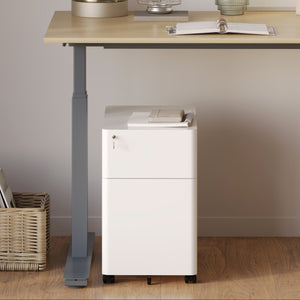






















Filing Cabinet Choices for Cleaner Workstation Planning
Cleaner workstation planning starts with filing storage that matches the desk, document volume, security needs, and daily workflow. Explore how cab...
Learn more
Visit quiz page to see how we makes it easy to create an inspiring workplace


Hybrid work has changed how we approach productivity. Instead of working in one fixed location, many people now split their time between home and the office. This shift brings convenience, but it also creates challenges when it comes to maintaining consistency, comfort, and efficiency.
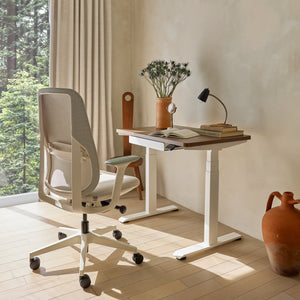
A flexible setup is essential. Even something as simple as a Mini Standing Desk Los Angeles can help create a workspace that adapts to your needs. The goal is to build an environment that works wherever you are, without sacrificing productivity or comfort.
Hybrid work is not just about location. It is about adapting to different environments while maintaining the same level of performance. Without a flexible setup, switching between home and office can disrupt your workflow.
Common challenges include:
Inconsistent desk and chair setups
Differences in workspace layout
Difficulty maintaining focus in new environments
Physical discomfort from poorly matched furniture
A flexible workspace solves these issues by creating consistency. When your setup supports your body and workflow in any location, you can transition smoothly and stay productive.
A flexible standing desk allows you to maintain the same working posture whether you are at home or in the office.
Easy transition between sitting and standing
Improved energy levels throughout the day
Reduced strain from prolonged sitting
Better adaptability in different environments
Look for desks that:
Adjust smoothly between heights
Fit both compact and larger spaces
Provide stability during use
These features make it easier to create a consistent setup across multiple locations.
A well-structured office desk setup helps maintain familiarity. When your workspace feels the same in different locations, your brain adapts faster.
Studies like this workspace design study highlight how environment design influences focus and efficiency.
Keep your monitor at the same height in all setups
Maintain a similar desk arrangement
Position frequently used items consistently
These adjustments help reduce the time needed to adapt when switching locations.
Comfort is one of the most important factors in maintaining productivity. When your workspace supports your body, you can focus on your tasks instead of your discomfort.
In hybrid work, comfort becomes even more critical because your environment changes frequently. A consistent and supportive setup helps reduce strain and keeps your performance stable.
A comfortable workspace allows you to:
Work longer without fatigue
Maintain focus across environments
Reduce physical strain
Accessories help bridge the gap between different work environments. An ergonomic arm allows you to adjust your monitor easily, ensuring proper alignment wherever you work.
When switching between locations, your setup may not be identical. Adjustable tools help maintain consistency.
Benefits include:
Better screen positioning
Reduced neck and eye strain
Improved posture
Monitor arms for flexibility
Cable organizers for portability
Compact storage solutions
These tools make your workspace adaptable and efficient.
Your chair plays a critical role in maintaining comfort and posture. Without proper support, switching between different seating options can lead to discomfort and reduced productivity.
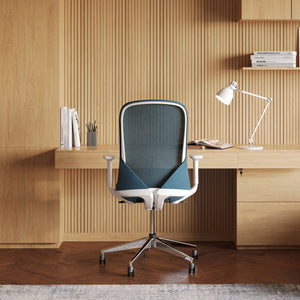
A supportive ergonomic office chair helps maintain proper alignment and reduces strain on your body.
Consistent seating ensures that your work experience remains comfortable, regardless of location.
|
Workspace Element |
Benefit |
Problem Solved |
Ideal Use Case |
|
Standing Desk |
Flexible positioning |
Prolonged sitting |
Hybrid work setups |
|
Office Desk |
Organized workspace |
Layout inconsistency |
Daily tasks |
|
Ergonomic Chair |
Spine support |
Discomfort |
Long work sessions |
|
Monitor Arm |
Adjustable screen height |
Neck strain |
Multi-location setups |
|
Clean Setup |
Reduced distractions |
Workflow interruptions |
Focused environments |
A flexible workspace works best when paired with consistent habits. Your routine should remain the same, even if your location changes.
Start work at the same time each day
Set up your workspace before beginning tasks
Keep your layout consistent
Take regular breaks
Consistency in your routine helps your brain adapt quickly. This reduces downtime and allows you to stay productive regardless of where you work.
A well-designed hybrid workspace provides long-term advantages that go beyond daily productivity.
These include:
Improved work-life balance
Increased efficiency
Reduced physical strain
Better focus and consistency
These benefits make hybrid work more sustainable and enjoyable.
One of the biggest challenges in hybrid work is dealing with inconsistent setups. Your office workspace may be optimized for comfort and productivity, while your home setup might not offer the same level of support. This mismatch can lead to discomfort, reduced focus, and inefficiency.
When your body constantly adjusts to different desk heights, chair support, or monitor positions, it creates unnecessary strain. Over time, this can affect both your posture and your ability to stay productive.
Consistency helps your body and mind adapt quickly. When your setup feels familiar in any location, you can start working without needing time to adjust.
Different desk heights between locations
Chairs that provide varying levels of support
Monitor positions that are too high or too low
Workspace layouts that change frequently
Match your desk and chair height as closely as possible
Keep your monitor at the same eye level in all locations
Use adjustable furniture to adapt to different spaces
Maintain a similar layout for essential tools
By reducing these inconsistencies, you create a smoother transition between work environments. This allows you to stay comfortable, focused, and productive no matter where you are working.
Designing a flexible workspace is about creating an environment that adapts to your needs. It should support your body, your workflow, and your changing locations.
Use a desk that allows easy adjustment
Choose a chair that supports your posture
Keep your setup consistent across locations
Add accessories that improve flexibility
Maintain a clean and organized workspace
Build habits that support productivity
Stay mindful of comfort and alignment
When your workspace is designed for flexibility, you can work efficiently anywhere. The right setup helps you stay productive, comfortable, and focused no matter where your work takes you.


You have unlocked free shipping!
You're saving $29 and unlocked free shipping!
Leave a comment