

























How Workstation Panels Improve Modern Collaborative Office
Workstation panels help modern collaborative offices balance focus, privacy, and team connection. By defining work zones, moderating localized dist...
Learn more
Visit quiz page to see how we makes it easy to create an inspiring workplace


Shared team desks can support communication, efficient space planning, and a stronger sense of connection between colleagues. They can also expose employees to constant visual movement, neighboring screens, loose cables, informal conversations, and materials spreading across the work surface.
The desk itself is rarely the entire problem. Distraction often increases because each person’s workspace lacks a visible boundary. Without clear separation, employees remain continuously aware of what is happening across and beside them, even when their task requires sustained concentration.
Thoughtfully selected workstation panels can create that missing definition. They reduce direct sightlines, establish individual work zones, and help shared desks feel calmer without turning an open office into a collection of enclosed cubicles. The strongest results come from treating panels as part of a complete workstation system that includes appropriate desk layouts, ergonomic seating, organized power, accessible storage, and dedicated areas for collaboration.
A shared workstation places several people, screens, devices, and work habits within one concentrated area. This arrangement can be efficient, but it also increases the number of visual signals competing for attention.
Employees do not need to look directly at a distraction for it to affect their focus. A colleague standing up, reaching for a document, turning toward another person, or moving an object across the desk can enter the peripheral field of vision.
These small movements may seem harmless, but they become more noticeable during concentration-heavy work such as writing, analysis, coding, design production, or detailed administrative tasks. The interruption may last only a moment, yet the employee still needs to redirect attention back to the original task.
Face-to-face desk arrangements create a particular challenge because employees can see one another’s expressions, monitor activity, and physical movement throughout the day. Side-by-side arrangements may reduce direct eye contact, but they still expose people to neighboring equipment, posture changes, and expanding personal materials.
A large shared desktop can appear open and flexible when it is first installed. Once several employees begin using it, the absence of boundaries can make the surface feel less organized.
Notebooks, charging cables, headphones, drinks, documents, and personal items may gradually move beyond one person’s immediate area. Even when employees are considerate, the visual overlap can make the entire workstation appear busier than it is.
A visible divider gives each person a clearer sense of where equipment and active materials belong. This does not require rigid rules or complete separation. It simply makes the shared surface easier to understand and manage.
Team proximity can make communication faster, but constant accessibility can also encourage unnecessary interruption. A brief observation may become a conversation. A question directed at one person may attract everyone seated nearby. A review that should take place in a meeting area may begin across active computer screens.
A focused team desk needs to support both connection and restraint. Employees should be able to communicate when necessary without feeling that every thought must be shared immediately.
Well-positioned modular workstation panels create a visual boundary directly where distraction is most likely to occur. They do not need to block the entire room or remove awareness of the surrounding office.
The most immediate purpose of a desk panel is to interrupt the line of sight between neighboring work areas. On a face-to-face desk, a central panel can reduce direct eye contact and limit visibility of the opposite monitor. On a multi-person pod, intersecting panels can separate both front and side work zones.
This visual screening is especially useful when employees need to read, write, calculate, or make decisions without repeatedly noticing nearby movement.
Panels should not be treated as a guarantee of higher productivity. Focus also depends on workload, communication habits, comfort, lighting, sound conditions, and management practices. A divider simply removes some of the avoidable visual activity that makes concentration harder.
A workstation panel does not need to create full-height isolation to be effective. In many offices, the most useful configuration controls sightlines while employees are seated but still allows them to see and speak to colleagues when standing.
This balance helps the desk remain connected to the larger workplace. Employees can concentrate behind the panel during individual tasks, then stand or move to the edge of the workstation when a conversation is needed.
The result is a clearer distinction between focused work and intentional interaction. Communication remains available, but it becomes a choice rather than a constant visual condition.
Some panel materials may help soften nearby sound reflections, particularly when compared with a completely hard, open desktop. Their effect depends on material, size, placement, ceiling height, flooring, surrounding surfaces, and the distance between speakers.
Desk panels should not be presented as soundproof barriers. They cannot prevent every conversation from being heard, especially in a large open office.
A realistic acoustic strategy may also include soft flooring, ceiling treatments, quieter equipment, meeting-room placement, reasonable speaking habits, and spaces where employees can complete highly sensitive or concentration-intensive work.
Choosing a panel only by appearance can result in poor coverage, equipment conflicts, or an uncomfortable workstation. Dimensions and placement should be evaluated in relation to the people, screens, chairs, and desk configuration.
The correct panel height depends on what employees can see from a normal working position. Before selecting a divider, the chair should be adjusted properly and the monitor should be placed at a comfortable viewing height.
The assessment should consider whether the employee can still see:
A colleague’s face across the desk
Movement on a neighboring monitor
Frequently handled equipment
People using an adjacent walkway
Materials rising above the opposite work surface
A panel that sits below the main line of sight may provide little practical visual privacy. A panel that is unnecessarily high may reduce daylight, restrict communication, or make the desk feel more enclosed than the team requires.
Monitor arms, laptop stands, large displays, and stacked screens can raise visual activity above the desktop. Panel planning should therefore happen alongside equipment planning.
Employees should not need to lower their screens or slouch in order to remain behind a divider. Comfortable posture must take priority. When screens need to sit higher, the panel system may require greater coverage or a different position.
The appropriate layout depends on where employees sit in relation to one another. Urbanica’s office desk and team workstation collection includes individual and multi-person desk configurations, making it important to match the panel arrangement to the workstation structure.
| Team desk configuration | Main visual concern | Practical panel approach | Communication pattern |
|---|---|---|---|
| Two-person face-to-face desk | Direct eye contact and opposite-screen movement | Continuous central divider across the active work area | Easy interaction around the ends |
| Side-by-side shared desk | Neighboring movement and spreading materials | Short side divider between work zones | Verbal communication remains direct |
| Four-person workstation pod | Movement from front and side positions | Intersecting central panels | Small-team communication stays nearby |
| Six-person bench workstation | Repeated movement across several seats | Consistent divider coverage across the bench | Longer discussions should move elsewhere |
| Mixed-role team desk | Different concentration requirements | Selective modular coverage | Layout can reflect task differences |
A long bench can feel uneven when some seats have effective visual protection and others remain exposed. Panel alignment, height, and length should remain consistent unless the roles genuinely require different conditions.
Consistency also supports a more considered appearance. When panels appear improvised or stop in unexpected places, the workstation may feel visually fragmented.
Not every employee needs the same degree of screening. Panel planning should respond to the work being performed rather than applying one standard to every department.
Roles involving analysis, writing, coding, financial review, document preparation, technical design, or detailed production often require employees to hold complex information in their working memory.
For these tasks, repeated visual interruptions can make it harder to maintain momentum. A central divider or more complete seated screening may be appropriate, particularly when several employees face one another.
Confidentiality may also influence placement. A panel can reduce casual screen visibility, although it should not be treated as a substitute for proper information-security practices, access controls, or privacy procedures.
Customer service groups, creative teams, project coordinators, and other highly collaborative roles may need more frequent communication. A lower panel or shorter divider can reduce direct exposure while preserving quick verbal exchange.
The best arrangement solves the actual distraction problem without creating a new obstacle. More privacy is not automatically better if employees must constantly stand, lean around the panel, or leave their seats to complete routine coordination.
A panel arrangement may be too restrictive when it:
Blocks useful daylight across the desk
Limits access to shared documents or equipment
Interferes with monitor arms or task lighting
Makes simple communication awkward
Creates a crowded appearance
Restricts comfortable chair movement
The most effective design is often the least intrusive configuration that provides adequate focus.
Visual privacy cannot compensate for physical discomfort. An employee who constantly shifts because of poor support, unsuitable seat height, or awkward arm positioning will still struggle to concentrate.
An ergonomic office chair collection should be evaluated as part of the workstation system because chair adjustment changes the employee’s eye line, screen position, and relationship to the panel.
Two employees using the same desk and panel may experience different levels of privacy if their chairs are adjusted differently. A taller seated position may expose more of the face or screen, while a lower position may place the divider unnecessarily high in the employee’s view.
Panel performance should be tested after the chair has been adjusted for a comfortable posture. Employees should not change a healthy seating position simply to fit behind a divider.
A balanced workstation allows employees to sit with supported posture, place their arms comfortably, view the monitor without excessive neck movement, and benefit from the intended panel coverage.
Panel supports should also remain clear of knees, feet, chair arms, and under-desk equipment. Employees need enough space to enter, turn, stand, and change position naturally throughout the day.
Cable clutter can weaken the order created by workstation panels. When chargers and extension cords cross personal work zones, the desktop begins to feel shared in the least useful way.
A four-outlet in-desk power module can centralize access to AC and USB connections within the workstation. This reduces the need to reach across neighboring areas or route everyday charging cables toward distant wall outlets.
Every seat should be reviewed according to the equipment it actually uses:
Primary and secondary monitors
Laptop or docking station
Phone charger
Headset or communication equipment
Task lighting
Shared office devices
Spare connection capacity
Panel brackets, cable openings, monitor mounts, and power components should be planned together. A divider that blocks a cable port or forces cords around its supports may create more clutter than it resolves.
Service access also matters. Employees or facilities teams should be able to change equipment and manage cables without dismantling the entire workstation.
A panel cannot create a focused environment when unused equipment, document stacks, bags, and project materials rise above it or spread around its edges.
The answer is not an unrealistic expectation that employees keep nothing at their desks. The more practical approach is to provide accessible storage for items that do not need to remain on the active work surface.
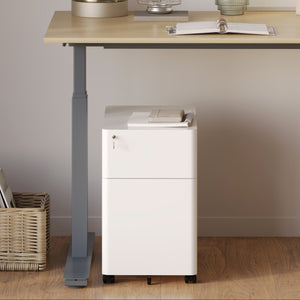
A compact locking filing cabinet can keep documents and personal items close to the workstation while preserving more usable desktop space. A movable cabinet can also remain connected to an employee when seating assignments change.
Locking storage may support responsible document handling, but it should still be used alongside the organization’s established privacy and records procedures.
Communal paper, cables, stationery, samples, and project materials need a separate home. When shared supplies are distributed across individual desks, employees lose the visual clarity that panels are intended to create.
A central supply area can reduce duplication and prevent the team desk from becoming the default storage surface.
Workstation panels can reduce visual distraction, but they cannot solve the disruption caused by a long conversation happening within the same connected desk.
Quick questions may be appropriate at the workstation. Reviews, presentations, brainstorming sessions, and discussions involving several participants should usually move to a space intended for collaboration.
Dedicated conference seating for meeting rooms helps establish a clear destination for discussions that require more time and attention. The team desk can remain associated with individual work, while the meeting area supports conversation and shared decision-making.
This physical distinction also helps employees develop better habits. Instead of gathering around someone’s monitor and distracting everyone nearby, the group can move to a setting designed for discussion.
Open offices often struggle because individual work and group communication happen in the same place at the same time. A stronger layout gives each activity an appropriate setting.
Panels support concentration at the desk. Meeting areas support conversation away from it. Neither space needs to eliminate the other.
Growing teams often need to adjust seating arrangements, add employees, or change how departments work together. Fixed construction can make those changes more complicated than necessary.
Desk-mounted boundaries allow offices to create visual definition within shared work areas without turning every focused task into a requirement for a private room.
A workstation system should be evaluated for how well its components work together and how easily the overall arrangement can respond to change. Panel continuity, desk dimensions, storage placement, and power access all affect whether a layout can be adjusted coherently.
Modularity does not mean every component can be moved without planning. It means the workspace has been selected as a coordinated system rather than a collection of unrelated pieces.
Urbanica’s approach to adaptable office furniture for varied workspaces reflects the reality that studios, coworking environments, compact professional offices, converted rooms, and larger workplaces do not share one universal layout.
We consider how desks, seating, panels, power, and storage function together within the available footprint. A successful team workstation should feel intentional whether it supports two people or a larger department.
Before selecting panels for a shared team desk, the complete workstation should be reviewed as a working environment rather than a single furniture purchase.
Desk compatibility: Confirm desktop thickness, mounting requirements, panel dimensions, and supported configurations.
Seated sightlines: Check visibility of neighboring faces, screens, equipment, and nearby walkways.
Active work coverage: Make sure the panel protects the area where employees actually look and work.
Communication access: Preserve appropriate openings for brief coordination.
Material expectations: Consider cleaning, durability, appearance, and realistic acoustic contribution.
Monitor clearance: Allow enough space for stands, monitor arms, screen adjustments, and ventilation.
Power coordination: Prevent conflicts between brackets, cable ports, charging equipment, and integrated power.
Storage access: Confirm that drawers and cabinets can open fully.
Chair movement: Protect comfortable entry, turning, standing, and posture changes.
Traffic flow: Keep circulation routes clear behind and beside every seat.
Visual consistency: Coordinate panel color, height, and alignment across the complete desk.
Future adjustment: Consider how the arrangement may respond to added seats or changing team roles.
A team desk feels more focused when each employee has a clearly defined place to work, reliable access to equipment, appropriate seated privacy, and a nearby destination for collaboration.
Workstation panels play an important role because they reduce direct visual exposure without requiring complete isolation. Their value increases when they are selected alongside the desk layout, chair adjustment, monitor position, power access, storage needs, and communication patterns of the team.
The goal is not to block colleagues from one another. It is to give people greater control over when they concentrate and when they connect. As shared offices continue to support more tasks within the same footprint, well-planned workstation boundaries can help team desks feel calmer, clearer, and more intentional.


You have unlocked free shipping!
You're saving $29 and unlocked free shipping!
Leave a comment