



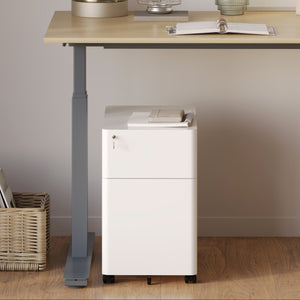






















Filing Cabinet Choices for Cleaner Workstation Planning
Cleaner workstation planning starts with filing storage that matches the desk, document volume, security needs, and daily workflow. Explore how cab...
Learn more
Visit quiz page to see how we makes it easy to create an inspiring workplace


A laptop stand can solve a real problem without turning a desk into something that feels technical, crowded, or overdesigned. The challenge is not whether a stand belongs on the desk. The challenge is how it is chosen, placed, and supported by everything around it. A thoughtful setup improves screen position, clears visual clutter, and protects the room from starting to look like a workstation that spilled out into the rest of the home.
That balance matters because many desks now serve more than one purpose. They are places to work, write, read, join meetings, sort papers, charge devices, and sometimes simply keep a room feeling settled. In that kind of environment, a laptop stand should feel like a quiet improvement. It should not announce itself as the center of the entire setup.
The most successful desk arrangements usually follow a simple principle. Add only what helps, and make sure each piece earns its footprint. A stand can absolutely belong in a minimal or design-conscious workspace. It just has to support comfort without creating a chain reaction of extra layers, bulky accessories, and visual noise.
An overbuilt desk rarely comes from one object alone. It usually happens when several individually useful items are combined without enough attention to scale, spacing, or restraint. A laptop stand gets blamed because it is raised and visible, but the real issue is often the surrounding buildup.
A desk starts to feel heavy when too many solutions compete in the same field of view. A stand sits on top of a riser. A large lamp leans into the center. Chargers stay visible. A tray becomes a stack. A keyboard, mouse, notebook, and speaker all remain permanently on display even when they are not needed. The result is not just clutter. It is a setup that feels overcommitted.
Visual weight comes from height, thickness, reflectivity, color contrast, and how many shapes overlap at once. A desk can have enough surface area and still feel cramped because the eye has nowhere calm to land. A laptop stand changes the eye line immediately, so it has to be balanced by openness around it.
That is why minimal desk styling is not about removing personality. It is about protecting breathing room. A single elevated object can look clean and deliberate. Three elevated objects usually start to feel improvised.
Many people do not need a fully engineered workstation. They need a desk that supports daily work while still belonging in a bedroom, living area, studio, or home office. A laptop stand should support that kind of integration. It should improve the way the laptop sits and the way the desk feels at the same time.
The stand should be chosen in relation to the desk, not in isolation. That is one of the most important decisions in keeping the setup from feeling overbuilt. A stand that looks perfectly reasonable on a large surface can feel bulky on a narrower desk. A compact stand can feel elegant in one room and under-scaled in another.
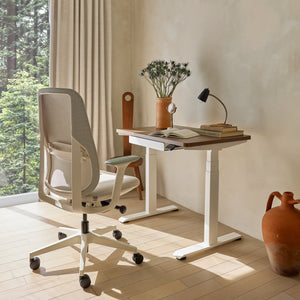
When evaluating fit, begin with the desk itself. Surface depth, usable width, material, and the number of things that already need to live there will tell you more than a feature list ever will. On a work surface that needs to balance writing room, laptop placement, and a task light, the surrounding office desks shape what kind of stand will feel natural rather than intrusive.
Depth determines whether the setup feels open or boxed in. On a shallower desk, a stand that lifts the screen too aggressively can push the laptop visually and physically too close to the user. That can compress the entire front-to-back layout, leaving little room for a notebook, keyboard, or even a comfortable resting area for the hands.
On a deeper desk, there is more flexibility. A stand can sit slightly farther back, allowing the desk to keep some open space in front. That open strip is more important than it looks. It helps the setup feel usable instead of densely arranged.
A narrow desk does not forgive excess. Every object becomes more prominent, and every cable becomes more visible. If the desk is shallow, the best solution is often the one with the fewest moving parts and the leanest silhouette. This is where careful restraint does more for comfort than adding more equipment.
A larger desk can absorb more objects without looking crowded, but that does not mean it should. Empty space without intention can make a stand feel oddly isolated, while too many accessories make the setup feel spread out and busy. Even on a roomy surface, it helps to organize the desk into a few clear zones rather than treating the whole top as active storage.
A stand does not have to match the desk perfectly, but it should feel related. A clean metal profile often works well with modern surfaces. A softer finish can sit more naturally on warmer materials. The point is not to create a showroom set. The point is to avoid introducing a piece that feels unrelated to the desk’s character.
The best stand is rarely the one with the most presence. It is the one that improves screen position while asking the least of the desk around it. That usually means choosing the smallest solution that solves the actual problem.
Some people need a fixed lift to improve angle and airflow. Others need adjustability because their desk supports several modes of use. Not every setup needs the same answer, and not every stand should be chosen for maximum flexibility.
A fixed stand is often a strong choice for desks that need to stay visually quiet. It introduces elevation without adding hinges, thick mechanical joints, or a larger-than-necessary footprint. For someone who values simplicity, a well-proportioned laptop stand can support daily use without making the desktop feel layered or technical.
A fixed profile also tends to look more settled in multipurpose rooms. It reads as part of the desk rather than as a device that constantly asks to be adjusted. That can be especially useful when the desk remains visible throughout the day and contributes to the overall atmosphere of the room.
Adjustability is useful when it solves a recurring need. Shared desks, changing postures, and setups that alternate between laptop-only use and separate peripherals can all justify a more flexible support piece. In those situations, an adjustable laptop stand can provide the range needed without requiring a more permanent multi-layered workstation layout.
The key is to let the stand do the work instead of adding more structures around it. If the stand adjusts, there is usually no reason to pair it with another riser or secondary platform. The cleaner the supporting environment, the more intentional the adjustable piece will feel.
One of the fastest ways to overbuild a setup is to buy for every possible scenario rather than the one that actually happens. If the desk is used in one consistent way most days, a more complex stand can create unnecessary visual density. If the workflow does change often, then adjustability earns its place. The difference comes down to honest use rather than imagined future needs.
A laptop stand often works better after the desk is simplified. This is because the stand changes the visual center of the surface. Once that happens, everything extra becomes more noticeable. The smartest next step is usually subtraction, not expansion.
Before adding anything else, clear the desk and bring back only what is used daily. This creates a better test of what the stand actually needs around it.
The desk should remain the main surface. The stand should be the one elevated support layer. Once another layer is introduced underneath or beside it, the setup begins to feel staged instead of natural. That is often where the overbuilt feeling begins.
A restrained desktop usually includes the stand, one light source, and perhaps a keyboard, mouse, notebook, or tray depending on how the laptop is used. Beyond that, every addition should answer a specific functional need.
Accessories are most effective when they address cable control, light, writing support, or day-to-day organization without asking for too much attention. Browsing office furniture accessories is most useful when each addition has a clear purpose and a defined place, rather than serving as a way to keep filling the surface.
That mindset protects the desk from turning into a collection of individually attractive objects that, together, become visually heavy. A clean setup is rarely the result of buying fewer good things. It is usually the result of knowing when to stop.
Many setups improve immediately when backup items leave the surface. Extra chargers, spare notebooks, unused adapters, packaging, and secondary tools all make the stand seem bulkier than it is. The stand becomes easier to live with when it is not surrounded by things that do not need daily access.
Lighting has an outsized effect on whether a laptop stand feels integrated or awkward. A lamp can frame the desk beautifully, or it can crowd the stand and make the entire layout feel blocked in. Many setups that seem overbuilt are really suffering from poor lighting placement.
The center area should feel calm. When the lamp leans into that central lane, the stand suddenly seems larger because both objects compete for the same visual space. A lamp placed at the rear corner or along an edge usually gives the desk more room to breathe.
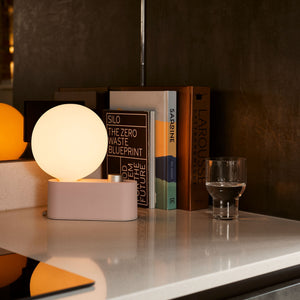
A thoughtfully chosen Alumina Lamp can support a cleaner composition because it introduces light without demanding the kind of bulky profile that often makes a work surface feel crowded. The stand should remain part of an open arrangement, not trapped between large neighboring forms.
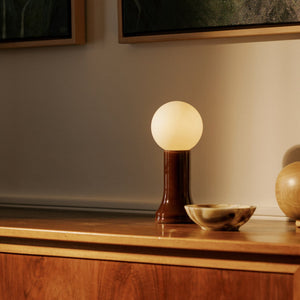
Some desks feel overbuilt because they try too hard to compensate for simplicity with more objects. Warmth is often better introduced through one material or one lighting element rather than by layering décor. A Shore table lamp can soften the desk’s atmosphere through form and material presence while keeping the setup more composed than a cluster of smaller styling pieces would.
That kind of move helps the desk feel lived in instead of clinical, but it does so without piling on more surface activity. One considered object often carries more character than several smaller ones scattered around the stand.
The stand should not be positioned only according to symmetry or habit. It should be placed in a way that supports posture, protects open space, and feels consistent with the rest of the room. Good placement helps a stand look like it belongs there.
A reliable way to keep the desk from feeling overbuilt is to divide it into three simple zones:
1. Primary work zone for the laptop stand
2. Support zone for one companion object such as a lamp or notebook
3. Open zone that remains intentionally clear
This structure creates order without making the desk feel rigid. The stand gets a defined role, the support object helps complete the layout, and the clear zone prevents the surface from feeling fully occupied.
Balanced does not have to mean symmetrical. In fact, slight asymmetry often feels calmer and more natural. If the stand sits near center or slightly off-center, keep one side visually lighter. That could mean nothing more than open wood or open desktop, and that emptiness is not wasted. It gives the eye a break and makes the entire arrangement feel less engineered.
Visible chargers, looping cords, adapters, and casual piles of tech accessories create the impression of a more complicated setup than the actual tools require. Even a beautiful stand can look awkward when those details are left exposed. The cleaner the transitions around the stand, the more intentional the whole desk will feel.
Many modern workspaces are part of shared rooms, apartments, or multipurpose corners. That means the desk has to function well while still belonging to the larger interior. A stand that works in a corporate environment might feel too dominant in a home setting if it introduces too much visual hardware.
A home office does not need to look sparse, but it does benefit from visual discipline. That means keeping forms clean, limiting surface buildup, and choosing pieces that support work without overwhelming the rest of the room. For spaces where comfort and visual restraint need to coexist, exploring modern ergonomic office furniture can help shape a setup that feels supportive, polished, and appropriate for a more residential setting.
A laptop stand should make the desk more usable, not make the room feel like it has surrendered to equipment. That is why material tone, object count, and scale matter so much. When the stand, desk, and lighting relate to one another, the whole setup feels calmer. When each piece fights for attention, even a useful desk can feel overbuilt.
Small choices can push a good setup in the wrong direction. These are some of the most common reasons a laptop stand ends up making a desk feel more built out than necessary.
| Mistake | Why It Creates Bulk | Better Direction |
|---|---|---|
| Choosing the biggest stand available | It adds visual mass the desk may not need | Match the stand to the actual laptop and surface |
| Layering the stand on other risers | Too many vertical levels compress the layout | Let the stand be the main elevation change |
| Using multiple lights | Competing light sources clutter the edges | Choose one well-placed lamp |
| Leaving accessories visible at all times | The stand loses breathing room | Keep only daily essentials on the surface |
| Ignoring negative space | Every zone feels occupied | Protect at least one open area on the desk |
The underlying principle is simple. A stand should improve the desk’s function while asking for as little compensation as possible. When it requires extra layers, extra styling, or extra gear to “make sense,” the setup is probably moving in the wrong direction.
The most successful desk setups do not look like they were assembled to prove how optimized they are. They look settled. They feel comfortable to use, easy to maintain, and visually balanced enough to live with every day.
A laptop stand can absolutely be part of that kind of setup. It becomes a problem only when it triggers unnecessary additions or gets chosen without enough attention to the desk around it. Start with the surface, choose the level of support that truly fits the way the laptop is used, protect open space, and keep the supporting cast restrained.
That is how a laptop stand does what it is supposed to do. It lifts what needs lifting, improves the way the desk works, and leaves the room feeling calm instead of overbuilt.


You have unlocked free shipping!
You're saving $29 and unlocked free shipping!
Leave a comment