



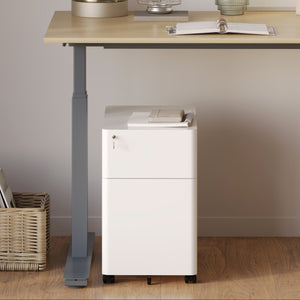






















Filing Cabinet Choices for Cleaner Workstation Planning
Cleaner workstation planning starts with filing storage that matches the desk, document volume, security needs, and daily workflow. Explore how cab...
Learn more
Visit quiz page to see how we makes it easy to create an inspiring workplace


A desk lamp seems simple until the workday starts asking more from it. Morning emails, spreadsheet reviews, handwritten notes, focused reading, video calls, and late-day planning all place different demands on the same surface. The right desk lamp helps the workspace feel clear, comfortable, and easy to use. The wrong one creates glare, shadows, clutter, or awkward reaching that quietly interrupts concentration.
Daily productivity depends on more than motivation. It depends on an environment that reduces small points of friction. A well-chosen desk lamp supports that goal by giving your eyes the right amount of task light, placing illumination where work actually happens, and fitting naturally into the way the desk is arranged. It should not overpower the room, compete with a screen, or take up more surface area than the work itself.
Choosing a desk lamp with intention means looking beyond style. Brightness control, color temperature, shade shape, adjustability, footprint, power access, material, and placement all influence how useful the lamp feels after the first day. A productive lamp is not necessarily the largest, brightest, or most decorative option. It is the one that supports consistent focus without making the desk harder to use.
A productive desk starts with visual comfort. When the lighting is too dim, the eyes work harder to separate text, objects, and screen details. When the light is too bright or poorly aimed, glare becomes a distraction. Both extremes can make ordinary tasks feel more tiring than they need to be.
Desk lighting matters because it sits closest to the active work zone. Overhead lighting fills the room, but it rarely gives enough controlled illumination for reading documents, writing notes, reviewing details, or working across a keyboard and notebook at the same time. A desk lamp gives the user more control over the area where attention is actually concentrated.
Most workspaces rely on three layers of light: ambient light from the room, screen light from a laptop or monitor, and task light from a lamp. Ambient light creates general visibility, but it may leave the desk surface unevenly lit. Screen light is bright, but it is not meant to illuminate papers, objects, or handwritten notes. Task lighting completes the setup by making the immediate work area easier to see.
This is why desk lamps are especially useful for mixed-task work. A laptop user may still need to read a printed agenda, jot ideas in a notebook, check product samples, or review a physical document. A desk lamp keeps those tasks visible without forcing the entire room to become brighter.
Poor lighting rarely feels dramatic at first. The problem often shows up as small, repeated interruptions. A shadow falls over a notebook. A lamp reflects on the laptop screen. A bright bulb sits directly in the line of sight. A dim corner makes printed text feel harder to read. Each issue breaks the rhythm of work.
A better lamp reduces those interruptions. It gives the desk a reliable zone of clarity, making it easier to shift between tasks without rearranging the workspace. In a well-planned office, lighting also works alongside seating, storage, desktop accessories, and surfaces. For teams designing a complete work environment, thoughtful ergonomic office furniture planning can help lighting choices feel like part of the whole workspace rather than an afterthought.
Many buyers assume the best desk lamp is the brightest one. For productivity, brightness control is usually more important than raw intensity. A lamp that is too bright can be just as distracting as one that is too dim, especially when it sits near a screen or reflects off a glossy surface.
The goal is not to flood the desk with light. The goal is to create a comfortable level of illumination for the task at hand. Reading paper documents may need stronger light than answering emails. A video call may benefit from softer, more diffuse light. Evening planning often feels better with a lower setting than daytime work.
A productive workday rarely stays in one mode. The same desk may support writing, research, meetings, sketching, reviewing paperwork, and end-of-day planning. Adjustable brightness gives the lamp a wider useful range.
For detailed work, a brighter setting can make small text or fine lines easier to see. For screen-heavy work, a moderate setting helps avoid strong contrast between the glowing display and the surrounding desk. For evening use, a lower setting can make the space feel calmer while still keeping the work surface functional.
A bright lamp placed too close to a laptop or monitor can create reflections, especially on glossy screens. It can also create a harsh contrast between the illuminated desk and a darker room. The eyes then keep adjusting between bright and dim zones, which may make concentration feel less steady.
A lamp with dimming, an adjustable head, or a well-designed shade gives more control over where light lands. This matters because productivity lighting should serve the work, not call attention to itself.
A practical approach is to match light level to the type of task:
1. Use stronger task light when reading printed pages, checking details, or writing by hand.
2. Use moderate light when working mainly on a laptop or monitor.
3. Use softer light for evening planning, light admin, or relaxed reading.
4. Use diffused light when the lamp contributes to video call visibility.
5. Lower the brightness if the lamp creates screen reflections or eye-level glare.
A desk lamp should make these adjustments simple. If the lamp only feels useful in one setting, it may not support the full range of daily work.
Color temperature describes whether light appears warm, neutral, or cool. It influences the mood of the workspace and the way tasks feel throughout the day. The best choice depends on the type of work, the time of day, and the overall atmosphere of the room.
Warm light can feel relaxed and comfortable. Neutral light often feels balanced for general productivity. Cooler light can make detail-oriented tasks feel sharper, although it may feel harsh if overused or placed poorly.
Warm light is often suitable for home offices, evening work, reading corners, and desks that share space with living areas. It creates a softer atmosphere and can make a room feel more inviting. For people who use a desk after standard working hours, warm light may feel less intense than a cool, bright beam.
The tradeoff is that very warm light may not be ideal for tasks that require high detail visibility or accurate color judgment. It works best when the goal is comfort, planning, reading, or lower-intensity work.
Neutral white light is often a strong choice for daily productivity because it keeps the desk clear without making the room feel overly clinical. It supports writing, typing, reading, and general office tasks with a balanced visual tone.
For many desks, neutral light provides the most flexible middle ground. It is not as cozy as warm light and not as crisp as cooler light, but that balance makes it practical for users who do many types of work in one place.
Cooler light can support tasks that need precision, such as reviewing small details, drafting, organizing materials, or examining visual work. However, the lamp still needs to be positioned thoughtfully. A cool light that is too intense or aimed poorly can feel uncomfortable, especially near screens or during late-day work.
The better approach is control. Cooler light is most useful when paired with good directionality, moderate brightness, and a shade that keeps the bulb from shining directly into the eyes.
| Daily Desk Task | Lighting Priority | Desk Lamp Feature to Prioritize |
|---|---|---|
| Laptop work | Reduced glare | Adjustable angle and dimming |
| Reading documents | Clear surface illumination | Focused beam with stable placement |
| Evening admin | Visual comfort | Warmer or dimmable light |
| Sketching or creative review | Detail visibility | Neutral light with directional control |
| Video calls | Softer facial lighting | Diffused light and flexible positioning |
Even a well-made lamp can perform poorly if it sits in the wrong place. Placement affects shadows, glare, screen comfort, available desk space, and how often the lamp needs to be moved.
A desk lamp should illuminate the active work area without shining into the user’s eyes or bouncing directly into the screen. It should also avoid creating shadows from the user’s hand, keyboard, laptop, or monitor stand.
For handwriting, document review, or sketching, lamp placement should account for the dominant hand. A right-handed user often benefits from placing the lamp on the left side of the desk so the writing hand does not cast a shadow over the page. A left-handed user often benefits from the opposite arrangement.
This rule is not absolute, but it is a useful starting point. The best placement is the one that keeps the work surface visible and the lamp out of the natural movement path.
Screen glare is one of the most common desk lamp problems. It usually happens when the lamp points too directly at the screen, sits behind the user at an awkward angle, or reflects off a glossy display. Moving the lamp to the side, lowering the brightness, or aiming the shade downward can help reduce reflections.
Laptop users should pay special attention to screen angle. A low laptop screen can catch reflections differently than an elevated display. When the screen sits at a more comfortable viewing height, it often becomes easier to balance posture, light direction, and desktop space. A setup that considers laptop height for desk comfort can make lamp placement feel more natural during screen-heavy work.
A lamp with a beautiful shape may still fall short if the beam cannot reach the active work zone. Some lamps provide a small pool of light, while others spread illumination more broadly. Adjustable arms, rotating heads, and pivoting shades can be useful when the desk supports multiple tasks.
Use these checks before committing to a desk lamp:
Can the lamp sit opposite your dominant hand?
Can the shade point downward without exposing the bulb directly?
Can the beam reach the main work area?
Can the lamp avoid reflections on the laptop or monitor?
Can the cord route cleanly to power without crossing the desk surface?
A desk lamp is part of the visual field all day. Its design can either calm the desk or add more visual noise. The right choice depends on the room, the desk size, and the type of work being done.
Style still matters, but it should work with function. A lamp that looks attractive but creates glare, crowds the surface, or feels awkward to adjust will not support productivity well.
A slim lamp, clean finish, and simple form can make a desk feel more open. This is especially valuable on smaller desks where every object competes for attention. Minimalist lamps often work well for users who prefer a focused, low-distraction surface.
The key is to avoid choosing minimalism at the expense of usefulness. A small lamp still needs enough reach, stability, and light control for the tasks it is meant to support.
Some workspaces are not dedicated offices. A desk may sit in a bedroom, living room, guest room, or shared studio. In those settings, a lamp that works across more than one context can be helpful. It should look appropriate when the workday ends while still providing usable light when the desk is active.
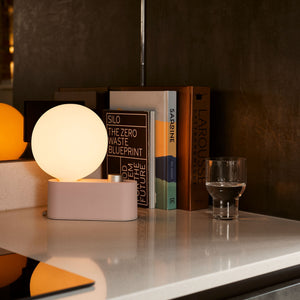
A multi-use LED table and wall light can fit this kind of flexible environment because the linked product is presented as lighting for table and wall use. That kind of format is relevant for spaces where lighting needs to support more than a traditional desk surface.
A decorative lamp can belong in a productive workspace, but it should still pass practical tests. The shade should manage glare. The base should feel stable. The light should land where work happens. The switch should be easy to reach. The scale should fit the desk and nearby furniture.
A lamp that supports the room visually and the work functionally has a longer useful life than one chosen for appearance alone.
A desk lamp needs power, and power access affects how convenient the workspace feels every day. A lamp that requires an awkward cord path, a crowded floor outlet, or a hard-to-reach power strip can become a source of irritation.
Power planning also matters because the lamp often shares the desk with a laptop, monitor, phone charger, speakers, or other work tools. When those items compete for outlets, the workspace can quickly become cluttered.
Before buying a lamp, it helps to look at the desk location. Is the desk against a wall, floating in the room, or part of a shared office layout? Is the outlet on the left or right? Will the cord cross the writing surface? Will a floor cable create visual clutter or a practical nuisance?
These questions are simple, but they prevent common buying mistakes. A lamp that fits the desk visually still needs to fit the power path physically.
For desks that support multiple devices, integrated power can reduce the need to reach under the desk or run cords across the surface. An in-desk power module is relevant in this context because the linked page identifies a desk-mounted power accessory with outlets and USB ports. Used thoughtfully, this type of accessory can help keep the lamp and daily devices easier to connect.
The benefit is not about adding complexity. It is about reducing small interruptions. When power is located where the user actually works, the desk is easier to maintain.
Not every desk setup calls for a built-in option. Some users move furniture, rent their workspace, or want an accessory that can adapt to different desk positions. In those cases, a clamp-on power outlet for desks may be relevant because the linked page describes clamp-on desk power access.
This kind of power planning is especially useful when a lamp, laptop, and phone charger all need convenient access without permanently changing the desk.
Ask these questions while evaluating the workspace:
Where is the nearest outlet?
Will the lamp share power with a laptop or monitor?
Does the cord need to cross the desk surface?
Can the lamp stay plugged in without disrupting movement?
Would built-in or clamp-on power make the desk cleaner?
Does the power setup need to adapt if the desk moves?
A lamp that fits one desk may feel completely wrong on another. Desk size affects the ideal base shape, height, reach, and adjustability. A compact desk often needs a lamp that saves surface area. A larger desk may need a lamp with greater reach or broader illumination.
The best desk lamp should feel proportionate. It should not crowd the work zone, block the monitor, compete with storage, or require constant repositioning.
On small desks, the lamp base matters as much as the light itself. A wide base can steal space from a notebook, keyboard, mouse, or laptop. A taller or more vertical lamp may provide enough illumination while using less surface area.
Small desks also benefit from clean cord routing. When the cord sits across the active work zone, the desk feels more crowded than it is. The lamp should help define the work surface, not complicate it.
A larger desk gives more placement freedom, but it also creates more distance between the lamp and the work area. A lamp with limited reach may leave parts of the surface dim. Adjustable arms, taller forms, or wider light spread can help the lamp cover the active zone more effectively.
The lamp should be chosen based on where work actually happens. If the user works mostly near the monitor, the lamp should support that area without glare. If the user spreads documents across the desk, broader coverage may matter more.
A productive lamp adapts as the task changes. Adjustable heads and arms allow the user to move light from a keyboard area to a notebook, from a document to a sketch, or from daytime task work to softer evening use.
Before choosing a lamp, confirm that:
The base does not crowd the keyboard, mouse, or notebook.
The shade can aim light without exposing the bulb directly.
The switch is reachable from a seated position.
The cord can reach power cleanly.
The height works with the laptop or monitor.
The lamp can support both focused work and light admin.
The style fits the desk without dominating it.
Desk lamp materials affect more than appearance. They influence how the lamp directs light, how much glare it creates, how stable it feels, and how naturally it blends with the workspace.
A lamp with an opaque shade often directs light more precisely. A translucent or glass form may create a softer visual presence. A glossy finish may catch reflections, while matte finishes often feel calmer near screens.
Opaque shades are common in task lamps because they control where light lands. They can help keep illumination focused on the desk surface rather than scattering it across the room or into the user’s eyes.
This is useful for focused work. When the shade directs light downward, the lamp can brighten documents, notebooks, or objects without overpowering the entire workspace.
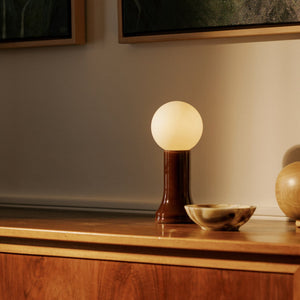
Some desks benefit from lighting that feels less task-heavy and more integrated with the room. A recycled glass table lamp can be relevant when the workspace calls for a softer material presence, because the linked page identifies the product as a table lamp made from recycled glass.
Glass lighting can work well in home offices, reading corners, and hybrid rooms where the desk needs to feel productive during work hours and visually comfortable afterward. The key is still to evaluate the actual light direction, brightness, and placement in relation to the desk task.
Glossy surfaces can catch highlights from lamps, windows, and screens. That does not make them wrong, but it does mean placement becomes more important. Matte or softly finished lamps often create less visual activity in the work area.
For screen-based work, a calmer visual field can make the desk feel easier to use. The lamp should support attention rather than become another bright object competing for it.
A desk lamp cannot fully solve a disorganized surface. If papers, cables, devices, and supplies crowd the work area, light may be blocked or scattered unevenly. Clutter also makes it harder to position the lamp where it works best.
Good lighting and good organization support each other. The lamp defines the active work zone, and storage keeps that zone available.
Stacks of paper can cast shadows. Loose cords can interrupt the work surface. Devices placed near the lamp can reflect light into the eyes or screen. Even small objects can make a desk feel visually busy when they sit inside the brightest part of the workspace.
Clearing the area around the lamp makes the light feel more intentional. It gives the user a predictable surface for reading, typing, writing, or reviewing.
The best-lit part of the desk should support active work, not long-term storage. Documents, supplies, and files that are not needed immediately should have a nearby place to go. A compact file storage cabinet fits this discussion because the linked page presents a cabinet for file storage, which is directly related to keeping paperwork off the active desk surface.
When storage supports the desk instead of replacing it, the lamp can do its job more effectively. The work surface stays clearer, the light reaches the right area, and the user spends less time moving things before starting.
A productive desk often has zones: a screen zone, a writing zone, a lighting zone, and a storage zone. The lamp should support these zones rather than compete with them. When everything has a place, the desk feels easier to reset between tasks.
That reset matters. A clear, well-lit surface makes it easier to begin work, pause work, and return to work without feeling visually overwhelmed.
Desk lamp mistakes usually come from focusing on one feature while ignoring the full workspace. A lamp can look good, feel bright, or fit a design style, yet still perform poorly during daily use.
Avoiding these mistakes helps the lamp remain useful after the initial purchase.
A visually appealing lamp still needs practical light control. If the shade exposes the bulb, the lamp may create glare. If the beam is too narrow, the work area may remain uneven. If the lamp cannot be adjusted, the user may have to move papers or devices around the light instead of moving the light around the task.
Style should support the work setting, not replace function.
A large lamp may look impressive in photos but feel inconvenient on a compact desk. It may take up too much room, interfere with a monitor, or make the desk feel crowded. Scale is especially important for home offices, small apartments, and shared work surfaces.
A lamp should leave enough space for the tools used every day. If it competes with the keyboard, notebook, mouse, or laptop, it may reduce productivity instead of supporting it.
Reading printed documents and working on a screen are not the same lighting task. Paper often benefits from direct task light. Screens require more careful glare control. A lamp that works well for reading may need to be dimmed or repositioned for laptop work.
The most versatile desk lamps make this transition easy. They allow the user to control brightness, direction, or placement without disrupting the workflow.
A lamp that cannot reach power cleanly may end up unplugged, poorly positioned, or routed through a messy cable path. Power access should be considered before style, especially if the desk supports multiple devices.
The simplest test is practical: imagine the lamp in its intended place, then trace the cord to the outlet. If that path interrupts the surface or creates inconvenience, the setup needs adjustment.
Different work habits call for different lighting priorities. A person who spends most of the day on a laptop does not need the same lamp setup as someone who reviews printed documents or sketches by hand. Matching the lamp to the work style makes the purchase more useful and less dependent on guesswork.
Laptop users should prioritize dimming, side placement, and a lamp shape that does not reflect directly into the screen. A compact base can also preserve room for a mouse, notebook, or external keyboard.
The lamp should support the laptop rather than compete with it. The screen remains the main visual focus, while the lamp keeps the surrounding desk comfortable and usable.
Users who read, annotate, sort, or compare documents need enough light across the surface. A lamp with a stable base and directional shade can help reduce shadows and keep text visible.
For this type of work, placement opposite the dominant hand becomes especially important. The goal is to keep the page clear while allowing the hand to move naturally.
Creative tasks often involve visual judgment. Sketching, material review, layout planning, and design work benefit from steady illumination that can be directed across the work surface. Neutral light is often useful because it supports visibility without strongly warming or cooling the workspace.
Adjustability matters here because creative work is rarely static. The lamp may need to shift as the user changes tools, papers, or viewing angles.
A home office lamp often has to serve two roles. It should support productive work, but it should also look appropriate in the room when work ends. Scale, material, warmth, and shade shape become especially important.
A lamp that feels too industrial may not fit a living space. A lamp that is too decorative may not provide enough useful task light. The strongest choice balances both needs honestly.
Shared desks or flexible workstations benefit from lamps that are easy to understand and reposition. Simple switches, stable bases, and adjustable heads are often more useful than complicated features.
The lamp should make the space easier for different users, not require explanation every time someone sits down.
The best desk lamp is not defined by a single feature. It is the result of several practical decisions working together: controlled brightness, suitable color temperature, comfortable placement, appropriate scale, clean power access, useful materials, and a clear desk surface.
A good lamp supports the rhythm of daily work. It helps the user move from screen tasks to paperwork, from morning focus to evening planning, and from detailed work to lighter admin without constantly fighting the environment.
A productive desk setup should feel easy to return to. The lamp should turn on without cable frustration, sit where it does not create glare, illuminate the active work zone, and fit the scale of the desk. Its material and style should support the room, but its main purpose is to make work feel clearer.
When choosing a lamp, the most useful question is not “Which lamp looks best?” The better question is “Which lamp will make this desk easier to use every day?”
A well-chosen desk lamp does not demand attention. It quietly improves the desk by making tasks more visible, reducing visual strain, and helping the workspace feel organized. When lighting supports the way work actually happens, productivity becomes less dependent on willpower and more supported by the environment itself.


You have unlocked free shipping!
You're saving $29 and unlocked free shipping!
Leave a comment