







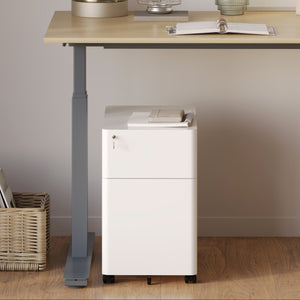






















Filing Cabinet Choices for Cleaner Workstation Planning
Cleaner workstation planning starts with filing storage that matches the desk, document volume, security needs, and daily workflow. Explore how cab...
Learn more

Visit quiz page to see how we makes it easy to create an inspiring workplace


Small workstations demand sharper decisions than large desks ever do. On a wide surface, a few loose charging cords or a power strip tucked near the back edge may not seem like a problem. On a compact desk, the same setup can eat into writing space, crowd legroom, and make the entire workstation feel disorganized before the day even begins. Cable management matters more when every inch has a job to do.
A clean workstation is not created by hiding every wire out of sight. It comes from giving each cable a logical path, reducing the number of cords competing for space, and choosing a desk setup that supports order instead of fighting against it. In smaller work areas, the best solutions are usually the simplest ones. They keep essential cables accessible, move bulk off the desktop, and make the workstation easier to maintain over time.
A small workstation has less margin for error. A few inches of extra cable slack, one oversized power adapter, or a charger draped across the surface can make the desk feel cramped. That is not only a visual issue. It changes how the workstation functions. The mouse has less room to move, notebooks overlap with devices, and routine tasks start to feel awkward.
Cable clutter also makes compact desks appear less intentional. Even when the furniture itself is well designed, exposed wires can make the setup feel temporary or unfinished. In smaller spaces, order has to be built into the daily workflow, not added as an afterthought.
Poor cable control affects more than appearance. It complicates cleaning, makes devices harder to unplug or move, and increases the chance of cords catching on chair arms, feet, or storage nearby. In home offices, bedroom workstations, and tight commercial layouts, those small points of friction add up quickly.
Good cable management improves flow. It helps the workspace stay calm, usable, and easier to reset at the end of the day.
Most small desks feel crowded because they carry more cables than the user really needs. Before adding trays, clips, or sleeves, it helps to separate essential connections from temporary extras. A basic workstation may only require a monitor cable, laptop power, keyboard or mouse connection, task light power, and one or two charging lines. Everything else should be evaluated carefully.
This first step prevents a common mistake: organizing unnecessary clutter instead of removing it.
A practical cable audit works best when cords are sorted by behavior rather than by device category alone.
These include monitor power, display cables, docking connections, and any line that rarely needs to be unplugged. These cables should be routed once and kept as stable as possible.
Phone chargers, headset lines, and occasionally swapped USB connections need to remain reachable. They still need organization, but they should not be buried so deeply that using them becomes inconvenient.
These are the ones that often create silent clutter. If a cable is used once every few weeks, it should not live across the desktop full-time.
Cable management often fails because people focus only on the desk surface. The real route starts at the power source, moves under or behind the desk, rises to devices, and sometimes returns back down again. In a small workstation, each segment matters.
Take note of:
outlet position
distance from wall to desk
underside clearance
leg movement area
any need for cable slack on adjustable desks
This measurement mindset leads to cleaner results and reduces the temptation to improvise with loose loops later.
One of the fastest ways to improve a small workstation is to move cable mass below the work surface. Power strips, adapter bricks, and extra cord length rarely need to stay visible. Leaving them on the floor or along the back edge of the desk wastes space and creates visual weight in the very area that should feel open.
The underside of the desk is often the most valuable cable zone in a compact setup because it clears the top surface without sacrificing access.
Items that work well below the desk include power strips, bundled excess length from permanent cables, and passive accessories that do not need daily handling. Items that are plugged in and left alone benefit from stable placement rather than constant movement.
A thoughtfully placed under-desk cable organizer can help contain the cable bulk that would otherwise collect near the floor or hang under the rear edge. In a small workstation, that matters because legroom and floor visibility affect how open the entire setup feels.
Under-desk organization should not create new frustrations. If the tray or routing method blocks knee space, hides the reset switch on a power strip, or makes it difficult to swap a key device, the system will not hold up in real use. The goal is controlled access, not total concealment.
Small workstations benefit from a single, intentional path from desktop to floor. Without that path, cables tend to spill behind the desk in different directions, creating a messy view from every angle. This is especially noticeable when the desk sits away from the wall or in a shared room.
A unified vertical drop helps in several ways. It reduces tangling, keeps cords away from chair movement, and makes the workstation easier to clean around.
When the desk height changes, the cable path changes too. That movement needs to be controlled. If the routing is too tight, connectors can be stressed. If it is too loose, cords may drag or hang awkwardly.
A flexible cable spine is especially useful when the workstation includes height adjustment and the visible descent from desk to floor needs to stay orderly. It serves a different purpose than an under-desk tray. Instead of storing cable bulk, it guides the moving cable path and keeps that transition visually controlled.
The right amount of slack depends on desk movement, device placement, and outlet position. In general, cables should move comfortably with the desk without forming a loose bundle that swings or pools below. This is one of the most important balance points in small-space cable management. Too little slack creates strain. Too much reintroduces clutter.
Cable management is not only about accessories. Desk structure matters. Frame design, rear clearance, underside accessibility, and the relationship between the desktop and support elements all influence what kind of routing is practical.
A desk with thoughtful clearance underneath gives more room for trays, clips, and power organization. A layout that leaves space behind the monitor area can reduce visible crossover lines and improve routing options.
Height-adjustable furniture can support a more dynamic workstation, but it also raises the standard for cable discipline. Movement means that every line needs a purpose and a path. Random loops hidden behind a static desk often become obvious problems once the surface begins to move.
A height-adjustable office desk fits naturally into a workstation built around flexibility, but flexibility only feels clean when the cables have been routed with equal care. That means planning for movement, not reacting to it after setup.
Workstations evolve. A monitor may be added, a laptop dock replaced, or a charging setup simplified. A desk that allows for cable access and adjustment supports those changes better than one that forces every new connection into the same crowded corner.
Not every cable problem needs a cable accessory. Sometimes the smarter fix is reducing what stays on the desk in the first place. If the surface is carrying duplicate chargers, unused accessories, or devices that are only relevant occasionally, the cable load can be lowered by editing the setup.
This creates more usable depth and less visual interference, both of which matter on compact desks.
Monitor risers, mounted accessories, and controlled charging points can help move support items out of the main work zone. When the desktop is reserved for current tasks instead of passive storage, cable management becomes easier because there are simply fewer paths crossing the surface.
A compact standing desk can reinforce this discipline. A smaller footprint naturally encourages selective placement, which often leads to fewer unmanaged accessories and a cleaner cable layout overall.
Shared desks become cluttered quickly when cable ownership is unclear. One user’s charging line crosses the other person’s keyboard area, adapters collect under the center of the desk, and nobody is fully sure which cable belongs to which device. The issue is not only quantity. It is overlap.
In compact collaborative setups, cable control works best when each side has its own logic.
A clean shared setup usually includes distinct left and right device zones, separate charging routes where possible, and a labeling system for anything that gets unplugged often. Those steps reduce confusion and make maintenance easier.
A two-person adjustable workstation brings this need into sharper focus because movement and shared use combine to make routing more complex. In that kind of setup, separation is not a nice extra. It is a practical requirement.
Many setups become overcomplicated because people buy organizers first and edit the cable load second. This leads to trays filled with unnecessary cords and clips attached to cables that should not be there at all.
An organizer should not become a cable junk drawer. When power adapters, spare lines, and bundled extras are packed into the same place, future maintenance becomes harder. Hidden clutter is still clutter.
A cable path that looks neat at one desk height may fail during actual use. The same goes for charging cords that are technically stored but frustrating to access. A system must work during the day, not just in a photo.
Different workstation formats need different priorities. The best setup is not the one with the most hardware. It is the one that fits the desk, the room, and the user’s habits.
| Desk Type | Main Challenge | Best Priority | Supporting Move |
|---|---|---|---|
| Compact fixed desk | Surface crowding | Move cable bulk underneath | Reduce visible crossover lines |
| Small adjustable desk | Cable tension during movement | Guide the vertical drop | Leave controlled slack |
| Mini workstation | Too many devices for the footprint | Simplify desktop equipment | Centralize charging |
| Shared desk | Overlapping ownership | Split cable zones | Label swap-heavy connections |
For readers still refining the desk itself, browsing broader office desk options can be more useful than solving cable issues in isolation. The desk and the cable plan should support one another.
Cable control improves when it is considered alongside furniture placement, storage access, and daily workflow. A desk positioned slightly differently in the room can change the cleanest route to power. Storage nearby can reduce the number of devices that need to stay on the surface. Even walking paths influence whether a floor cable run feels safe and unobtrusive.
The most successful cable management ideas for small workstations are not the most elaborate ones. They are the ones that remain practical after weeks of real use. Cables stay where they belong, the desktop stays open enough for work, and changes to the setup do not require starting over.
For businesses or home offices making broader setup decisions, workspace furniture planning can support better alignment between desk selection, workstation layout, and long-term organization. That broader perspective often leads to cleaner cable outcomes because the workstation is being considered as a complete environment rather than a collection of isolated products.
A simple process prevents most cable mistakes:
1. Remove every cable from the desk area that is not part of the daily setup.
2. Group the remaining cables into permanent, frequent-use, and occasional-use categories.
3. Decide where the power source should live before routing visible lines.
4. Move bulk below the desk where possible.
5. Create one controlled vertical path from desk to floor.
6. Test sitting and standing reach if the desk adjusts.
7. Label anything shared or regularly swapped.
8. Review the setup from normal working angles and remove any distracting excess.
A clean workstation should feel open, stable, and easy to use. It should not force awkward reaching, trap adapters in inaccessible places, or depend on constant readjustment. The strongest cable management ideas for small workstations create order that lasts because they reflect real habits, real desk dimensions, and realistic daily use.


You have unlocked free shipping!
You're saving $29 and unlocked free shipping!
Leave a comment