























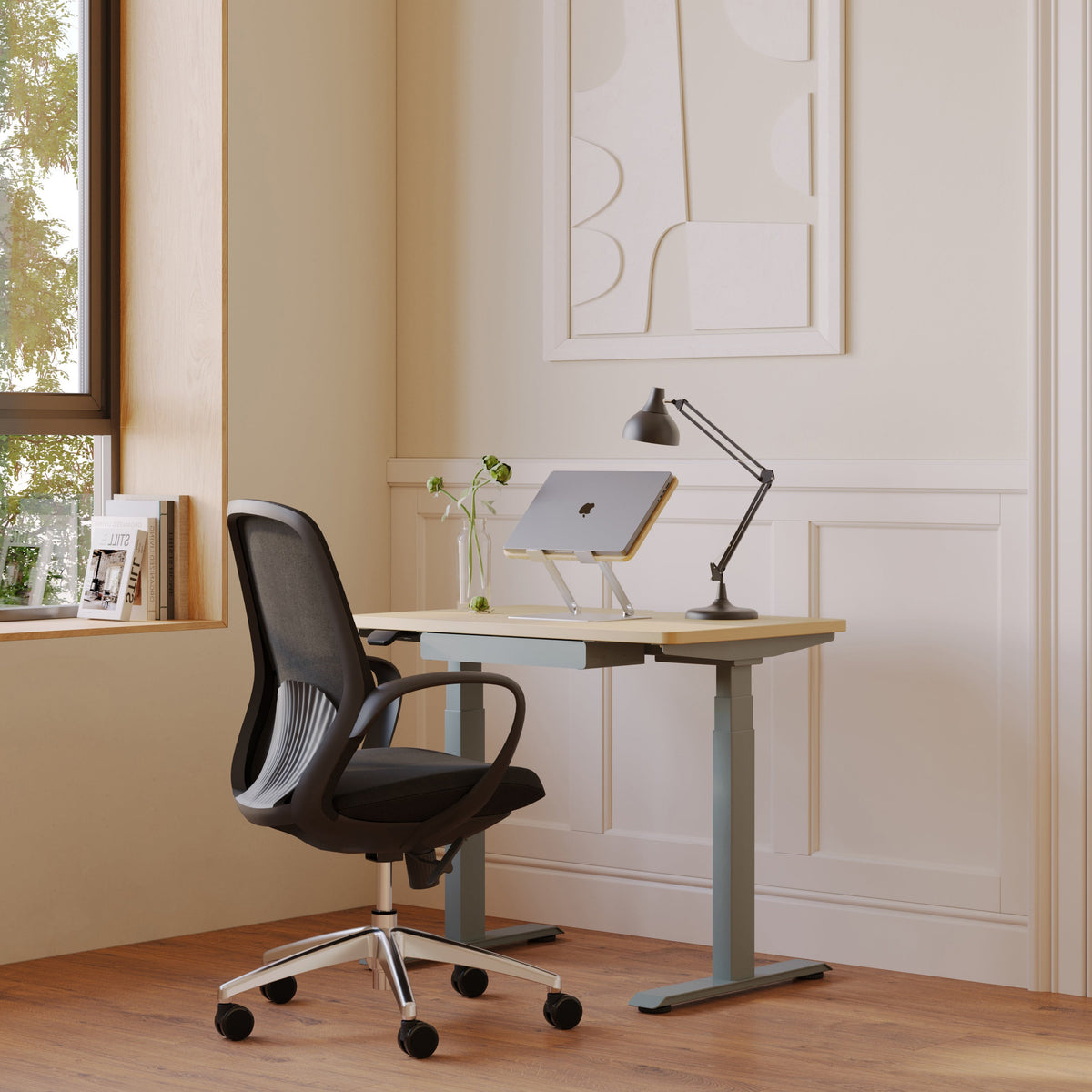
Can a Laptop Stand Improve Focus, Desk Space, and Typing Position?

A laptop stand can improve focus, create more usable desk space, and support a better typing setup, but the benefit is not automatic. The real value comes from how it changes screen height, clears the center of the desk, and influences the way the rest of the workstation is arranged. A stand is often treated like a simple accessory, yet it affects visual comfort, body position, cable flow, and the daily rhythm of computer work in ways that are easy to underestimate.
That matters because most people do not lose focus for one dramatic reason. Concentration usually breaks down through small forms of friction. A crowded desk makes it harder to find what you need. A low screen encourages a downward gaze that can become tiring over time. A cramped work area turns typing, note-taking, charging, and switching between tools into a series of tiny interruptions. When a laptop stand solves even part of that friction, work can feel calmer and more deliberate.
Why a Laptop Stand Changes More Than Screen Height
A laptop stand is often described as a way to raise the screen, but that only captures part of the story. Elevating a laptop changes the visual geometry of the desk. It moves the display closer to eye level, opens up the surface below it, and can make a workstation feel more intentional rather than improvised.
Screen elevation changes where your attention settles
When a laptop sits flat on a desk, the screen usually pulls your eyes downward. That does not just affect posture. It also changes what sits in your field of view. Pens, receipts, charging cables, sticky notes, and unrelated objects tend to collect around the base of a laptop. Over time, the brain starts treating that area as part of the working environment, even when it is mostly clutter.
A stand raises the display and often reduces how much visual noise competes with the task on screen. Instead of working into a pile of objects, you work toward a more defined focal point.
An open visual field can make the desk feel more usable
The psychological effect of open space matters. A desk does not need to be large to feel functional, but it does need to feel organized enough that each tool has a place. By lifting the laptop, the setup creates separation between the screen zone and the work surface. That separation can make even a modest desk feel easier to use.
Lighting also influences how clean and focused a workspace feels. In rooms where brightness is uneven or where bulky fixtures interrupt the look of the ceiling, recessed ceiling lighting can support a more streamlined environment that pairs naturally with a cleaner desktop arrangement.
How a Laptop Stand Can Support Better Focus
A laptop stand does not improve focus in the same way a timer, schedule, or quiet room might. Its effect is more indirect. It reduces physical strain, visual crowding, and unnecessary desk friction, which can make concentration easier to maintain.
Less downward looking can reduce low-grade fatigue
Looking down at a screen for long periods encourages the head and neck to settle into a forward-leaning position. Many people adapt to that posture without noticing it at first. The problem appears later as upper-back tightness, neck discomfort, or a general feeling of fatigue after routine computer use.
A stand can help by placing the screen in a more natural viewing zone. When the display is easier to see without collapsing toward it, the body often works with less tension. That does not guarantee perfect posture, but it can reduce one common source of daily strain that quietly drains attention.
A clearer desk supports deeper work
Focus often improves when the desk stops demanding management. A raised laptop creates room for a notebook, planner, external keyboard, or reference material without forcing those items into the same small strip of usable space. The result is not just tidiness for its own sake. It is a desk that lets you work without constantly rearranging things.
Lighting quality still matters
A better screen angle will not solve glare, dim corners, or shadows falling across the keyboard and writing area. Visual comfort depends on the full environment. If a room needs more control over where light is directed, track lighting installation can make task zones easier to illuminate without flooding the entire room with flat light.
Focus gains are usually the result of reduced friction
The strongest case for a laptop stand is not that it transforms motivation. It improves the conditions that support steady work. Less crowding, better sightlines, and fewer posture-related distractions create an environment where concentration is easier to protect.
Desk Space Improvements Are Often the Fastest Noticeable Benefit
For many users, the most immediate change is not posture. It is space.
Vertical clearance creates horizontal working room
The area under a laptop stand becomes valuable real estate. On a small desk, that space can hold an external keyboard when it is not in use, a notebook, a slim docking accessory, or the daily items that would otherwise sit in front of the screen. Even a few extra inches of free surface can change how comfortable the desk feels.
This matters most in compact home offices, bedrooms, apartment corners, shared family spaces, and temporary workstations where every inch of the desk is already doing too much.
More room changes workflow, not just appearance
A cleaner desk is easier to move through. You can write notes without balancing paper on the edge of the keyboard. You can place a mouse in a more natural position. You can switch between digital and handwritten work without clearing space first. These are small improvements, but they accumulate throughout the day.
Cable placement can either support or sabotage the gain
A desk can still feel cramped if charging cables, power strips, and lamp cords spill into the working area. That is why physical layout matters beyond the laptop stand itself. In home offices where devices compete for accessible power, properly placed switches, outlets, and dimmer controls can make the surrounding setup easier to manage and less visually messy.
Simple ways users often reclaim space with a stand
-
Slide an external keyboard under the stand when reading or video calling
-
Keep a notebook centered on the desk instead of pushed off to the side
-
Route charging cables behind the stand instead of across the wrist area
-
Separate writing tools from the laptop’s base so the center of the desk stays open
Typing Position Improves Only When the Full Setup Improves
This is where many articles oversimplify the topic. A laptop stand can improve screen height, but that does not automatically improve typing position.
Raising the laptop also raises the built-in keyboard
The screen and keyboard are attached to the same device. Once the laptop is lifted to a better viewing height, the built-in keyboard rises with it. That often places the hands too high for comfortable typing. Shoulders may lift, wrists may bend upward, and the arms can end up working harder than they should.
So the answer is nuanced. A laptop stand can improve typing position only if the setup separates screen height from typing height.
External input devices make the difference
The most effective arrangement is usually a laptop stand paired with an external keyboard and mouse. That allows the display to sit higher while the hands stay lower and more relaxed. In that configuration, the benefits are much stronger because the body is no longer forced to compromise between seeing the screen clearly and keeping the wrists comfortable.
Signs the typing setup still needs work
If a stand is in place but typing feels awkward, the problem often shows up quickly.
Watch for these signals
-
Wrists angled upward while typing
-
Shoulders creeping toward the ears
-
Elbows floating instead of resting comfortably
-
Mouse placed too far away from the body
-
Palm or forearm pressure after short sessions
These are useful clues because they show whether the stand is helping only the eyes or helping the whole workstation.
What Good Laptop Stand Ergonomics Actually Looks Like
Ergonomics does not require a complicated formula. It requires a sensible relationship between the screen, keyboard, chair, and desk.
Screen height should support a neutral gaze
A useful rule is to position the screen so it can be viewed comfortably without a deep downward bend of the neck. Exact measurements vary because bodies, chairs, desks, and visual preferences vary. The goal is not a perfect number. The goal is a position that feels natural for sustained work.
Viewing distance matters as much as height
Some users raise the screen but leave it too close. Others place it far enough away but too low. Both can create strain. The stand works best when the screen is high enough to reduce hunching and far enough back to avoid forcing the eyes and neck into a cramped position.
Desk depth changes the outcome
A shallow desk can limit how far back the laptop can sit. That may improve neck angle while making the screen feel uncomfortably close. A deeper desk gives more flexibility because it creates room for proper screen distance as well as a better keyboard and mouse position.
The rest of the furniture still matters
A stand cannot fix a chair that is too low, a desk that is too high, or a sitting position with no foot support. It can improve one part of the chain, but the broader workstation still matters.
What a Laptop Stand Can Fix and What It Cannot
A realistic article on this topic should be clear about limits.
What a laptop stand can improve
A stand can often help with:
-
Screen visibility
-
Neck angle
-
Center-desk clearance
-
Airflow around some laptops
-
Overall workstation organization
What it cannot solve on its own
A stand usually cannot fix:
-
A poor chair setup
-
Bad wrist position when using the built-in keyboard
-
Harsh glare
-
Excess cable congestion
-
Long periods without movement
Room-level support still matters in a home office
As workstations become more equipment-heavy, the surrounding electrical setup becomes part of daily function. Multiple chargers, monitors, task lights, and office devices can place more demand on one area of the home than people expect. In those situations, awareness of the home electrical panel becomes relevant because dependable workspace comfort depends on more than desk accessories alone.
Comparing Common Laptop Stand Types
Not every stand serves the same kind of user. The best choice depends on how and where the laptop is used.
| Laptop Stand Type | Best Fit | Main Strength | Main Limitation |
|---|---|---|---|
| Fixed stand | Permanent desk setup | Stable and simple | Limited adjustability |
| Adjustable stand | Users refining posture | Flexible height and angle | Larger footprint |
| Foldable stand | Hybrid work and travel | Easy to carry | Can feel less stable |
| Heavy-duty stand | Larger laptops and docked setups | Strong support | Less portable |
Fixed stands suit stable workstations
These are often best for desks where the setup rarely changes. They tend to look clean, stay put, and work well when the user already relies on an external keyboard and mouse.
Adjustable stands support experimentation
An adjustable model can be useful for people still dialing in screen height and angle. That flexibility can be especially helpful when multiple people share the same desk.
Foldable stands favor mobility
For students, hybrid workers, and anyone carrying a setup between rooms or locations, portability matters. A foldable stand may not feel as solid as a heavier desktop model, but it can still be very effective when travel is part of the routine.
Signs a Laptop Stand Will Probably Help Your Setup
A stand is especially worth considering when current work habits reveal the same friction every day.
Common signs the desk could benefit
1. You spend hours looking downward at the screen.
2. The desk feels full before the day is half over.
3. You shift objects around just to make room to type.
4. Your neck, shoulders, or upper back feel tight after routine computer use.
5. You want a more intentional desk layout rather than a makeshift one.
Some users also reach a point where they start thinking beyond one accessory and begin evaluating the entire room. Seeing examples of completed electrical work for residential spaces can be useful when workspace comfort is tied to broader improvements in lighting, power access, or layout.
How to Set Up a Laptop Stand for Better Focus and Posture
A stand works best when setup is treated as a system rather than a single purchase.
Start with the screen position
Raise the laptop until the screen feels comfortable to view without dropping the head too far downward. Then check whether the display is far enough back to read comfortably.
Lower the typing surface
Add an external keyboard and mouse so the hands can stay in a lower, more natural position than the elevated laptop keyboard would allow.
Use the cleared space intentionally
Do not let the newly available area become another clutter zone. Reserve it for items that truly support the workflow, such as a notebook, keyboard, or a neatly routed charging path.
Refine the environment around the desk
A workstation often performs better when the room supports it. Light placement, power access, and overall usability affect how smooth the desk feels day to day. When a space needs broader electrical support, learning about BK Electric Services can help homeowners understand the team behind those kinds of home improvements.
Is a Laptop Stand Worth It for Focus, Desk Space, and Typing Position?
For many people, yes. A laptop stand can absolutely improve focus, desk space, and typing position, but each benefit arrives through a different mechanism.
Focus improves because the setup often becomes less distracting and less physically tiring. Desk space improves because lifting the laptop creates more usable surface area. Typing position improves only when the elevated screen is paired with lower input devices, usually an external keyboard and mouse.
That is why the most honest answer is not simply that a stand works or does not work. It works best when it solves a real problem in the workstation and when the rest of the setup supports that improvement. In homes where people are already refining how a workspace functions, it can also make sense to keep an eye on current service promotions when related electrical updates are already under consideration.
A laptop stand is not a miracle tool. It is a practical workspace upgrade. Used thoughtfully, it can make the desk feel more open, the screen easier to work with, and the day less physically draining. That kind of improvement is rarely flashy, but it is often exactly what makes a workstation more effective.
Related Articles
-
 Our Conference Chairs and Meeting Tables Compared, so You Can Furnish a Huddle Room, a Meeting Room, or a Boardroom for Eight in One Order
-
 This Is How To Build A Small Home Office You Actually Want To Work From, And How To Pick Desks For Small Spaces - Urbanica Furniture's Full Guide
-
 Best Setup for Laptop and 2 Monitors With Less Neck Strain
-
 Round Meeting Table Ideas That Make Team Talks Smoother
-
 Can a Desk Lamp Improve Productivity or Just Improve the Look of a Desk?
-
 Why Midday Fatigue Starts Where You Sit


