























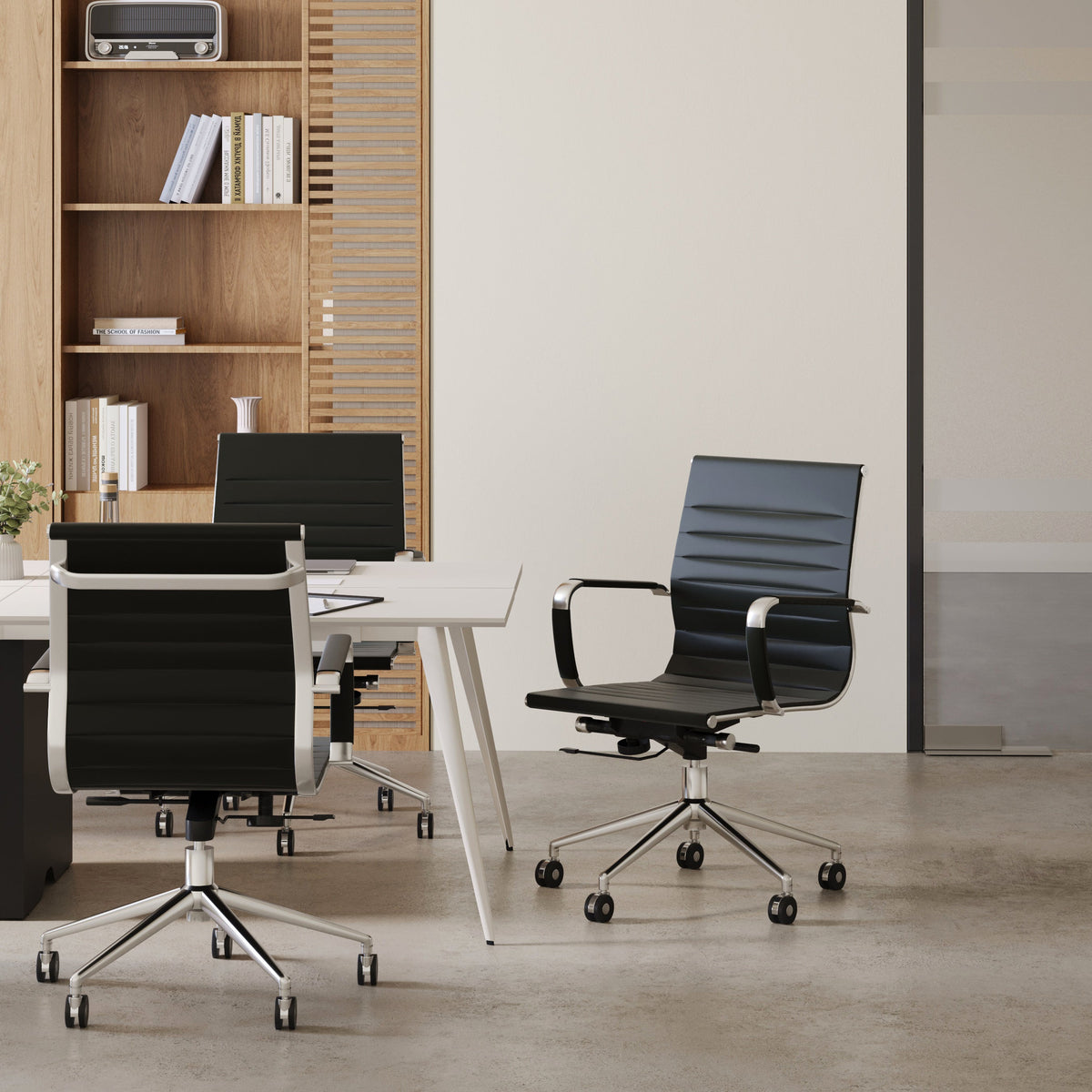
Better Seating Around Executive Conference Tables Today

Executive conference tables carry some of the most important conversations in a workplace. Leadership reviews, client presentations, budget discussions, planning sessions, interviews, and hybrid calls all place pressure on the same environment: a table surrounded by people who need to think clearly, speak confidently, and stay comfortable long enough to make decisions well.
Better seating around executive conference tables today is not only about choosing impressive chairs. The strongest rooms are planned as complete meeting environments. The chair must fit the table. The table shape must match the kind of conversation. The surrounding clearance must allow people to sit, stand, move, and present without awkward interruptions. Technology must support remote participants without forcing people into poor posture. Nearby work areas should help teams continue the work that begins in the room.
When seating is planned carefully, the conference room feels calm, capable, and intentional. Every chair has a purpose. Every person has a clear view. Every participant has enough room to listen, speak, write, type, and move naturally.
Executive Conference Seating Now Shapes How Decisions Happen
Executive rooms are expected to support more than formal boardroom meetings. A single conference table may host leadership check-ins in the morning, client presentations at midday, confidential planning in the afternoon, and hybrid team discussions before the day ends. Seating has to support all of those moments without making the room feel crowded, stiff, or underprepared.
The chair is part of the meeting experience
A chair influences how long people can stay focused, how naturally they approach the table, and how comfortably they participate. When seating is too low, too wide, too rigid, or poorly matched to the table, people compensate with awkward posture. They lean forward, push back too far, bump into armrests, or turn their bodies away from the conversation.
That is why executive rooms benefit from conference seating designed for meeting rooms, especially when the goal is to support both professional presentation and everyday usability. The right chair should feel appropriate for a serious business environment while still making long discussions easier to manage.
Better seating supports presence, not just comfort
Executive seating should help people appear attentive and composed. A chair that supports upright posture can make participation feel more natural during a high-stakes discussion. A seat that allows easy movement helps someone turn toward a screen, speaker, whiteboard, or remote camera without shifting noisily or disrupting the room.
The experience also affects guests. Clients, partners, candidates, and advisors notice whether a conference room feels thoughtfully arranged. A room with poor spacing or mismatched chairs can make even a strong table feel less credible. A room with balanced seating communicates order before a word is spoken.
Three behaviors every executive seat should support
Better seating around executive conference tables should help people do three things well:
1. Listen without strain. Every seat should have clear sightlines to speakers, screens, and other participants.
2. Speak without awkward positioning. People should be able to sit close enough to the table to contribute naturally.
3. Work without crowding. Laptops, notebooks, phones, water, and documents should fit without forcing elbows into neighboring spaces.
A conference room that supports these behaviors feels easier to use because the seating plan is working with the meeting rather than against it.
Chair-to-Table Fit Is the Foundation of Better Executive Seating
Even a well-made chair can fail in the wrong room. Executive seating must be evaluated against the table it surrounds, the clearance around the room, and the type of meetings the space is meant to host.
Seat height and tabletop access should feel natural
The relationship between seat height and table height is one of the first details to evaluate. People should be able to sit close to the table without raising their shoulders, hunching forward, or resting their arms at an uncomfortable angle. The table edge should be easy to reach for typing, writing, reviewing documents, or setting down a device.
Armrests are especially important. If they are too high, they may collide with the table edge and prevent the chair from pulling in properly. If they are too wide, they can reduce the number of people who can sit comfortably around the table. If they are too low or poorly shaped, they may not support relaxed posture during longer meetings.
Chair width affects real room capacity
Many conference rooms are planned around a target number of seats, but real comfort depends on chair width, table size, and elbow room. A table may technically allow a certain number of chairs, yet the meeting experience can still feel crowded if participants cannot move naturally.
A better approach is to plan for working capacity rather than maximum capacity. Working capacity means the number of people who can sit, use the tabletop, maintain personal space, and participate without feeling squeezed. For executive rooms, this often creates a more premium and functional experience than filling every possible gap with another chair.
The chair should be substantial without dominating the table
Executive seating often needs a more refined presence than casual task seating, but visual weight matters. Oversized chairs can make the table feel smaller, narrow the walking paths, and block sightlines across the room. Chairs that are too slim may feel under-scaled next to a large executive table.
A balanced chair profile should complement the table’s proportions. Back height, frame thickness, upholstery tone, and base style all influence whether the room feels composed or crowded. The strongest layouts allow the table to remain the visual anchor while the seating supports the room’s purpose.
Seating-fit checklist for executive conference tables
Before finalizing a seating plan, each chair should pass a practical fit check:
-
Can the chair pull back without hitting a wall, credenza, door swing, or neighboring chair?
-
Do the armrests clear the underside or edge of the table?
-
Can participants sit close enough to write, type, and speak comfortably?
-
Is there enough space for laptops, notebooks, glasses, and documents?
-
Can each person turn toward a display, presenter, or camera without twisting awkwardly?
-
Does the chair style match the formality of the executive table and surrounding office?
Table Shape Changes How People Sit, Speak, and Share Authority
The shape of an executive conference table affects more than the appearance of the room. It influences hierarchy, participation, sightlines, and how easily people engage with one another.
Rectangular tables support formal leadership settings
Rectangular executive tables remain a strong choice for structured meetings. They create clear orientation, often with a natural head-of-table position. This can be useful for board meetings, legal reviews, investor conversations, leadership updates, and formal client presentations where direction and order matter.
The seating plan should still avoid making the room feel rigid. Chairs along the sides need enough space for participants to face each other without feeling too far apart. Seats at the ends should not block screens or become isolated from the conversation. If a rectangular table is used for hybrid meetings, camera placement and screen visibility should be considered before the final chair count is set.
Round tables encourage balanced participation
For smaller executive rooms or leadership huddles, a round meeting table for collaborative rooms can create a more equal conversation pattern. Round tables reduce the sense of a dominant seat and can make it easier for everyone to see each other.
This format is especially useful when the goal is discussion rather than presentation. Strategy sessions, creative reviews, department check-ins, and quick leadership alignment often benefit from a layout where participants can read facial expressions and enter the conversation without feeling physically distant.
Compact round tables support informal executive touchpoints
Not every executive conversation needs the full conference room. Some decisions happen in smaller moments: a quick pre-meeting alignment, a coffee conversation with a client, a two-person review, or a short discussion after a presentation.
A Bistro Table for compact office conversations can support these moments without requiring the scale or formality of a full boardroom. In a reception-adjacent space, private office corner, lounge area, or small collaboration zone, a compact table gives people a place to sit briefly and speak with focus.
Matching table shape to meeting behavior
| Executive Meeting Style | Strong Table Direction | Seating Priority |
|---|---|---|
| Formal board review | Rectangular table | Clear hierarchy and direct presentation focus |
| Leadership workshop | Round or softened table format | Balanced participation and shared visibility |
| Client presentation | Rectangular or presentation-oriented layout | Sightlines to speakers, screens, and materials |
| Quick executive huddle | Compact round table | Easy access and conversational comfort |
| Hybrid strategy call | Shape based on camera and screen placement | Face visibility and device control |
The best table shape is the one that reflects how people actually use the room. Seating should follow that behavior rather than forcing every meeting into the same format.
Spacing Around Executive Conference Tables Determines Room Quality
A conference room can have a strong table and appropriate chairs yet still feel uncomfortable if the spacing is wrong. Clearance affects first impressions, body movement, accessibility, and the feeling of calm inside the room.
Comfortable seating begins before anyone sits down
People experience the room before they reach the chair. They enter through the door, move around other participants, pull out a seat, place belongings, and settle in. If the path is tight, the room immediately feels less refined.
Good spacing allows guests and team members to move without interrupting others. Chairs should pull back cleanly. People should be able to stand without pushing into a wall. A presenter should be able to walk to a screen or sideboard without squeezing past seated participants.
Working capacity is better than maximum capacity
Maximum capacity asks, “How many chairs can fit?” Working capacity asks, “How many people can meet comfortably and productively?” Executive rooms should usually be planned around the second question.
Crowding the table can weaken the room’s purpose. It reduces elbow room, limits document space, makes laptop use awkward, and creates visual noise. A slightly lower seat count often feels more confident because every place at the table has enough space to function properly.
Circulation supports hospitality and authority
Clear circulation matters in leadership environments because people often enter and exit at different moments. Assistants may bring materials. A guest may arrive after the meeting starts. A presenter may stand near a display. Someone may step out for a private call.
When the layout allows movement without disruption, the room feels more controlled. That sense of control supports the tone of an executive setting.
| Seating Decision | Crowded Executive Room | Better Executive Seating Plan |
|---|---|---|
| Chair count | Every possible side is filled | Seats match real meeting behavior |
| Pull-back room | Chairs hit walls or storage | Users can stand without disruption |
| Elbow space | Devices and notebooks overlap | Each person has a usable work zone |
| Visual impression | The room feels packed | The room feels intentional and calm |
| Movement | People interrupt others to exit | Circulation stays open and natural |
Hybrid Meetings Require Better Sightlines and Device Planning
Executive conference tables now need to support people in the room and people joining from elsewhere. Seating that works for an in-person meeting may not work as well when cameras, microphones, laptops, and screens are involved.
Camera visibility changes which seats are useful
Some seats around a conference table may look acceptable on a floor plan but perform poorly during hybrid meetings. A seat may be too far from the camera, hidden behind another person, angled away from the screen, or positioned where the participant appears disengaged to remote attendees.
Better seating plans consider how each chair appears on camera. People should not need to lean into view or twist their necks to follow the conversation. Chairs should be positioned so facial expressions, gestures, and eye contact remain part of the meeting experience.
Laptop position affects posture and presence
Laptops are common in executive meetings, but they can create posture problems when used flat on the table for long periods. Participants may look downward, round their shoulders, or appear less engaged on video.
A Laptop Stand for better screen height can help create a cleaner device setup when laptops are part of the meeting environment. The goal is not to turn the executive table into a workstation, but to make device use feel more controlled, comfortable, and camera-aware.
Tabletop space should protect both technology and conversation
A conference table should not become cluttered with cables, chargers, personal devices, and scattered notes. When the tabletop is overloaded, participants lose eye contact and the room feels less polished.
Better planning gives each person enough space for essentials without blocking conversation. Screens should be visible without dominating the table. Power access should be considered without letting cables become the room’s visual focus. Microphones and speakers should support the whole table, not only the people closest to the equipment.
Hybrid-ready seating questions
A modern executive conference room should answer these questions clearly:
-
Can each participant be seen by the room camera?
-
Do seats face screens without forcing people to twist?
-
Is there enough laptop space without blocking eye contact?
-
Are microphones or speakers positioned so every seat can contribute?
-
Can in-person participants still read body language across the table?
-
Does the room feel professional when devices are in use?
Executive Seating Should Connect With Nearby Collaboration Zones
The conference table may be where decisions happen, but it is rarely where the work ends. Strong office planning considers what people do immediately before and after executive meetings.
Decisions often move from the table to team work
After a leadership meeting, teams may need to revise a plan, update a proposal, review drawings, coordinate schedules, or divide responsibilities. If the surrounding office does not support that next step, momentum can fade.
A shared workstation for larger teams can serve as a practical nearby environment for group follow-up. It gives teams a place to continue working after the executive discussion without keeping the conference room occupied longer than necessary.
Privacy boundaries help protect focus near meeting rooms
Executive meeting areas often sit near open workspaces, reception zones, or shared team areas. Without some form of boundary, noise and movement can affect both the people inside the meeting room and those working nearby.
Modular panels that define workspace zones can help organize nearby areas so the conference environment feels more focused. Panels can also make adjacent workspaces feel more intentional by giving teams a clearer sense of separation without requiring every zone to become fully enclosed.
Nearby zones should support the rhythm of executive work
| Nearby Zone | How It Supports Executive Seating Strategy | Layout Need |
|---|---|---|
| Team workstation | Helps turn decisions into action | Shared surfaces and coordinated seating |
| Private office | Supports confidential follow-up | Quiet seating and visual separation |
| Bistro or lounge area | Encourages brief alignment conversations | Compact tables and flexible chairs |
| Focus area | Gives participants a place to continue work | Defined boundaries and reduced distraction |
| Reception area | Shapes the impression before meetings begin | Comfortable seating and clear circulation |
When these surrounding zones work together, the executive conference room becomes part of a broader decision-making environment rather than an isolated room with a large table.
Local Workspace Planning Makes Executive Rooms More Cohesive
Executive conference seating should not feel disconnected from the rest of the office. The strongest workspaces use consistent design logic across conference rooms, private offices, team areas, reception spaces, and informal meeting zones.
Furniture choices should support the whole office language
A company may choose a refined executive table, but if the surrounding rooms feel mismatched, the effect is weakened. Consistent finishes, chair silhouettes, table shapes, and material tones help the workplace feel planned.
Businesses furnishing leadership spaces often benefit from design-focused workspace support for local offices when they want executive rooms, workstations, accessories, and supporting furniture to feel connected. The point is not simply to fill rooms, but to create a workplace where each area supports the next.
Executive rooms should align with how the company works
A law office, creative studio, technology team, financial firm, and design practice may all need executive conference seating, but the ideal room will not look or function exactly the same. Some spaces need formal hierarchy. Others need flexible collaboration. Some rely heavily on hybrid calls. Others focus on client presentations or internal planning.
The seating plan should reflect the company’s real meeting culture. A room used for confidential reviews may need fewer seats, stronger spacing, and a more composed atmosphere. A room used for team workshops may need flexible chairs, open sightlines, and a table shape that supports discussion.
Consistency builds confidence before the meeting starts
People form impressions quickly. A conference room with thoughtful proportions, clear circulation, and seating that matches the table communicates care and competence. The same is true when the room connects visually with the surrounding office.
Consistency does not mean every piece must look identical. It means the choices should feel related. Similar finishes, compatible shapes, balanced colors, and repeated design cues can make the workplace feel unified without becoming flat or predictable.
Materials, Proportions, and Finish Choices Shape Executive Presence
Better seating around executive conference tables depends on more than dimensions. Materials, finishes, colors, and silhouettes all influence how the room feels.
Chairs should complement the table rather than compete with it
The table is usually the anchor of the executive room. Seating should support that anchor. If chairs are too tall, heavy, or visually busy, they may overpower the table and make the room feel crowded. If they are too light or casual, the room may lose the sense of authority expected from an executive setting.
A well-balanced room lets the table, chairs, lighting, and surrounding storage work together. The chair backs should not create a wall that blocks visibility. The bases should suit the floor and movement needs. The upholstery or finish should match the level of formality without making the room feel stiff.
Neutral tones create calm while contrast creates definition
Color choices influence how people experience the room. Neutral seating can create a calm, focused setting that keeps attention on the conversation. Darker tones can bring formality and visual weight. Lighter tones can make the room feel more open. Wood, metal, fabric, and other finishes can add warmth or structure depending on how they are used.
Contrast should be intentional. A strong contrast between table and chair can create a defined executive look, but too many competing finishes may make the room feel less organized. The goal is a setting that feels confident without becoming distracting.
Adaptability keeps the executive room useful
Executive conference rooms should feel stable, but they should not be so rigid that they only work for one meeting style. Seating that allows people to turn, reposition slightly, or shift attention from table to screen helps the room support different types of discussions.
Adaptability does not require unrealistic technology or complicated systems. Often, it comes from practical decisions: enough clearance, chairs that move appropriately for the floor, table shapes that match the meeting style, and accessories that support real work habits.
| Seating Style | Strong Use Case | Possible Limitation |
|---|---|---|
| Slim-profile chairs | Smaller executive rooms | May feel under-scaled beside a large table |
| Higher-back chairs | Formal leadership settings | Can block sightlines if too tall |
| Upholstered chairs | Longer meetings and client-facing rooms | Can crowd the room if oversized |
| Sled-base chairs | Stable meeting-room layouts | Less flexible for dynamic sessions |
| Swivel chairs | Presentation and hybrid meetings | Need enough clearance around the table |
Common Seating Mistakes That Weaken Executive Conference Rooms
Many conference room problems come from reasonable choices made in isolation. A chair may look good online. A table may seem large enough. A floor plan may appear efficient. But when people actually use the room, small mismatches become daily friction.
Choosing chairs for appearance while ignoring duration
Executive chairs need to look appropriate, but appearance alone is not enough. A chair used for long meetings should support sitting, listening, turning, writing, and device use. If it only looks impressive when empty, it is not doing enough for the room.
The better question is how the chair performs during the second hour of a meeting. Can people stay engaged? Can they shift comfortably? Can they sit close to the table without strain? Does the chair support the room’s authority without creating discomfort?
Treating every seat as equally useful
A table may have ten chairs, but not every chair necessarily offers the same experience. Some seats may have poor screen visibility. Others may sit too close to a wall. Some may fall outside camera range. A few may be difficult to enter or leave once the room is full.
Better seating plans evaluate each place at the table individually. If a seat creates a poor experience, it may be better to remove it, adjust the table position, or change the room layout.
Filling the room past its natural comfort level
Adding more chairs can seem efficient, but it often makes an executive room feel less effective. Crowding reduces focus and weakens the sense of quality. It can also make hospitality harder, especially when clients or guests need space for bags, laptops, coats, or presentation materials.
A room with fewer, better-spaced seats often feels more confident than one filled edge to edge. In executive settings, comfort and clarity usually matter more than theoretical capacity.
Forgetting the moments before and after the meeting
Executive conference seating should support the full meeting sequence. People may gather before the meeting, step aside for a private comment, move to a workstation afterward, or continue discussion in a smaller setting. If the office has no supporting spaces, the conference room carries too much responsibility.
A stronger plan considers the entire path: arrival, seating, discussion, presentation, hybrid participation, departure, and follow-up work. The conference table remains central, but the surrounding environment helps the meeting succeed.
A Modern Executive Conference Seating Plan Starts With Intentional Use
Better seating around executive conference tables today begins with a practical question: what should the room help people do? Once that answer is clear, chair selection, table shape, spacing, technology, and adjacent areas become easier to plan.
Define the dominant meeting type before choosing seat count
A boardroom used mostly for formal presentations needs a different seating strategy than a leadership room used for collaborative workshops. A hybrid-heavy room needs stronger attention to camera views and laptop posture. A client-facing room needs excellent first impressions, clear circulation, and seating that feels comfortable without looking casual.
The seat count should follow the room’s primary purpose. A room designed for eight focused decision-makers may perform better than a room forced to hold twelve crowded participants. A small executive huddle space may benefit from a round table rather than a formal rectangular layout. A larger conference room may need more structured seating zones so presenters, guests, and decision-makers can all participate clearly.
Build the room around comfort, credibility, and clarity
The best executive conference rooms balance three qualities.
Comfort keeps people engaged through long conversations. This includes chair support, spacing, posture, and movement.
Credibility comes from visual consistency, appropriate materials, refined proportions, and a room that looks prepared for important conversations.
Clarity helps meetings run smoothly. People can see one another, hear clearly, use devices without clutter, and move through the room without distraction.
When these qualities work together, the room feels ready for leadership. The seating does not call attention to itself. It simply allows people to focus on the conversation.
Every seat should feel intentional
Better seating around executive conference tables is not about filling a room with the most chairs possible. It is about giving every participant a place that supports attention, communication, and confidence.
A well-planned executive conference room respects the table, the people around it, and the work being done there. Chairs fit the table instead of fighting it. Spacing feels generous without wasting room. Table shape supports the meeting style. Technology works without dominating the surface. Nearby zones help the work continue after the meeting ends.
That is what better executive seating delivers today: a room where decisions feel supported by the environment, not limited by it.
Related Articles
-
 Round Meeting Table Choices for Smarter Shared Work Spaces
-
 How to Style a Round Meeting Table for Focused Work Talks
-
 Round Meeting Table Setups That Make Small Talks Easier
-
 Make Client Seating Feel Easier Around a Round Meeting Table
-
 Why Shared Teams Work Better Around a Round Meeting Table
-
 Round Meeting Table Ideas That Make Team Talks Smoother


