



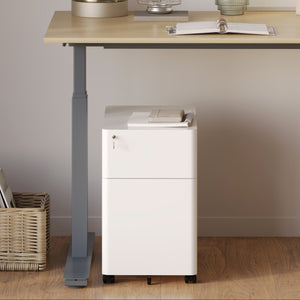






















Filing Cabinet Choices for Cleaner Workstation Planning
Cleaner workstation planning starts with filing storage that matches the desk, document volume, security needs, and daily workflow. Explore how cab...
Learn more
Visit quiz page to see how we makes it easy to create an inspiring workplace


Compact workstations ask a lot from every piece of furniture. A desk may need to support focused work, video calls, paperwork, devices, lighting, and daily supplies within a footprint that might be no larger than a bedroom corner, apartment alcove, shared office nook, or small professional studio. When storage is not planned carefully, the desktop becomes the catchall. Papers stack near the keyboard, chargers tangle beside notebooks, and essential documents end up competing with the very surface meant for work.
An under-desk filing cabinet solves one of the most common small-workspace problems: it brings storage close without expanding the workstation outward. The best setup does more than hide papers. It protects legroom, keeps tools within reach, supports better posture, and helps the entire desk area feel composed. For compact workstations, the right filing cabinet should feel integrated into the work zone rather than pushed into whatever leftover space remains.
The strongest under-desk filing cabinet ideas begin with fit, then move into workflow, style, lighting, seating, and organization. A small workstation works best when every inch has a role and nothing feels accidental.
A compact workstation usually becomes frustrating for one simple reason: the storage plan is weaker than the work routine. Even a minimalist worker has daily objects to manage. Documents, notebooks, receipts, pens, cables, adapters, personal items, and small office tools need a reliable place to go. Without that place, the desk surface starts carrying too much visual and functional weight.
Large offices can absorb clutter more easily because there are shelves, credenzas, side tables, and storage walls nearby. Compact workstations rarely have that luxury. A few folders and accessories can make a small desk feel crowded. Once the surface is full, basic tasks become slower. There is less room to write, fewer clear areas for sorting documents, and more distractions in the user’s line of sight.
An under-desk cabinet keeps active work materials nearby while preserving the main surface for focused tasks. Instead of stacking folders beside a laptop, a compact filing cabinet can give papers and office essentials a dedicated storage zone below the work surface.
The under-desk zone is valuable because it already belongs to the workstation footprint. Using it well creates storage without adding a separate shelf or bulky floor cabinet elsewhere in the room. This matters in apartments, bedrooms, shared workrooms, and small business offices where every visible object affects how open the room feels.
The key is controlled placement. A cabinet should support the workstation, not crowd the user. When it sits to one side, allows the chair to move naturally, and leaves the central knee space open, it becomes useful without making the desk feel boxed in.
Compact workstations often sit in rooms that serve more than one purpose. A desk might share space with a sofa, bed, dining table, or client seating area. Concealed storage helps the work area reset at the end of the day. Papers disappear into drawers, tools return to their places, and the room feels less like an active office after work is done.
That visual calm is not just aesthetic. A cleaner workstation can make it easier to begin work, shift between tasks, and maintain a professional-looking setup during calls or meetings.
A filing cabinet can look perfect online or in a showroom but still fail in a compact workstation if the measurements are wrong. Fit is not only about whether the cabinet slides under the desk. It is about whether the desk, chair, cabinet, legs, drawers, cables, and user movement can all coexist comfortably.
Start by measuring from the floor to the underside of the desktop. This measurement determines the maximum possible cabinet height. The actual cabinet should leave enough open space for natural leg movement, especially if the user changes posture throughout the day.
Knee clearance is easy to underestimate. A cabinet that nearly touches the underside of the desk may technically fit, but it can make the workstation feel cramped. The user should be able to sit, shift, cross or reposition feet, and reach for drawers without feeling trapped under the work surface.
The central area under the desk should usually stay open. In compact setups, the most comfortable placement is often to the left or right side, not directly in front of the chair. This keeps the main sitting zone clear while allowing the cabinet to remain close.
A wide cabinet may offer more storage, but it can reduce the usability of a small desk. For compact workstations, a slightly smaller cabinet that preserves legroom is often more practical than a larger one that forces awkward posture.
Many people measure the cabinet body but forget the drawers. A file drawer needs space to open. If the chair, wall, bed frame, side table, or room corner blocks the drawer path, the cabinet becomes inconvenient.
Before deciding on placement, imagine the cabinet in use. Can the top drawer open while the chair is tucked in? Can the file drawer extend enough to access folders? Can the user reach inside without twisting too far? A filing cabinet that opens easily is more valuable than one that only fits when closed.
Use this practical sequence before choosing placement:
1. Measure the underside height of the desk.
2. Check the width of the open knee zone.
3. Pull the chair in and out as it would be used daily.
4. Allow room for the cabinet drawer to open.
5. Check nearby outlets, cables, baseboards, and desk legs.
6. Sit naturally and reach for the planned drawer position.
An under-desk cabinet works best when it feels connected to the desk, not like a separate storage piece squeezed underneath. The proportions, finish, frame style, and available clearance all influence how integrated the workstation feels.
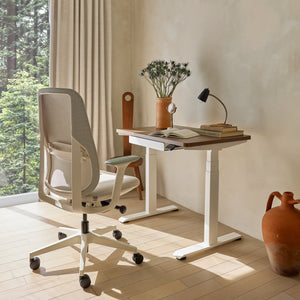
A small desk should stay as open as possible. The cabinet’s role is to support that openness by taking pressure off the desktop. Pairing storage with adjustable office desks can help create a workstation where the surface handles active work and the cabinet handles files, supplies, and everyday tools.
This approach keeps the work zone organized by function. The desk is for tasks in progress. The cabinet is for what supports those tasks. That separation is especially helpful when a compact desk needs to shift between writing, laptop work, video meetings, and document review.
A height-adjustable desk introduces another layer of planning. The cabinet should not block the desk’s movement or interfere with cables, frames, or nearby accessories. Any storage under a sit-stand desk should be placed where the desktop can move freely.
Cable clearance is particularly important. Power cords, charging cables, monitor wires, and lamp cords should not get trapped behind the cabinet or stretched when the desk changes height. A clean cable route keeps the workstation safer, neater, and easier to adjust.
For narrow desks, the most effective under-desk cabinet layout is often side-tucked. The cabinet sits under one side, while the chair and legs occupy the center. This creates a compact workstation with storage, but without closing in the user.
Side placement also makes the cabinet easier to style. It can visually align with the desk leg, create balance under the surface, or act like a small pedestal that anchors one side of the workstation.
The best filing cabinet layout depends on how the workstation is used. A bedroom office, laptop desk, creative studio, and shared team desk all place different demands on storage.
In an apartment, a workstation may sit against a bedroom wall, inside a living room corner, or near a window. The goal is to keep the desk functional without making the room feel like a full office. A cabinet tucked to one side allows files and supplies to stay close while the center remains open for comfortable sitting.
This setup works especially well when the cabinet finish blends with the desk or wall color. A visually quiet cabinet helps the workstation feel intentional rather than crowded.
Hybrid workers often need a workstation that can reset quickly. A filing cabinet with a compact footprint can hold documents, notebooks, and essentials during work hours, then help clear the desk when the day ends.
In a multipurpose room, mobility can be useful if the cabinet needs to shift slightly for cleaning, guest use, or a different task. Even without moving frequently, a flexible layout should keep drawers accessible and avoid blocking other room functions.
Creative workers often store more than standard paperwork. Sketchbooks, samples, swatches, tools, small equipment, client notes, and printed references may all need a place. Under-desk storage can create a close-at-hand archive without overwhelming the desk.
The cabinet should be organized by active use. Current project files belong in the easiest drawer to reach. Less active materials can sit lower. Small tools should have inserts, trays, or pouches so they do not become a messy drawer pile.
Laptop-first workstations benefit from vertical organization. The screen should sit at a comfortable viewing height, while the desk surface stays clear for typing, notes, or a separate keyboard and mouse. A Laptop Stand can help lift the device, while the filing cabinet below keeps papers, notebooks, and supplies from spreading across the surface.
This pairing is especially useful for compact desks because it divides the workstation into layers: screen above, active work on the desktop, storage below.
In compact workstations, storage should be useful without becoming visually heavy. The cabinet’s style influences how large or small the desk area feels.
Simple drawer fronts, restrained hardware, and clean lines help a filing cabinet blend into a small workspace. Too many visible handles, contrasting materials, or decorative details can make the under-desk area feel busier than it is.
A cabinet with a calm profile supports the broader goal of a compact workstation: fewer distractions, easier organization, and a more polished desk zone.
Light finishes often make small work areas feel more open. White, soft gray, pale wood, or neutral tones can help the cabinet visually recede, especially when paired with a light desk or wall.
This does not mean every compact workstation needs light furniture. It means the finish should be chosen with visual balance in mind. A cabinet that blends with the surrounding pieces usually feels less intrusive.
A dark filing cabinet can work beautifully in a compact setup when used intentionally. Under a light desktop, it can ground the workstation. Against a neutral wall, it can define the work zone. In a modern office, a darker cabinet can create contrast without requiring additional furniture.
The best dark cabinet placement avoids overcrowding. It should look like part of the workstation structure, not a heavy block wedged under the desk.
A cabinet should first relate to the desk. Consider the desktop color, frame finish, leg shape, and overall proportions. If the cabinet feels connected to the desk, the whole workstation looks more deliberate.
A filing cabinet is only as useful as its internal system. Without organization, drawers become hidden clutter. With a clear plan, even a compact cabinet can support daily work with surprising efficiency.
The top drawer should hold items used throughout the day: pens, sticky notes, earbuds, charging cables, keys, small notebooks, clips, and other quick-reach tools. These items are often the first to clutter a small desktop, so giving them a defined drawer helps keep the surface clean.
Small trays or dividers can prevent this drawer from becoming chaotic. The goal is quick access, not deep storage.
Active paperwork should live where it can be reached easily. Current project folders, meeting notes, forms, invoices, printed references, and client documents belong in a drawer that supports daily workflow.
This is where compact filing becomes most valuable. The user can move between digital work and paperwork without leaving the desk or stacking documents beside the keyboard.
The bottom drawer is best for heavier supplies and longer-term storage. Hanging folders, paper stock, archived documents, manuals, and backup supplies work well here. Storing weight lower can also make the cabinet feel more stable.
Less frequently used items should not occupy the easiest drawer. Compact workstations depend on prioritization. The most active items should be closest, while occasional items should sit lower or farther back.
| Cabinet Zone | Best Items to Store | Compact Workstation Advantage |
|---|---|---|
| Top drawer | Pens, chargers, sticky notes, earbuds, keys | Keeps small desktop surfaces clear |
| Middle drawer | Current files, notebooks, project folders, forms | Supports active work without piles |
| Bottom drawer | Hanging folders, paper stock, archived documents | Stores bulkier items lower |
| Cabinet top | A tray, plant, printer, or lamp only when useful | Adds function without expanding the footprint |
Lighting has a strong effect on how compact workstations feel. A dim desk corner can make storage look heavier, paperwork harder to manage, and the entire setup feel crowded. Good lighting helps the workstation feel intentional.
Filing cabinets are used for sorting, reading labels, reviewing documents, and finding small items. If the desk area is poorly lit, these tasks become slower and less comfortable. A focused desk lamp can make the surface easier to work on while also improving visibility around the cabinet.
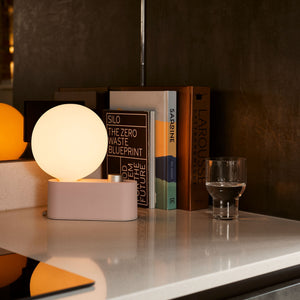
The Alumina Lamp can support a cleaner work surface when a compact desk needs dedicated lighting without adding unnecessary complexity to the setup.
Many compact workstations sit in rooms where work is not the only activity. A bedroom desk or living room workstation should feel comfortable after the workday ends. Softer lighting can help the office area blend into the home environment rather than feeling like a separate commercial zone.
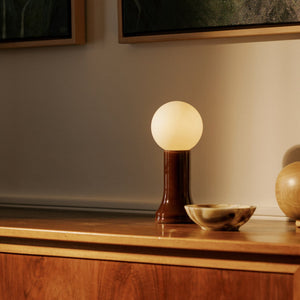
A Shore Table Lamp can add a gentler lighting layer when the workstation is part of a shared home setting.
Lighting should not become another source of clutter. A lamp can sit on the desk, on the cabinet top if the height and cord path make sense, or on an adjacent surface. The best placement illuminates the work area without blocking drawers, crowding the keyboard, or creating cord tangles.
A filing cabinet can be organized and attractive but still frustrating if it interferes with comfort. In compact workstations, ergonomics and storage must be planned together.
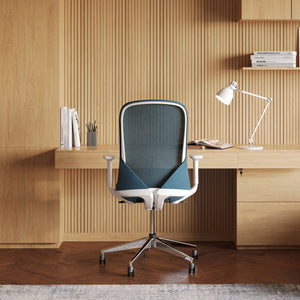
The chair defines how the user enters, exits, turns, and reaches within the workstation. If the cabinet blocks the chair or forces the user to sit off-center, the setup will feel awkward. Choosing ergonomic office chairs alongside under-desk storage helps the workstation support natural movement rather than forcing the body to adapt to a cramped layout.
Armrests, seat width, caster movement, and recline clearance all matter. The cabinet should not collide with the chair during normal use.
Some users prefer files on the right because they reach with their dominant hand. Others prefer the cabinet on the left to keep the mouse area open or to align with room constraints. There is no universal best side. The right placement is the one that supports natural movement.
A simple test helps: sit at the desk, keep the shoulders relaxed, and reach toward the planned drawer location. If the movement requires twisting, leaning, or pulling the chair away each time, the cabinet needs a better position.
Compact workstation planning often tempts people to choose the largest cabinet that fits. But storage capacity should not come at the cost of comfort. If the cabinet steals foot space, blocks posture changes, or makes the user sit at an angle, it will make the workstation less effective.
A smaller cabinet with better placement often performs better than a larger cabinet that dominates the under-desk area.
Different work environments call for different under-desk filing cabinet ideas. The goal is to match the cabinet strategy to the room, workflow, and visual expectations of the space.
A bedroom workstation should be easy to visually quiet at the end of the day. Under-desk storage helps by giving work materials a place to disappear. Papers, notebooks, and chargers can be stored away so the room feels restful rather than unfinished.
For this setting, a simple cabinet profile and restrained surface styling work best. The cabinet top should not become a second desk. A small tray or single decorative item may be enough.
When a desk sits in a living room, it is visible from multiple angles. The cabinet should coordinate with the desk and surrounding furniture so it looks planned. Clean finishes, aligned proportions, and uncluttered surfaces matter more here because the workstation is part of the room’s overall appearance.
Concealed storage is especially valuable in this setting. It keeps work materials out of sight without requiring a large shelving unit.
Small professional workstations often need document access, but not every office has space for large storage walls. An under-desk filing cabinet can support individual workstations by keeping essential documents and supplies close to the person who uses them.
For studios and teams shaping a cohesive work environment, workspace pieces for design-first professionals can help connect desks, seating, storage, and accessories into a more unified office setup.
Creative work rarely follows a single pattern. One day may involve sketches and samples. Another may involve proposals, invoices, or client notes. A compact filing cabinet should be flexible enough to support those shifts.
Use drawers by activity rather than by object type when that makes more sense. For example, a “current client” drawer may hold folders, notes, samples, and reference materials together. This reduces searching and keeps project momentum intact.
The wrong cabinet choice can make a compact workstation feel smaller, even if it adds storage. Avoiding a few common mistakes can protect both comfort and organization.
Many workstation plans start with the desk and cabinet, then add the chair later. This can create problems. The chair may hit the cabinet, armrests may block drawers, or the seat may not slide in properly.
Measure all three pieces together: desk, chair, and cabinet. A compact workstation succeeds when they function as a system.
More drawers do not automatically mean better organization. A cabinet that is too wide or deep can make the desk feel crowded and reduce movement. Storage should support the user, not dominate the under-desk area.
The best filing cabinet is often the one that holds the right categories of items while preserving posture, reach, and floor space.
A filing cabinet can accidentally cover outlets, pinch cords, or block access to power strips. In sit-stand setups, it may also interfere with desk movement if placed carelessly.
Plan cable routes before final placement. Keep charging access easy, avoid tight bends in cords, and leave room behind or beside the cabinet when needed.
The top of a filing cabinet is tempting because it creates another surface. But in a compact workstation, every surface needs a purpose. If the cabinet top becomes a pile of mail, extra cups, receipts, and random tools, the storage solution starts creating more clutter.
Assign the cabinet top one clear role. It can hold a lamp, a paper tray, a small printer, or nothing at all. The less it collects, the cleaner the workstation feels.
Small filing cabinets stay useful when they are maintained. When new papers go in, outdated papers should be removed, archived elsewhere, or discarded when appropriate. This habit prevents drawers from becoming overfilled and difficult to use.
A compact workstation needs storage that fits physically, visually, and functionally. Before choosing a cabinet, review the practical details that affect daily use.
Measure the desk’s underside height.
Confirm the cabinet allows comfortable knee movement.
Leave the central leg zone open when possible.
Test whether drawers can open fully.
Check chair armrests, casters, and seat movement.
Keep access to outlets and cable paths.
Decide whether the cabinet should stay fixed or move occasionally.
Choose a finish that coordinates with the desk.
Plan drawer categories before filling the cabinet.
Keep the cabinet top intentional and uncluttered.
The most useful filing cabinet features are simple and practical. Smooth drawer movement helps daily access feel easy. A stable base supports heavier files. File-compatible storage keeps documents upright and easier to sort. A lock can be useful for sensitive paperwork in shared spaces. A clean exterior helps the cabinet blend into the workstation.
Avoid choosing features that sound impressive but do not solve a real need. Compact workstations benefit from clarity. Every feature should support better storage, better movement, or a cleaner visual setup.
Proportion is one of the most important visual details. A cabinet should look appropriately scaled to the desk. If it appears too tall, too wide, or too deep, the workstation may feel crowded even if the measurements work.
Hardware should also be considered. Slim pulls, simple handles, or clean drawer fronts tend to suit small workstations better than bulky details. The cabinet does not need to disappear, but it should not compete with the rest of the workspace.
The best under-desk filing cabinet ideas treat storage as part of the complete workstation, not as an afterthought. A compact desk becomes easier to use when documents, tools, lighting, seating, and surface space all support one another.
A well-placed cabinet gives daily essentials a home. It clears the desktop without pushing storage into another part of the room. It helps small offices, apartment desks, creative studios, and shared workstations feel more composed. Most importantly, it protects the reason the workstation exists in the first place: clear, comfortable, focused work.
A compact workstation does not need to feel limited. With the right under-desk filing cabinet strategy, the space below the desk becomes one of the most useful parts of the entire setup.


You have unlocked free shipping!
You're saving $29 and unlocked free shipping!
Leave a comment