























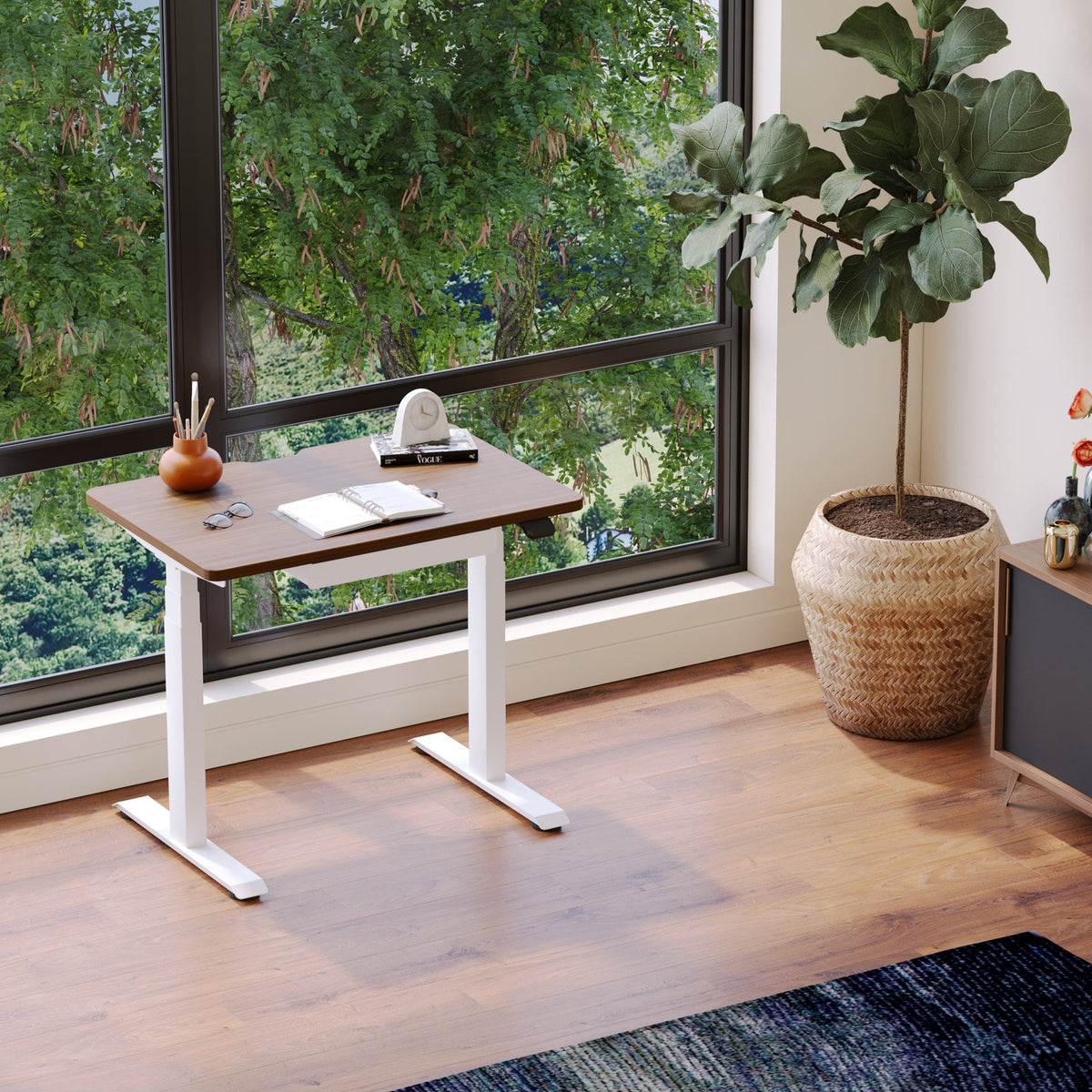
Small desk for living room: what to look for and what to skip

The living-room desk reality check: what the space must still do after you add a desk
A small desk in a living room succeeds when it respects the room’s first job. It is still where people relax, host, eat snacks, fold laundry, watch movies, and recharge. When a desk interrupts those routines, even the most beautiful piece starts to feel like clutter.
From our perspective at Urbanica, the most reliable starting point is not the desk. It is the living room’s daily flow.
“Work zone” vs. “hang zone”: deciding what wins during peak hours
Before measurements, decide how the space behaves during the busiest part of your day.
-
If work happens while someone else is watching TV, the desk needs to be visually quiet and easy to reset.
-
If the living room becomes your primary office, comfort and ergonomics become non-negotiable, even if the desk stays compact.
-
If the desk is only for short sessions, the priorities shift toward placement and cable discipline over extra features.
The goal is not to force a living room to become an office. The goal is to give work a defined home that can soften back into the room when you are done.
The circulation baseline: keeping walkways open, doors swinging, and seating usable
Small desks often “fit” on paper, then fail because they pinch movement. Start by protecting the walk paths people actually use.
Clearance targets that prevent the pinch-point feeling
Use practical checks instead of perfect numbers:
-
Walk from the main entry to the seating area without turning sideways.
-
Pull out a coffee table drawer or open a media console door if you have one.
-
Sit on the sofa and cross your legs, then stand up. If the desk edge blocks that natural motion, it will irritate you daily.
Measuring when furniture shifts every day
Living rooms are dynamic. Ottoman slides, side tables migrate, throw baskets appear. Mark your desk zone with painter’s tape for a few days and live with it. If you keep stepping around it, the “fit” is theoretical.
The noise-and-visibility factor: where video calls and screens do not dominate the room
A living-room desk is not only physical. It changes what you see. If the first thing you notice when you enter the room is a glowing monitor, that setup will feel like it is taking over.
Look for placements where the screen can face a wall or a niche, and where your chair does not sit in the middle of the room like a command center. If calls are common, avoid backlit window angles that turn your face into a silhouette.
Small desk sizing that feels intentional, not like you shoved it in
“Small” is not a single size. A small desk can feel generous if the depth and layout match your actual tasks.
Surface depth vs. real tasks: laptop-only, monitor + keyboard, or paperwork
Most living-room setups fall into one of three patterns:
Laptop-only work that still protects your posture
Laptop-only is common, but it becomes uncomfortable when the screen drops too low and the keyboard sits too high. If the desk is shallow, plan for a laptop stand or a compact riser, then use an external keyboard and mouse. That approach lets a smaller desktop behave like a bigger workstation.
One-monitor work that does not force cramped wrists
If you use a monitor, the desk needs enough depth so the screen is not too close to your face while you type. If the desktop is shallow, consider a slim monitor arm so you can reclaim surface space and position the screen precisely.
Legroom and knee space: why “small” sometimes feels smaller than it measures
Some desks look compact but steal legroom through bulky supports, thick modesty panels, or poorly placed crossbars. In a living room, where you may sit down casually and shift positions, open knee space matters more than people expect.
A simple rule we use: if you cannot slide into the desk without thinking about where your knees go, the desk will not feel effortless.
Shapes that buy visual space: slim profiles and softened corners
Rounded edges and lighter silhouettes matter in high-traffic living rooms. Sharp corners get bumped. Thick, blocky legs read heavier than they are and make a compact zone feel crowded.
When a sit-stand desk is the smarter “small desk” choice
Living rooms rarely belong to one person all day. A height-adjustable desk can help you switch modes quickly, especially when you want to stand for a call, then lower it to tuck the chair in later. The key is choosing adjustability that does not demand extra floor space.
If you want the flexibility of standing while keeping the footprint sensible, the Urbanica Standing Desk is a relevant reference point because it is designed as an adjustable work surface rather than a decorative console.
Desk placement strategies that keep the room looking like a living room
Placement solves problems that features never will. The right placement reduces visual noise, simplifies cables, and makes the desk feel integrated.
Behind-the-sofa setups that work for short sessions
A desk behind the sofa can function like a work console, especially if you do admin tasks or laptop sessions. The advantage is that the desk sits in an area the room already treats as a transition zone.
If you try this, protect the back of the sofa from chair contact, and keep the desktop minimal. When the surface fills with chargers, pens, and mail, that placement becomes the first visual hit in the room.
Cable routing for behind-the-sofa desks
Route power down a table leg or along the back edge and aim for one clean path to the outlet. Loose cords behind a sofa become magnets for dust and tangles.
Window-wall placements: managing glare and heat
Window light feels energizing, but it can create glare on screens and add heat that makes the desk uncomfortable. Use a simple test: sit where the desk would go at the time you usually work. If you squint or see reflections, plan for a shade, rotate the desk angle, or choose a different wall.
Corner placements: what makes them feel clean vs. claustrophobic
Corners are natural candidates for small desks. They also amplify clutter because everything stacks visually in one spot. To keep a corner desk from looking messy, use vertical organization and keep the floor around it clear.
The line-of-sight test: preventing the desk from becoming the focal point
Stand in your doorway and look into the room. If the desk becomes the focal point, refine placement or choose a design with lighter visual weight. A living-room desk should feel like a supportive detail, not the headline.
Stability is the hidden dealbreaker in compact living-room desks
Small desks fail when they wobble, especially on rugs. Even a subtle shake becomes annoying when you type, write, or rest your forearms on the surface.
What causes wobble: narrow bases, tall settings, and soft flooring
Wobble usually comes from one of four sources:
-
A narrow stance that does not distribute weight
-
A tall height with insufficient rigidity
-
Uneven floor surfaces or thick rugs
-
Loose fasteners after assembly or moving
The five-minute wobble test you can do at home
If the desk is already in your space, test it like this:
1. Place both hands near the front edge and apply gentle side-to-side pressure.
2. Lean in with your forearms as if you are typing.
3. Push lightly from the corners, because corners reveal twisting.
If it shifts dramatically, the solution might be as simple as leveling feet, moving it off the thickest rug section, or tightening hardware. If it still wobbles, the base design may not be suited for a living room where the desk gets moved and bumped.
Why wobble shows up only when you type
Typing creates repeated micro-forces. A desk that feels fine when you touch it once may feel unstable during continuous input. That is why stability is not a showroom-only concern.
Choosing adjustability without trading away steadiness
If you expect to raise the desk regularly, look for a design intended for height changes. The Urbanica Standing Office Desk is a clear example of a product built for that sit-to-stand use case, which is often where stability matters most.
Desktop materials and finishes that survive living-room life
Living rooms are less controlled than offices. Sunlight, drinks, pets, and casual habits add wear quickly.
Sunlight, heat, and drinks: what matters near windows and coffee tables
Near a window, finishes can fade over time and surfaces can warm up. Near a sofa, drinks are the reality. Choose surfaces that feel easy to wipe and do not punish you for everyday use.
Matte vs. higher sheen: fingerprints, glare, and visual calm
Matte and low-sheen finishes tend to hide fingerprints better and reduce screen glare. In a living room, that matters because reflections and smudges read “busy,” even when the desk is clean.
Edge durability: corners get the most abuse
Edges take hits from chairs, vacuum heads, and daily bumps. A desk can have a strong top but still look worn if the edges chip easily. Softened edges also feel better in a space where you brush past furniture.
What to skip for longevity in a shared room
Skip delicate finishes that require special care to stay presentable. Living-room desks should tolerate real life without anxiety.
Cable management that protects the room’s calm
Cables are the fastest way to make a living room feel like a workstation. The fix is rarely fancy accessories. It is planning and restraint.
The “one visible cord” goal
Aim for one visible power path, not a web. When the eye sees a single line, the area reads intentional.
Where the power strip should live
Place the power strip where it is accessible but hidden, often under the desk or behind a leg. Avoid leaving it floating mid-wall. Keep slack under control so cords do not droop and loop.
What to skip: clutter devices that create new clutter
Skip solutions that add bulky trays or oversized routing hardware that steals legroom. In small living-room desks, every add-on has a cost.
Work-surface essentials: what deserves inches on a small desk
Small desks win when the surface supports the essentials and nothing else.
The minimum usable surface by use case
A small desk feels larger when the layout is consistent:
-
Screen zone stays anchored
-
Input zone remains clear for hands and tools
-
Drop zone is limited to one small area, not the entire surface
Vertical thinking: reclaiming the surface without increasing footprint
Vertical storage and a monitor arm can open space without forcing a bigger desk. Keep it minimal. A living-room desk should not resemble a server rack.
A reset routine that clears the desk fast
If you live with other people, the desk needs a “closing ritual.” Put the keyboard away, coil the charger, and return one item to a drawer or basket. That two-minute habit does more than any organizer system.
What to skip: accessories that steal knee space
Large under-desk drawers and bulky trays often reduce legroom and make you sit further away. In a compact setup, that can create shoulder tension.
Desk style integration: making a workspace blend with decor
A living-room desk should look like it belongs to the home, not like it was borrowed from a corporate floor plan.
Visual weight: why airy silhouettes look smaller
Thin legs and open space under the desk help it recede visually. Heavy panels make the desk feel like a block in the room.
Color logic: matching undertones to avoid the “almost matches” problem
Warm woods next to cool woods can clash subtly and make the desk stand out. Try to match undertones, not just the general color. If your living room has warm flooring, choose a desk finish that does not fight that warmth.
Lighting that supports work without cluttering the surface
A compact task lamp is often better than relying on overhead lighting. Place it so it illuminates the work zone without shining directly into your eyes or reflecting into the screen.
Ergonomics in a small footprint: comfort upgrades that do not expand the desk
Ergonomics does not require a giant workstation. It requires correct relationships between your body, the desk, and the screen.
Monitor height and viewing distance with limited depth
The top of your screen should generally sit around eye level when you sit upright. If the desk is shallow, distance becomes the challenge. A monitor arm or a compact riser can help you position the screen without consuming the entire surface.
Keyboard and mouse zones: the small-desk posture trap
A small desk can push your keyboard too close to the edge, which makes wrists bend upward. It can also push the mouse into an awkward angle. Make space for your forearms to rest lightly, not hang.
Chair pairing: why the right seat matters more than an extra drawer
A desk can be perfect and still feel wrong if the chair does not support you. When we design living-room-friendly workstations, we treat the chair as half the system.
If you want an ergonomic chair option designed for daily work sessions, the Urbanica Ergonomic Novo Chair is one example in our lineup.
If you prefer an ergonomic seat with a different feel and structure, the Urbanica Ergonomic Onyx Chair is another relevant reference when comparing chair styles for compact setups.
The 10-second posture tune-up for living-room work
-
Feet: Place both feet flat, or use a low footrest if needed.
-
Seat height: Adjust so hips are level with, or slightly above, knees.
-
Back support: Sit back so your lower back is supported, not hovering.
-
Elbows: Keep elbows close to your sides, roughly at a comfortable right angle.
-
Shoulders: Drop shoulders away from ears, then relax hands on the keyboard.
-
Screen: Raise screen so you are not tilting your head down for long periods.
This checklist helps small desks feel better without asking the room to become an office.
Storage without bulk: containment rules for living-room-friendly work
Storage is helpful until it expands the desk’s physical and visual footprint.
The three-item rule: what truly needs to live at the desk
Most people only need three categories to stay at the desk:
1. A charging solution
2. One writing tool
3. One small container for essentials, like a notepad or earbuds
Everything else can live elsewhere and return only when needed.
Micro-storage that stays invisible
Small baskets, slim organizers, and vertical sorters help keep the surface clear without making the desk feel larger.
What to skip: wide drawers that force a bigger desk than you wanted
Large drawer units often add depth and visual weight. They also encourage clutter because empty space invites filling.
Shared living-room setups: designing for two people without daily friction
A shared living room adds competing needs. The desk must cooperate.
One person working while someone relaxes
Make the desk visually quiet. Keep the screen oriented away from the main seating line if possible. Use a chair that tucks in easily. Most importantly, plan a daily reset so the room can return to calm.
Two people working: when one desk should become two zones
If both people work at the same time regularly, forcing two setups onto one tiny desk creates frustration and clutter. Side-by-side work needs defined zones and enough surface to avoid elbow battles.
When that shared work time is consistent, a purpose-built solution like the Urbanica Two-Person Standing Desk is designed around the reality of two users, rather than making one person perch on the edge.
The skip list: common “small desk” mistakes that backfire in living rooms
Buying “small” but choosing a design that looks heavy
A compact desk with thick panels can feel larger than a slightly bigger desk with lighter lines. In living rooms, visual weight matters as much as inches.
Over-optimizing for storage and losing legroom
Adding drawers can push your chair position back and create shoulder strain. If storage forces you to sit awkwardly, the feature is not helping.
Letting cables define the corner
A small desk with messy cables looks like an unfinished project. Cable discipline is the difference between “home workspace” and “temporary mess.”
Choosing style over stability
A desk that looks perfect but wobbles will become a daily annoyance. Stability is comfort.
Desk shopping filters that remove guesswork
Small living-room desks are easier to choose when you filter decisions through a few repeatable checks.
The five non-negotiables: a practical decision framework
1. Fits the flow: Does not block paths or disrupt seating.
2. Supports the task: Depth and layout match how you work.
3. Stays stable: No distracting wobble in real use.
4. Controls cables: Has a clean plan from outlet to devices.
5. Blends visually: Looks like furniture, not a permanent office installation.
A “bring-home test” mindset without overcommitting emotionally
A living-room desk should earn its place through daily use. Test it with your real routine, then adjust placement and cable routing until it feels natural.
Look for vs. skip: small living-room desk decision table
| Category | Look for | Skip |
|---|---|---|
| Placement | Works with walkways and seating | Blocks doors or pinches paths |
| Surface layout | Clear zones for screen and input | No room for hands and tools |
| Visual weight | Open space, lighter silhouette | Heavy panels that dominate |
| Stability | Solid feel on your actual floor | Persistent wobble on rugs |
| Cable plan | One clean routing path | Dangling cords and floor tangles |
| Storage | Minimal, intentional containment | Large drawers that invite clutter |
| Reset ability | Easy to clear at end of day | Always looks “in progress” |
A desk that feels like part of home, not a permanent office installation
The best living-room desks support work and then step back visually.
Fixed-height simplicity that stays visually quiet
If your work sessions are shorter and you want a clean, minimalist baseline, a straightforward desk can be the right choice. The Urbanica Office Desk fits that “simple surface, furniture-first” role for many living-room setups.
Coordinating the workspace without turning it into a project
When you want the desk, chair, and accessories to feel cohesive, it helps to browse pieces as a system rather than buying one item at a time. Our Urbanica office furniture for creative workspaces page is one place where we group desks, chairs, and supporting pieces in a way that makes coordination easier.
The litmus test that keeps the decision honest
A small desk belongs in a living room when it meets two conditions at once: it is comfortable enough to work at, and it is easy enough to ignore when you are not working.
Related Articles
-
 This Is How To Build A Small Home Office You Actually Want To Work From, And How To Pick Desks For Small Spaces - Urbanica Furniture's Full Guide
-
 Filing Cabinets for Small Spaces That Still Look Clean Now
-
 Minimalist Office Table Ideas That Work Like a Bistro Table
-
 Make Small Shared Spaces Work Better With a Bistro Table
-
 Best Filing Cabinet Layout Ideas for Small Home Offices and Shared Rooms
-
 What Size Filing Cabinet Makes Sense for Small Workspaces?


