
























How to Choose the Right Workstation Layout for Your Office
How to Choose the Right Workstation Layout for Your Office
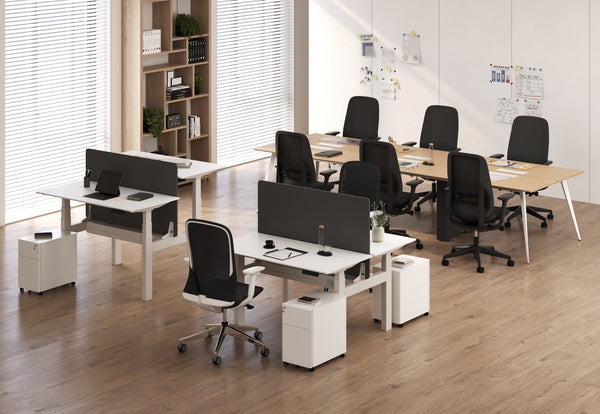
Designing the right workstation layout for your office isn’t just about arranging desks in neat rows. It’s about creating an environment that enhances productivity, nurtures employee well-being, and reflects your company’s culture. With hybrid work trends, ergonomic considerations, and increasing demands for flexibility, today’s offices require smarter workstation strategies than ever before.
This guide will walk you through the most important considerations, workstation layout options, and actionable steps to ensure your office design supports both business goals and employee needs.
Why the Right Workstation Layout for Your Office Matters
The Direct Link Between Workstation Design and Productivity
Your workstation layout shapes how work gets done. For instance, an open-plan office may encourage idea-sharing but can reduce concentration for employees handling analytical tasks. In contrast, private pods or cubicles enhance focus but may stifle spontaneous collaboration. The key lies in balancing these competing needs.
A real-world example: one digital marketing firm redesigned its space from a uniform open-plan layout to a hybrid system, introducing soundproof booths alongside collaborative tables. The result? A 22% increase in project turnaround speed and reduced complaints about noise.
Collaboration vs. Focus: Finding the Right Blend
Workstation design should consider when employees need to connect — and when they need to disconnect. Without this balance, you risk “collaboration overload” where employees spend more time talking than working.
Supporting Employee Health and Well-being
Workstation layout directly influences wellness. A poorly designed environment may lead to back pain, eye strain, or fatigue, while a thoughtful layout promotes movement and better posture. Flexible desks, adjustable chairs, and varied workstation options are essential.
Check out Urbanica Furniture’s desks collection for versatile options that help support ergonomic health.

Key Factors to Consider When Planning a Workstation Layout for Your Office
Space and Floor Plan Analysis
Calculating Square Footage Per Employee
A typical benchmark is 125–225 square feet per employee. However, this varies by industry. Tech companies might prioritize collaborative hubs, while law firms allocate more private offices per employee.
Considering Flow and Movement
Beyond square footage, flow matters. Are pathways wide enough? Are meeting rooms easily accessible without disrupting workstation zones? Good circulation minimizes distractions and ensures compliance with safety standards.
Employee Needs and Work Styles
Work Mode Categories
Employees alternate between four modes:
-
Focus Work – tasks requiring concentration.
-
Collaboration – brainstorming, team meetings.
-
Social Interaction – informal connections that strengthen culture.
-
Rejuvenation – short breaks for rest and reset.
An effective workstation layout for your office accommodates all four modes.
Generational and Cultural Differences
Gen Z employees may value open collaboration spaces, while older workers might prefer quieter, more private environments. Cultural expectations also shape how employees view openness vs. privacy.
Ergonomics and Health Considerations
Seating and Desk Height
Adjustable seating and desk systems allow employees to maintain healthy posture. Even minor ergonomic improvements can reduce discomfort and increase productivity.
Standing Desk Options
Standing desks are an increasingly popular feature of modern workstation layouts. Harvard Health reports that alternating between sitting and standing reduces risks associated with prolonged sitting. The Urbanica Standing Desk is a great example of a solution that fits seamlessly into contemporary layouts.
Lighting and Air Quality
Workstations should ideally be placed near natural light sources, which boost mood and energy. Proper ventilation ensures focus and reduces fatigue.
Popular Workstation Layouts for Your Office
Open Plan Workstations
Advantages
-
Cost-effective and scalable.
-
Promotes transparency and collaboration.
-
Simplifies reconfiguration as the team grows.
Disadvantages
-
High noise levels.
-
Lack of privacy and potential for distractions.
Cluster or Team-Based Workstations
When They Work Best
Ideal for departments that thrive on constant interaction, like creative teams or customer service units.
Challenges
Clusters can create “mini silos,” limiting cross-department collaboration.
Private Cubicles and Semi-Private Pods
Benefits
-
High focus and privacy.
-
Reduced noise disruptions.
Innovations
Modern pods now feature soundproofing, built-in ventilation, and integrated power hubs. These upgrades make cubicles less isolating and more adaptable.
Hybrid and Flexible Workstations
Activity-Based Workstations
Employees select their work area based on the task at hand. These layouts combine collaboration zones with private booths.
Hot-Desking and Desk Hoteling
Useful in hybrid workplaces where not everyone is in the office daily. However, they require good booking systems to avoid conflicts.
Compact Solutions
For small offices, compact setups like the Mini Standing Desk provide ergonomic benefits without taking up valuable space.
Comparing Workstation Layouts for Your Office
Here’s a comparison table outlining the pros and cons of the most common layouts:
| Layout Type | Cost per Employee | Space Efficiency | Collaboration Potential | Privacy Level | Flexibility | Best For |
|---|---|---|---|---|---|---|
| Open Plan | Low | High | High | Low | Moderate | Startups, creative teams |
| Cluster/Team-Based | Moderate | Moderate | High | Moderate | Moderate | Agile project teams |
| Cubicles/Pods | High | Moderate | Low | High | Low | Legal, finance, HR |
| Hybrid/Flexible | Moderate | High | High | Moderate | High | Hybrid companies |
Tips for Choosing the Best Workstation Layout for Your Office
Match Layout to Company Culture
Creative and Collaborative Industries
Advertising, design, and tech startups often flourish in open or hybrid layouts.
Privacy-Intensive Professions
Law firms, HR, and financial companies often prioritize confidentiality, making cubicles or private offices preferable.
Balance Aesthetics with Functionality
The Psychology of Color and Design
Warm tones can energize spaces, while cooler tones promote calm. Align color and décor with your company’s culture.
Incorporating Brand Identity
Offices that mirror brand values create a stronger sense of belonging. For eco-conscious companies, this may mean using sustainable materials.
Invest in Adaptable Furniture
Modular and Multi-Purpose Solutions
Adaptable furniture ensures your layout grows with your business. The Two-Person Standing Desk is a practical solution that combines collaboration with flexibility.
Test and Evolve
Pilot Programs
Start small, test the layout, and gather employee feedback.
Continuous Improvement
A workstation layout for your office is not static. Revisit and adapt as team sizes, technologies, and workstyles change.

Step-by-Step Guide to Implementing a Workstation Layout for Your Office
-
Assess Current Space Usage – Analyze how employees currently use the office.
-
Engage Employees in Surveys – Understand needs before making changes.
-
Define Key Priorities – Collaboration? Privacy? Ergonomics? Space efficiency?
-
Choose Layout Type – Based on your culture and team needs.
-
Select Adaptable Furniture – Ensure it supports evolving workstyles.
-
Pilot Test the Layout – Roll out gradually.
-
Evaluate and Refine – Collect feedback and make adjustments.
How the Right Workstation Layout for Your Office Shapes the Future of Work
Smart and Connected Workstations
IoT-enabled desks that track posture, occupancy sensors, and climate-controlled zones are reshaping how offices operate.
Sustainability in Design
Future office layouts will prioritize recycled materials, energy efficiency, and layouts that reduce waste.
Hybrid-First Workplaces
With hybrid schedules now the norm, layouts are evolving to emphasize collaboration spaces rather than traditional desk farms.
Meeting Gen Z Expectations
The next generation of workers expects flexibility, tech integration, and collaborative yet adaptable environments.
How the Right Workstation Layout for Your Office Future-Proofs Your Workplace
The right workstation layout for your office is more than a matter of comfort or aesthetics it’s a long-term strategy for productivity, culture, and adaptability. By aligning your office layout with employee needs, ergonomic best practices, and evolving workplace trends, you’re not only optimizing today’s performance but also preparing for tomorrow’s challenges.
A future-proof workstation layout grows with your business, supports hybrid work, and enhances employee well-being. When designed thoughtfully and updated regularly, it ensures that your office remains competitive, efficient, and attractive to top talent—no matter how work continues to evolve.
Related Articles
-
 Our Conference Chairs and Meeting Tables Compared, so You Can Furnish a Huddle Room, a Meeting Room, or a Boardroom for Eight in One Order
-
 This Is How To Build A Small Home Office You Actually Want To Work From, And How To Pick Desks For Small Spaces - Urbanica Furniture's Full Guide
-
 Filing Cabinet Choices for Cleaner Workstation Planning
-
 Best Setup for Laptop and 2 Monitors With Less Neck Strain
-
 Round Meeting Table Ideas That Make Team Talks Smoother
-
 Furniture Trends Defining Modern Offices


